1. TOOL OVERVIEW
1.What does this tool do? Wiz provides a unified cloud security platform that gives organizations complete across their entire cloud environment, including IaaS, PaaS, and SaaS layers. It continuously scans the cloud infrastructure to identify security risks such as misconfigurations, software vulnerabilities, excessive permissions, and identity-related issues. By analyzing all these elements together, Wiz helps organizations understand not just isolated problems, but how different risks are connected across the environment. 2.What problem does it solOne of the major problems Wiz addresses is alert fatigue, where security teams are overwhelmed by thousands of unprioritized alerts. Instead of presenting a long list of disconnected issues, Wiz uses a Security Graph to correlate risks and highlight the most critical attack paths. This means it can show the exact chain of weaknesses an attacker could exploit to compromise sensitive data. By focusing on these high-impact risks, security teams can prioritize what truly matters, improving efficiency and reducing the time spent on less critical issues. 3.Where is it used? Wiz is widely used for continuous cloud security monitoring in organizations that rely heavily on cloud infrastructure. It supports key security functions such as: ● Identify: Discovering all assets and resources in the cloud environment ● Protect: Securing configurations and enforcing best practices ● Detect: Continuously monitoring for new and emerging risks in real time It is commonly used in medium to large enterprises across industries where maintaining strong cloud security and compliance is essential. 1 HOW THE TOOL WORKS (TECHNICAL)
- Working mechanism : Wiz uses "Snapshot Scanning." Instead of logging into each server, it takes a digital "photo" of your cloud's storage (disk volumes) and analyzes it from the outside. This means it can see everything without slowing down your systems. - Architecture components : ● Cloud Connector : A secure bridge that connects Wiz to your cloud account (like AWS or Azure) using "read-only" permissions. ● Wiz Security Graph : The "brain" of the tool. It maps how your servers, identities, and internet connections are linked to find dangerous "toxic combinations." - Data flow explanation: 1. Connect: Wiz links to your cloud via API. 2. Scan: It takes a snapshot of your data and settings.
- Analyze: The Security Graph connects the dots (e.g., "This server has a bug AND is connected to the internet").
- Alert: It tells you exactly which risk to fix first. 2 FEATURES & CAPABILITIES
- Core Features : ● Vulnerability Scanning: Finds bugs and outdated software. ● Configuration Checks: Spots "unlocked doors" in cloud settings. ● Identity Tracking: Flags users with too many permissions/access keys. ● Secret Scanning: Finds "forgotten" passwords hidden in code. - Advanced Capabilities : ● Security Graph: Visually maps how a hacker could move through your system. ● Toxic Combinations: Alerts you only when multiple risks overlap to create a major threat. ● Data Protection: Specifically hunts for leaked sensitive data (like credit cards).
- Limitations: ● Non-Blocking: It finds risks but doesn't "block" an active attack in real-time. ● Read-Only: It points out the mess but doesn't "clean" (fix) it for you automatically. **3 DEPLOYMENT MODELS
- Supported environments: ● On-premise: Limited (requires hybrid cloud connection). ● Cloud: AWS, Azure, GCP, OCI, Alibaba Cloud. ● SaaS: Yes (primary deployment). - Deployment types: ● Single node: Not applicable (SaaS-based). ● Distributed: Multi-cloud, multi-tenant support. ● Agent-based / Agentless: Agentless. 4 SYSTEM REQUIREMENTS ● For the User To access Wiz, users only need a standard web browser such as Google Chrome, Mozilla Firefox, or Microsoft Edge, along with a stable internet connection. Since Wiz is entirely web-based, there is no need to install any dedicated application on the user’s device. ● For the Cloud Environment Wiz requires a read-only role or permission within the cloud platform. This means users must grant Wiz access to view and analyze their cloud resources without making any changes. This “look but not touch” approach ensures that the platform can securely scan configurations, detect risks, and monitor the environment without affecting normal operations. ● No Hardware Requirements**
As a fully cloud-based solution, Wiz does not rely on local system resources. There is
no need for additional RAM, CPU power, or storage space on the user’s computer. All
processing, data analysis, and security monitoring are handled within the cloud,
making it lightweight and easy to use from virtually any device.
5 INSTALLATION & SETUP
● There are two types of set like:
1.Local Setup
2.Cloud Setup
A. Local Setup:
The First one is local setup, that Wiz cannot be installed on a local system because it
is a cloud-based tool. It works as a SaaS platform, so users access it through a web
browser because it will not be supportive to the local setups.
B. Cloud Setup:
The second one is Cloud setup, Wiz is connected to cloud platforms like AWS or
Azure instead of being installed.
SECURITY RISKS WITH WIZ SECURITY GRAPH AND GOOGLE CLOUD
The following steps are:
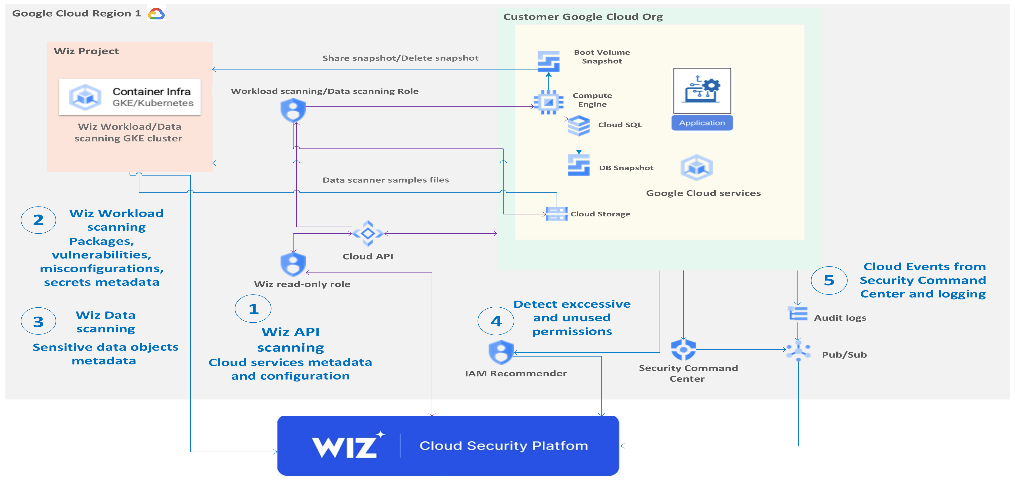
- The following diagram shows how Wiz connects to your Google Cloud infrastructure and how Wiz is integrated with built-in Google Cloud tools.

Wiz Cloud Security Platform is a software-as-a-service (SaaS) solution. This architecture diagram demonstrates the following workflow:
- Wiz API scanning collects Google Cloud services and their configuration metadata to build a complete inventory.
- Wiz Workload scanning collects the metadata of operating systems, apps, packages, secrets, and container files to create a list of vulnerabilities and misconfigurations.
- Wiz Data scanning scans Cloud Storage, non-OS volumes, tables in Cloud SQL, and collects metadata from sensitive data objects.
- Wiz uses Identity and Access Management (IAM) Recommender to find excessive and unused permissions to create Wiz findings.
- Wiz ingests Admin Activity audit logs and Security Command Center findings to add threat events to create Wiz findings.
- Connect the Wiz tenant to your Google Cloud infrastructure Before you connect Wiz to your Google Cloud infrastructure, ensure that you've met the following prerequisites. To deploy on the organization level, the person who performs the connection must have sufficient permissions, either as a Google Cloud owner or as a user with the following organization-level roles: ● roles/iam.serviceAccountAdmin ● roles/iam.organizationRoleAdmin ● roles/iam.securityAdmin
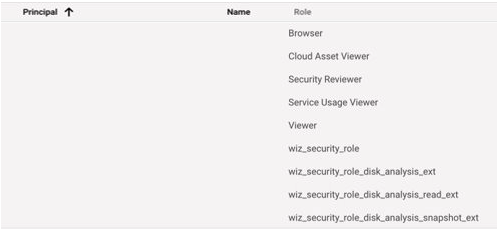
- Create a Google Cloud connector Wiz provides auto-generated scripts that you can run to create a service account and all the roles that you need to use Wiz with Google Cloud. The following screenshot shows a Wiz service account created by the scripts:
Use Cloud APIs to scan your organization
● This section explains the interactions between Wiz and Google Cloud
components to help you understand the necessity of permissions and roles to
be granted.
● Use IAM to grant Wiz with read-only roles to scan your Google Cloud
organization using Cloud APIs.
●
- Use Wiz Workload scanning
● To create and delete a snapshot, Wiz requires proper IAM roles. After the API
scan is complete, Wiz automatically creates a Workload scanner in the
same region where the Compute Engine instance resides.
● The Wiz Workload scanner creates a snapshot of the boot volume of each
Compute Engine instance. It does so by mounting a read-only volume that is
backed by the snapshot It also detects operating systems or applications on a
VM, container, or serverless function–for example, Linux, NGINX, Docker, or
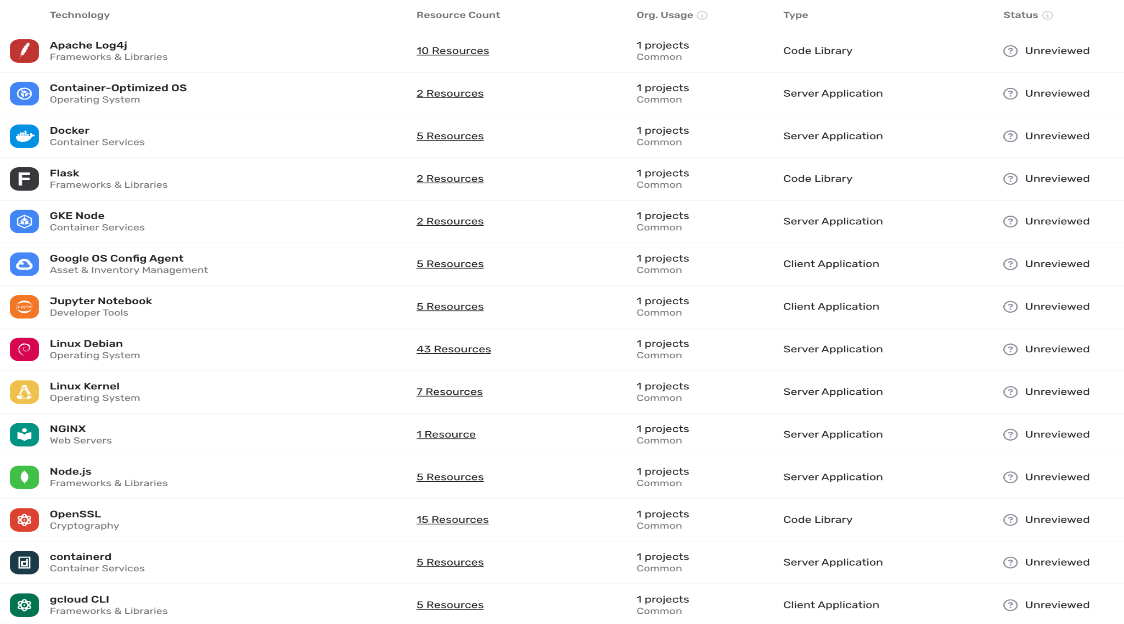
Ansible. The following screenshot of the Wiz UI shows the results of a Wiz
Workload scan:
 Use Wiz Data scanning
Data scanning is an extension of Wiz Workload scanning. If you enable data discovery, the
scanner performs a sampling scan of the files. Files are scanned in the following locations:
● Buckets
● Hosted databases on non-OS disks (if scanning non-OS disks is enabled)
● Tables in SQL servers
Use Wiz Data scanning
Data scanning is an extension of Wiz Workload scanning. If you enable data discovery, the
scanner performs a sampling scan of the files. Files are scanned in the following locations:
● Buckets
● Hosted databases on non-OS disks (if scanning non-OS disks is enabled)
● Tables in SQL servers
Wiz searches files for the following sensitive data: ● Payment card industry data ● Personally identifiable information (PII) ● Protected health information (PHI) A Control consists of a pre-defined Security Graph query and a Severity level. If a Control's query returns any results, an Issue is generated for every result.
-
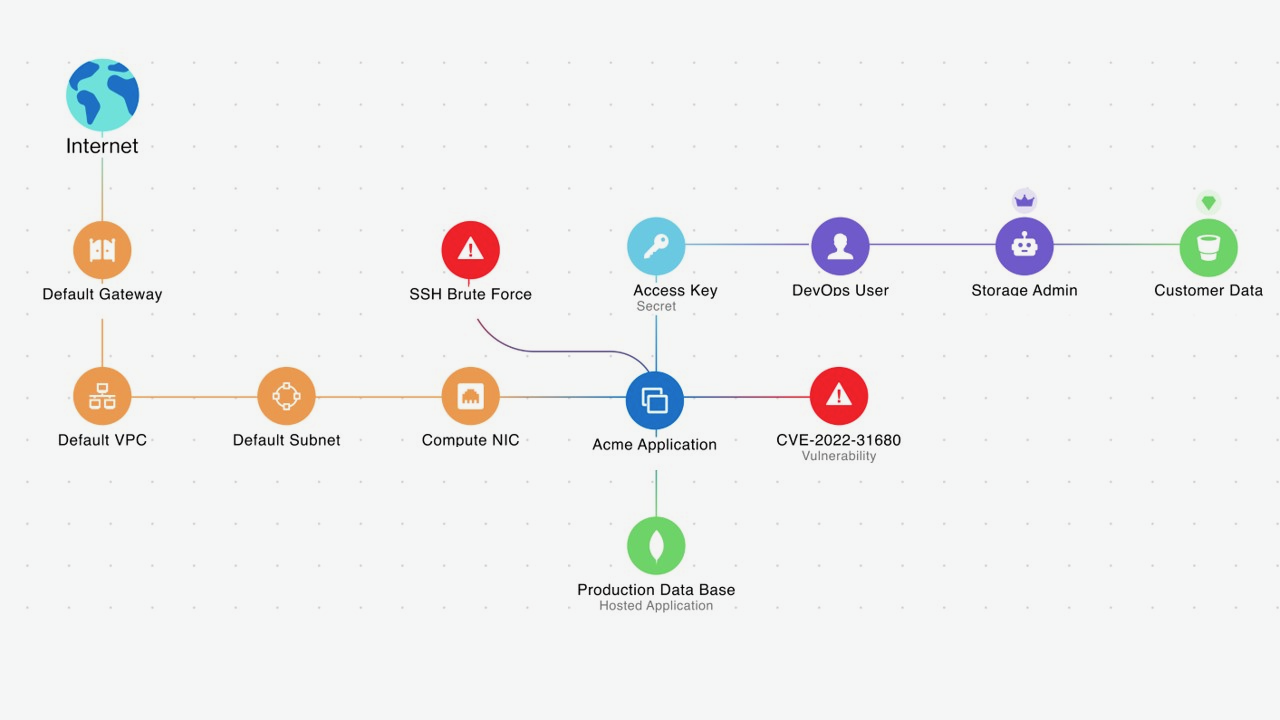
Ingest Event Threat Detection from Security Command Center ● Wiz integrates Google Cloud's Event Threat Detection with Security Command Center to add correlation and context to Security Command Center events and highlight the critical risks on the security graph. ● For example, Wiz Security Graph visualizes an exposed Compute Engine instance with a critical vulnerability and a lateral movement finding on which Event Threat Detection has also detected potentially suspicious events. The following diagram illustrates the attack path analysis of a hypothetical critical issue in Security Graph:
 The diagram shows how Wiz ingests threat events from Event Threat Detection and
adds them to Security Graph. There is an SSH Brute Force finding associated with a
hypothetical Compute Engine instance. The hypothetical Compute Engine instance
has Common Vulnerabilities and Exposures (CVE) and is exposed to the internet for a
malicious actor to access this instance and exfiltrate any data it contains.
The SSH Brute Force alert on this hypothetical Compute Engine instance needs
immediate attention.
The diagram shows how Wiz ingests threat events from Event Threat Detection and
adds them to Security Graph. There is an SSH Brute Force finding associated with a
hypothetical Compute Engine instance. The hypothetical Compute Engine instance
has Common Vulnerabilities and Exposures (CVE) and is exposed to the internet for a
malicious actor to access this instance and exfiltrate any data it contains.
The SSH Brute Force alert on this hypothetical Compute Engine instance needs
immediate attention. -
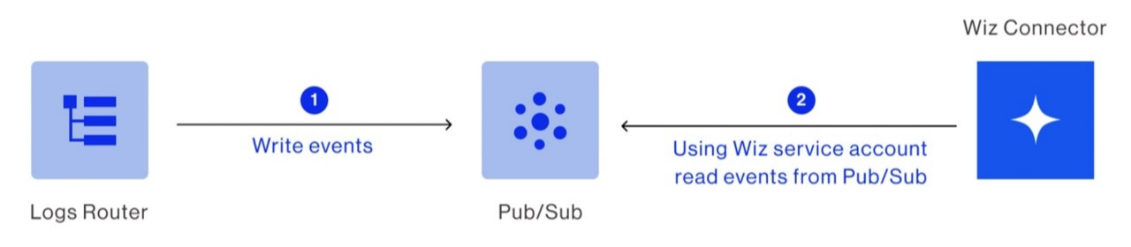
Connect Cloud Audit Logs to Wiz Cloud Detection and Response ● Wiz Cloud Detection and Response (CDR) detects, investigates, and responds to cloud threats. Wiz CDR ingests cloud events from Cloud Audit Logs and Google Workspace audit logs. These logs are streamed to a Pub/Sub topic that you create. ● Here are the deployment steps: i. Create a Pub/Sub topic and subscription in a Google Cloud project. ii. Stream admin activity and data access audit logs to the created topic. iii. Stream audit logs from Google Cloud to Wiz. iv. Connect Wiz to the Pub/Sub topic. v. The following diagram shows that Wiz connects to Pub/Sub to read logs that are published by the connected projects or organization. The following diagram shows how the Wiz Runtime Sensor in the Google Cloud environment connects to the Wiz container registry and the Wiz cloud backend:
- Deploy the Wiz Runtime Sensor to a GKE cluster In the diagram, the Wiz Runtime Sensor is an eBPF-based executable designed to offer real-time visibility into your Google Cloud and Kubernetes workloads. Prerequisites ● To deploy the Wiz Runtime Sensor to a GKE cluster, you must meet the following prerequisites: ● Google Cloud is connected to Wiz. ● GKE is running version 1.20.9-gke.1000 and later. ● The GKE cluster allows outbound HTTPS connectivity. For more information see, Outbound Communication. Deployment
Here are the steps to use a Helm chart to deploy Wiz Runtime Sensor daemon set to a GKE cluster:
- Create a Service Account for the Runtime Sensor in Wiz.
- Obtain the Runtime Sensor Helm chart.
- Obtain the Runtime Sensor image pull key from Wiz.
- Install the Runtime Sensor on a GKE cluster.
- Perform a confidence check.
- Security ● As a customer, you own your Wiz tenant. Wiz doesn't have access to your tenant. To list your cloud resources and interrogate the control plane for their configuration, the cloud scanner connects using read-only permissions. ● The read-only permissions grant access to your cloud APIs (like AWS, Azure, Google Cloud, OCI, Kubernetes, and others). ● By default, the read-only permissions that you created for the Wiz scanner grant access to all the Google Cloud services that you use. The goal is complete visibility into your environment. To exclude some of the services, you can modify your Wiz role-creation scripts.
- VPC Service Controls If your organization uses VPC Service Controls to restrict Google services in projects that you want Wiz to scan, you need to add an access rule for each perimeter. Users that have either ; ● the roles/accesscontextmanager.policyAdmin role or the roles/accesscontextmanager.policyEditor role can perform this operation. Because Wiz initiates requests from outside of the VPC Service Controls perimeters, you might need to add Wiz to your ingress rules. If your access level selection restricts source IP addresses, you can add IP addresses for Wiz data centre.
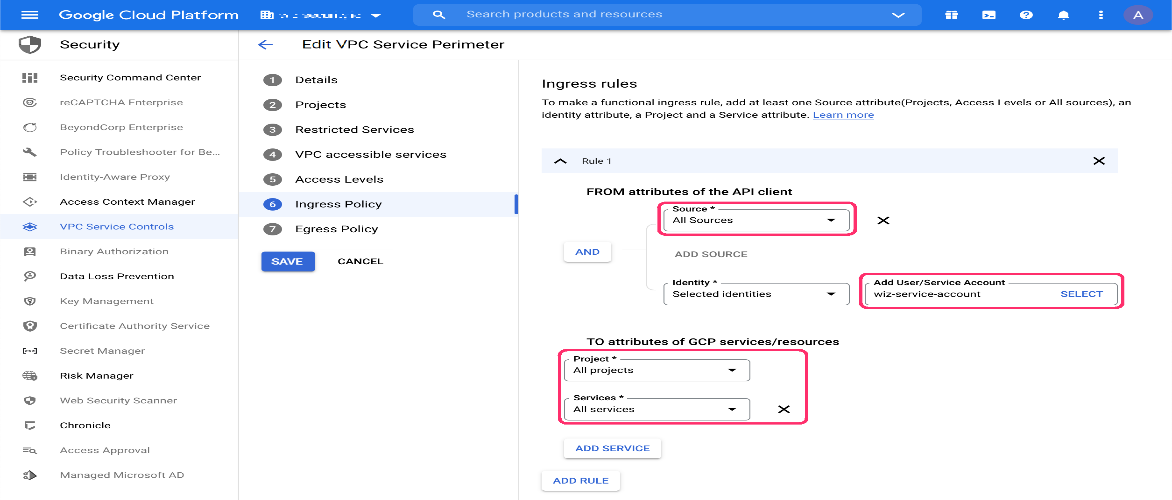
- Ingress policy ● In the Google Cloud console, navigate to Security > VPC Service Controls. Each perimeter protects one or more projects. ● For each perimeter that restricts Google services in projects where you want Wiz to scan, click Edit > Ingress Policy.
 As shown in the preceding screenshot, leave the Source, Project, and Services fields with
their Default values.
As shown in the preceding screenshot, leave the Source, Project, and Services fields with
their Default values.
- Select the Wiz Service Account (default name: wiz-service-account), then click Add Rule.
- Click Save.
- Navigate to Access Level Manager and add Wiz Data Center Scan IP addresses to
the Access level.
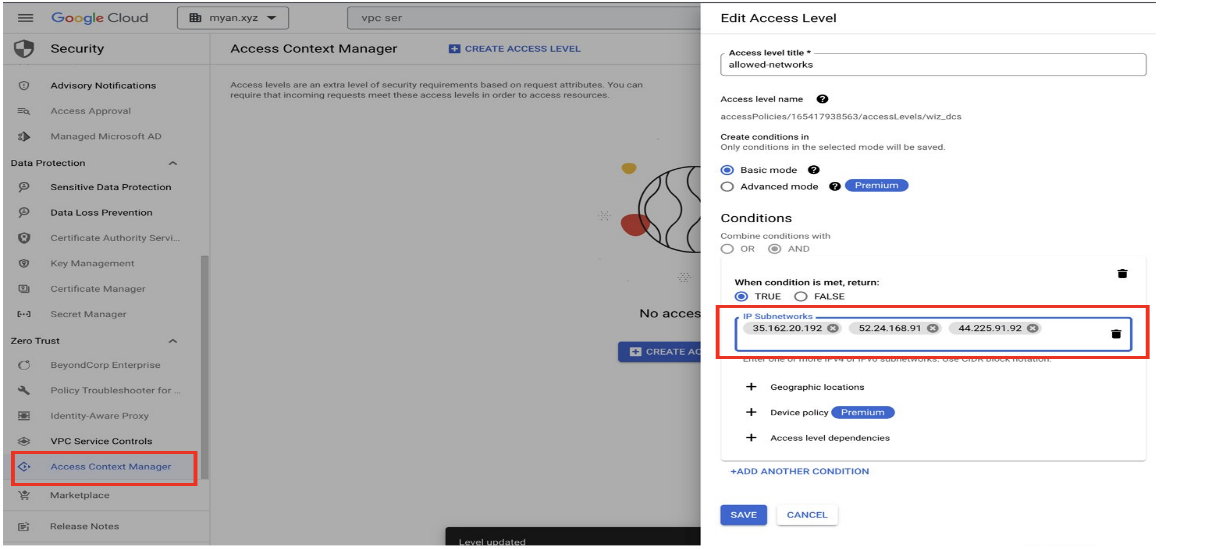
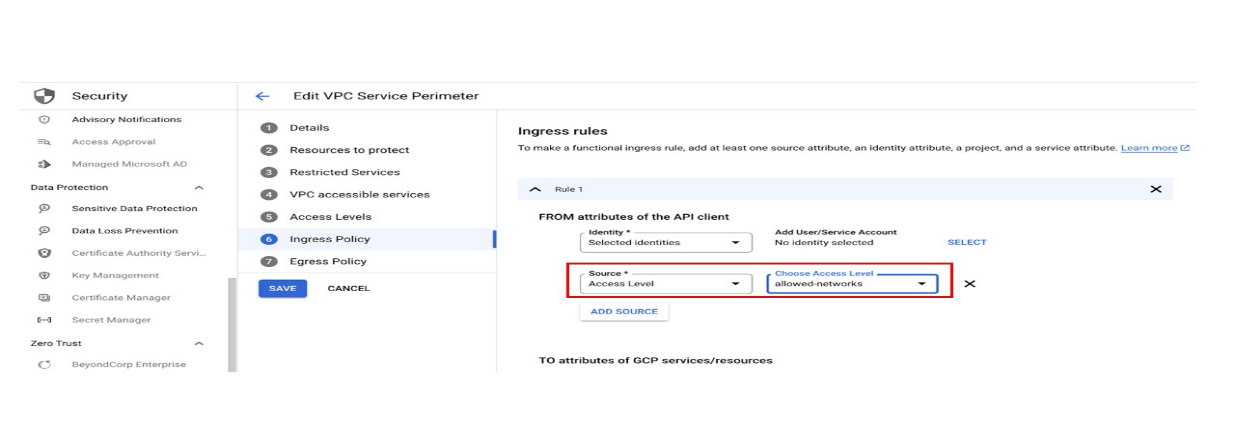 As shown in the preceding screenshots, you create an access level with a custom name, and
then you add the IP addresses of the data center where your Wiz tenant is located.
As shown in the preceding screenshots, you create an access level with a custom name, and
then you add the IP addresses of the data center where your Wiz tenant is located.
- In the Conditions section: a. Add each Wiz data center IP address as an IP address subnetwork in this format: 3.132.145.19/24. b. Set When condition is met, return to TRUE.
- Click Save to update the perimeter settings. Deployment can take up to 20 minutes.
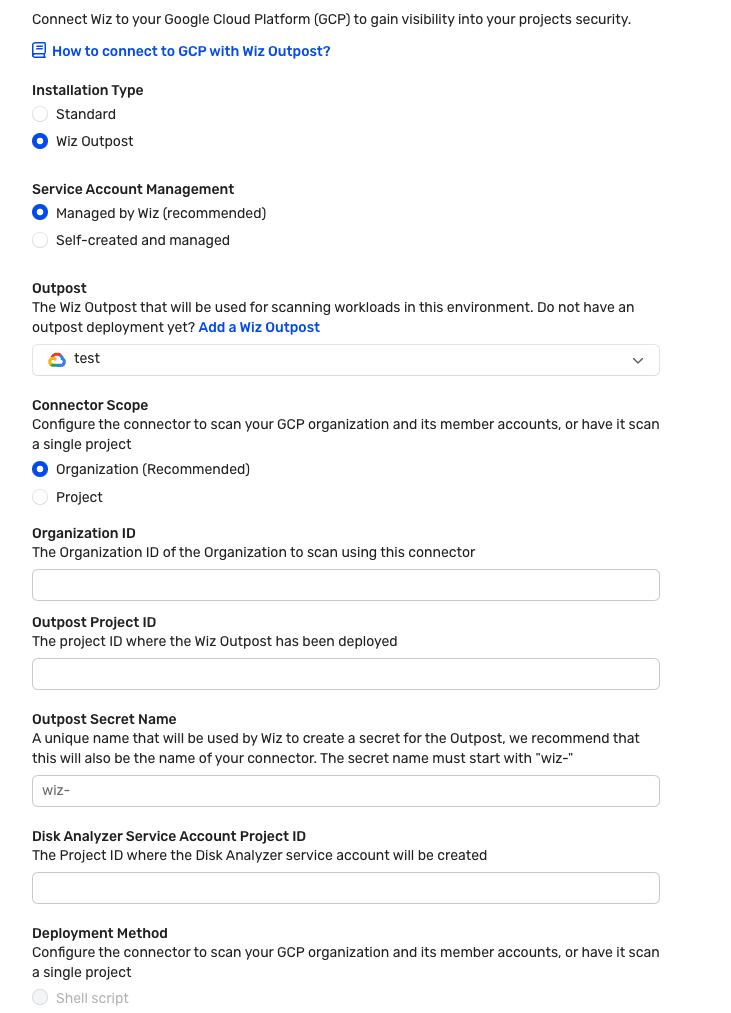
- Repeat the previous three steps for every access level used by a perimeter that affects a project that you want Wiz to scan. Use Wiz Outpost to keep data in your project As shown in the following screenshot, Wiz Outpost is an alternative deployment model to the standard SaaS deployment mode that's described in this document. It lets you perform all Workload scanning in your own environment, using your own infrastructure. The following screenshot shows how to connect Outpost in the Wiz portal.
 As shown in the preceding screenshot, you must provide the Google Cloud organization ID
you want to scan using this connector. You must also provide the project ID of the project
where the Wiz outpost was deployed.
The following sample command creates a Wiz service account with a read-only role
to all the cloud services and a role to create snapshots and delete snapshots.
After determining the correct deployment information for your use case, use Cloud
Shell to run the following command:
● https:// SERVER_URL /deployment-v2/gcp/cli/wiz-gcp.sh | bash /dev/stdin
managed-standard organization-deployment
● --organization-id= ORGANIZATION_ID
● --wiz-managed-id= WIZ_MANAGED_ID
Replace the following:
● SERVER_URL : The server URL that appears in the Wiz console.
As shown in the preceding screenshot, you must provide the Google Cloud organization ID
you want to scan using this connector. You must also provide the project ID of the project
where the Wiz outpost was deployed.
The following sample command creates a Wiz service account with a read-only role
to all the cloud services and a role to create snapshots and delete snapshots.
After determining the correct deployment information for your use case, use Cloud
Shell to run the following command:
● https:// SERVER_URL /deployment-v2/gcp/cli/wiz-gcp.sh | bash /dev/stdin
managed-standard organization-deployment
● --organization-id= ORGANIZATION_ID
● --wiz-managed-id= WIZ_MANAGED_ID
Replace the following:
● SERVER_URL : The server URL that appears in the Wiz console.
● ORGANIZATION_ID : The Google Cloud organization ID.
● WIZ_MANAGED_ID : The account ID for the Wiz managed service account in Google
Cloud.
Using the Wiz Outpost deployment model, all Workload scanner functionality is
pulled out of the Wiz backend and recreated in your own environment.
● The Wiz workload scan of the GKE cluster in Wiz project should be deployed to a
project in the Customer Organization.
● Snapshots in the Outpost deployment model are still created, scanned, and deleted in
the same manner, but all analysis occurs in your environment. Only the metadata
results are sent to the Wiz backend. Examples of metadata results include the
following:
- Installed packages
- Exposed secrets
- Malware detection
Use case: Agentless scanning provides full stack
multi-cloud visibility in minutes
Wiz scans the entire cloud stack in read-only mode, including all VMs, containers, serverless
apps, data repositories, and PaaS services that use the Cloud APIs. For example, customers
use Wiz to search for resources that are associated with Log4j vulnerabilities.
The Wiz cloud risk engine compiles multiple layers of configuration, network and identity
data, and cloud events from Cloud Audit Logs to surface effective external exposure,
unintentionally excessive permissions, exposed secrets, and lateral movement paths.
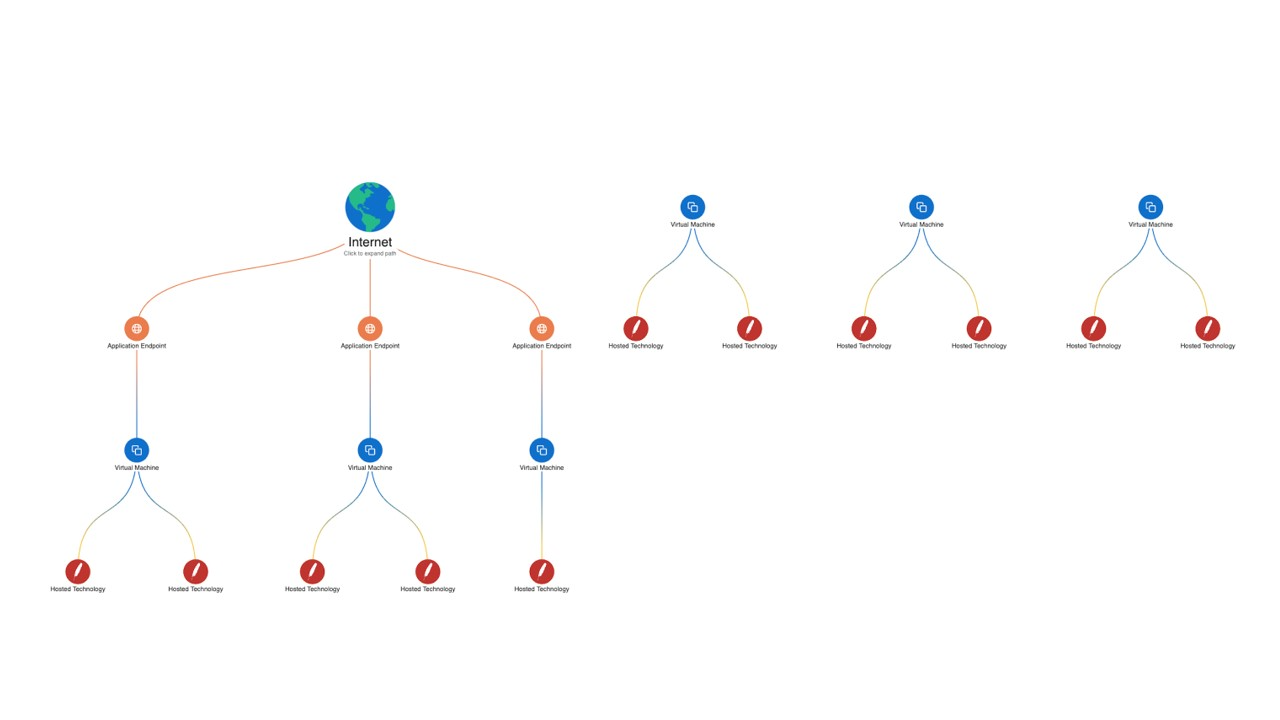
As shown in the following diagram, Wiz Security Graph shows the cloud resources that are
associated with Log4j vulnerabilities:
- Compliance
Wiz automatically assesses your compliance posture against more than 100
industry compliance frameworks or your custom frameworks. That assessment helps
eliminate the manual effort and complexity of achieving compliance in dynamic and
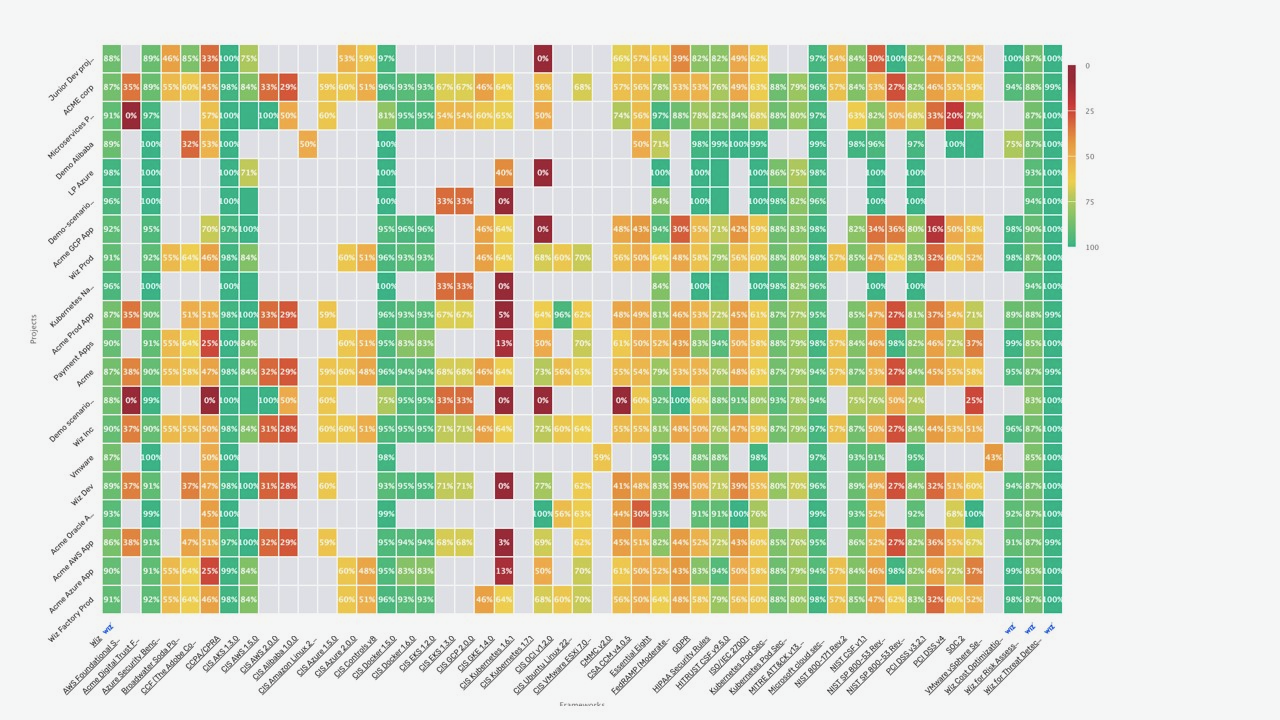
multi-cloud environments. The following screenshot shows a compliance heatmap, which lets
you survey your Google Cloud environment across all compliance frameworks–including
CIS and NIST–at a high level and quickly determine where your security teams should focus.
- Container security Wiz assesses and correlates container security risk across container images, identities, the Kubernetes network, and the cloud environment. Wiz also enables comprehensive, end-to-end Kubernetes security posture management and compliance. Wiz Guardrails enable organizations to enact a single policy framework that spans the development lifecycle (CI/CD pipeline) to runtime. Wiz Runtime Sensor is a lightweight eBPF-based agent that can be deployed within Kubernetes clusters as a daemon set to provide real-time visibility and monitoring of running processes, network connections, file activity, system calls–and more–to detect malicious behavior affecting the workload. The following diagram shows the Wiz Guardrails that are in place. These guardrails span the development cycle to runtime.
 3.Deploy Wiz
Connectors let Wiz access your cloud environment to assume roles, create snapshots, share
snapshots with Wiz for analysis, and delete snapshots. You'll need to create a Cloud
Connector for your Google Cloud organization or project. As mentioned previously, Wiz
supports both shell script and Terraform.
3.Deploy Wiz
Connectors let Wiz access your cloud environment to assume roles, create snapshots, share
snapshots with Wiz for analysis, and delete snapshots. You'll need to create a Cloud
Connector for your Google Cloud organization or project. As mentioned previously, Wiz
supports both shell script and Terraform.
7. CONFIGURATION Configuration in Wiz typically begins with the basic setup required to connect cloud accounts so the platform can start scanning and analyzing the environment. This initial configuration involves securely integrating cloud providers (such as AWS, Azure, or Google Cloud) using APIs or role-based access. Once connected, Wiz automatically begins discovering assets, mapping the cloud environment, and identifying potential risks without requiring complex deployment steps. Beyond the basic setup, Wiz also supports advanced configuration options that allow organizations to tailor the platform to their specific security needs. This includes defining custom security policies, setting up alerts and notifications for detected risks, and prioritizing vulnerabilities based on severity and impact. Users can also integrate Wiz with other tools such as SIEM systems, ticketing platforms, or DevOps pipelines to streamline workflows and improve incident response. These advanced configurations enhance the overall effectiveness of the platform by enabling automation, improving visibility, and ensuring that security operations align closely with organizational requirements and compliance standards. 8. HANDS-ON USAGE There is no since hands on usage because the direct access is not available and the usage is explained conceptually. Steps: 1.Start the tool (AWS & Azure) by logging into the Wiz dashboard. 2.Perform scanning of cloud resources.
3.View results such as alerts, reports, and risk dashboards.
9. LAB SETUP A sample lab setup can be created using a cloud environment like AWS Free Tier. Dummy resources can be used to simulate real scenarios. Information: Lab environment: AWS Free Tier Tools used: Sample cloud resources Testing: Misconfiguration detection Result: Security risks identified 10. USE CASE MAPPING ● The use of Wiz is primarily centered around security professionals, especially security engineers and cloud security teams, who are responsible for monitoring, managing, and protecting cloud environments. These users rely on Wiz to gain deep visibility into their infrastructure, identify vulnerabilities, detect misconfigurations, and respond to potential threats in real time. ● Its ability to provide a unified view of security risks makes it a valuable tool for teams handling complex cloud operations. ● Wiz is particularly well-suited for medium to large organizations that operate at scale and require advanced security solutions. Industries such as IT, finance, and healthcare benefit significantly from its capabilities, as they often deal with sensitive data and must comply with strict regulatory requirements. ● For example, financial institutions need continuous monitoring to prevent breaches, while healthcare organizations must ensure patient data remains secure and compliant with privacy standards. ● Overall, Wiz is best utilized in environments where cloud infrastructure is extensive and dynamic, and where maintaining a strong security posture is critical to business operations. 11. PRICING ● Wiz follows a subscription-based pricing model, which means organizations need to purchase a plan to access its full range of features. It does not offer a free version, so users typically rely on demos or trials (if approved) to evaluate the platform before committing. ● The pricing is not fixed and is instead customized based on several factors, primarily the size and scale of an organization’s cloud environment. This
includes the number of cloud accounts, workloads, and the overall volume of
resources being monitored.
● As a result, larger organizations with more complex infrastructures may incur
higher costs, while smaller setups may have comparatively lower pricing. This
flexible pricing approach allows Wiz to tailor its services to the specific needs
and usage patterns of each organization.
● However, it can also make it less transparent upfront, as potential users need to
engage with the sales team to get an exact quote based on their requirements.
12. FREE VS PAID Wiz does not offer a free version for individual users. It is primarily designed for organizations and enterprises, which means access is typically granted only through a paid license. This approach aligns with its focus on providing comprehensive cloud security solutions at scale rather than serving casual or individual users. The paid subscription includes the platform’s full range of features, such as cloud environment scanning, risk detection, and continuous security monitoring. These capabilities allow organizations to identify vulnerabilities, detect misconfigurations, and gain complete visibility into their cloud infrastructure. By offering all core functionalities within the licensed version, Wiz ensures that customers can fully utilize the platform without needing to purchase additional feature add-ons. 13. COMPETITORS ANALYSIS The popular competitors of Wiz include: 1.Prisma Cloud by Palo Alto Networks 2.Microsoft Defender for Cloud These tools also provide cloud security and help in identifying risks and vulnerabilities. The reason for this two only is: ● Prisma Cloud - is a security platform by Palo Alto Networks that protects cloud applications and infrastructure. It offers multiple features like workload protection, compliance, and vulnerability management. ● Microsoft Defender for Cloud - Microsoft Defender for Cloud helps secure cloud resources, especially in Azure environments. It provides threat detection, security recommendations, and continuous monitoring. 14. ADVANTAGES AND DISADVANTAGES
● Advantages:
● Wiz is known for its ease of use and quick deployment. One of its
biggest advantages is that it operates in an agentless manner ,
meaning there is no need to install software on individual systems or
workloads. This significantly reduces setup complexity and saves time
for security teams.
● The platform can be configured quickly by simply connecting cloud
accounts through secure APIs. Once connected, Wiz begins scanning
the cloud environment almost immediately, providing instant visibility
into assets, risks, and vulnerabilities. This makes it highly efficient for
organizations that want fast onboarding and minimal operational
overhead.
● Disadvantages:
● Despite its strengths, Wiz does have some limitations. One of the
primary drawbacks is its cost , as it is generally expensive and tailored
for medium to large enterprises. This makes it less accessible for small
businesses or individual users.
● Additionally, Wiz is a fully cloud-based solution , which means it
cannot be deployed or used in local (on-premise) environments.
Organizations that rely heavily on on-prem infrastructure or require
offline capabilities may find this limiting.
15. ISSUES ● One of the most common challenges users face is the inability to access the platform without first obtaining a valid license or receiving demo approval. This requirement can act as an initial barrier, especially for new users who are eager to explore the platform’s features but are delayed by administrative or approval processes. ● In many cases, organizations enforce strict access controls to ensure security and compliance, but from a user’s perspective, this can feel restrictive and time-consuming. ● Without immediate access, users may struggle to evaluate the platform’s capabilities, which can slow down onboarding and reduce early engagement. ● Additionally, beginners often encounter a noticeable learning curve when they first start using Wiz. The platform is designed with powerful features and advanced functionalities, which, while beneficial for experi ● enced users, can be overwhelming for newcomers.
● Understanding the interface, navigating through different modules, and
effectively utilizing its tools may require time, practice, and sometimes
external guidance such as documentation or training sessions.
● As a result, new users might initially feel intimidated or unsure about how to
fully leverage the platform, potentially impacting their productivity and
overall experience until they become more familiar with its workflow and
capabilities.
16. SECURITY & COMPLIANCE ● Wiz adheres to industry-standard security practices and is designed to support key compliance frameworks such as SOC 2 and ISO standards. ● These certifications demonstrate that the platform maintains strong controls around data security, availability, and confidentiality, which are essential for organizations operating in regulated environments. ● The platform integrates with cloud providers through secure APIs, allowing it to access necessary data without compromising the integrity or safety of the environment. This approach ensures that sensitive information remains protected during data exchange. ● Additionally, all interactions and data flows are continuously monitored, enabling real-time visibility and quick detection of any unusual or potentially risky activities. ● This combination of secure connectivity and ongoing monitoring helps maintain a robust security posture while giving users confidence that their cloud environments are well-protected. 17. SCALABILITY Wiz is built with high scalability in mind and is particularly well-suited for large organizations with complex cloud infrastructures. Its architecture allows it to seamlessly support environments that span multiple cloud providers, enabling organizations to manage security across platforms like AWS, Azure, and Google Cloud from a single interface. The platform is designed to efficiently handle vast volumes of data generated by large-scale cloud operations. It processes and analyses this data without causing performance slowdowns, ensuring that users continue to receive fast insights and real-time visibility into their security posture. This makes it especially valuable for enterprises that operate dynamic, rapidly growing environments. Additionally, Wiz scales effortlessly as an organization expands. Whether new workloads are added, additional cloud accounts are integrated, or data volumes increase significantly, the platform maintains consistent performance and reliability. This ensures that security monitoring and risk assessment remain uninterrupted, even as the complexity of the cloud environment grows.
18. DEPLOYMENT SOP
Deployment Steps to Use Wiz
- Obtain Access or License ● First, you need to get access to the Wiz platform. ● This is usually done by: o Requesting a demo from the Wiz team o Completing the demo session o Receiving login credentials or license activation ● After approval, you will be able to log in to the Wiz console and begin setup.
- Connect Your Cloud Accounts ● Once logged in, the next step is to integrate your cloud environment with Wiz. ● Wiz supports major cloud providers such as: o Amazon Web Services (AWS) o Microsoft Azure o Google Cloud Platform ● You need to: o Select your cloud provider in the Wiz dashboard o Authorize Wiz to access your cloud account (usually via IAM roles or service principals) ● This step ensures Wiz can securely read your cloud configurations and resources.
- Configure Required Settings ● After connecting your cloud account, you need to configure the Wiz environment. ● This includes: o Setting permissions and access controls o Defining security policies and rules o Enabling integrations (like alerts or ticketing systems) ● Proper configuration ensures accurate scanning and better security visibility.
- Start Scanning Cloud Resources ● Once everything is configured, Wiz automatically begins scanning your cloud environment. ● It performs agentless scanning, meaning: o No software installation is required on your servers ● Wiz scans: o Virtual machines o Containers and Kubernetes clusters o Storage services o Network configurations ● This process helps discover all assets and detect potential risks.
- Identify and Fix Security Issues ● After the scan is complete, Wiz provides detailed insights into your cloud security posture. ● It identifies:
o Vulnerabilities
o Misconfigurations
o Identity and access risks
o Exposed secrets or sensitive data
● Wiz prioritizes issues based on severity and impact.
● You can then:
o Review findings in the dashboard
o Follow remediation steps provided by Wiz
o Fix the issues directly in your cloud environment
- DEMO SUMMARY .