TOOL OVERVIEW
Microsoft Purview is a unified data governance, compliance, and data protection platform designed to help organizations discover, classify, protect, and manage sensitive data across their environment. In the context of DLP, it is used to prevent sensitive information from leaving the organization through email, cloud apps, endpoints, and supported collaboration services. Its main purpose is to give security and compliance teams centralized visibility and control over where data exists, how it moves, and who can use it. At a practical level, Microsoft Purview solves the problem of accidental or intentional data leakage. Many organizations store information across Microsoft 365 apps, devices, and cloud services, which makes manual monitoring difficult and inconsistent. Purview addresses this by allowing administrators to define policies that automatically detect sensitive content and apply actions such as warning the user, blocking the action, or generating an alert for review.
Purview is especially important in cybersecurity because data protection is not just about stopping malware; it is also about controlling how information is handled by authorized users. DLP policies help reduce insider risk, human error, and non-compliant sharing of sensitive data. This is why Purview fits into the prevention, monitoring, and compliance stages of the cybersecurity lifecycle rather than only the incident-response stage. The platform works across multiple layers of the organization’s data estate. It can monitor files, emails, Teams activity, SharePoint, OneDrive, and endpoints, and it can also integrate with labels and other compliance controls for a more complete protection strategy. This makes it suitable for organizations that want one centralized tool to govern both data protection and compliance requirements.
One of the strongest parts of Microsoft Purview is that it combines detection and enforcement. It uses built-in and custom sensitive information types, pattern matching, and classification logic to identify protected data, then applies policy rules to control what users can do with that data. This layered approach helps organizations balance security with usability, because policies can be tuned to audit, warn, justify, or block actions depending on business need.
Purview is also useful beyond basic DLP because it supports broader governance and visibility. Administrators can use it to understand where data lives, how it moves across systems, and what actions have been taken on it over time. That gives security teams not only prevention capability but also investigation support, reporting, and compliance evidence. In real-world use, Microsoft Purview is commonly deployed in organizations that rely heavily on Microsoft 365 and cloud collaboration.
It is used by compliance teams, data protection officers, security operations teams, and IT administrators to protect regulated or confidential information such as financial records, personal data, intellectual property, and internal business documents. Because of its cloud-based nature, it can scale from small environments to large enterprises with distributed users and devices.
HOW THE TOOL WORKS TECHNICALLY?
1.Working Mechanism:
➢ Deep Content Analysis: Instead of simple keyword scanning, DLP performs deep
content inspection. It analyses content using regular expressions (Regex), keyword
dictionaries, internal function validation (e.g., Luhn check for credit cards), and machine
learning algorithms to understand content context.
➢ Contextual Evaluation: DLP evaluates not just the content but also the action (e.g.,
sharing, copying, printing) and the user involved, allowing it to determine if an activity
is risky.
➢ Real-time Enforcement & Policy Tips: When a user attempts a risky action, DLP can
display a policy tip (pop-up) in real-time, educating the user, blocking the action, or
requiring justification.
➢ Policy Synchronization: Policies created in the Purview portal are synchronized to
various enforcement points—Exchange, SharePoint, OneDrive, Teams, and Devices—
within roughly an hour.
- Architecture Components:
➢ Centralized Policy Portal (Microsoft Purview Compliance Portal): The control hub
for defining, managing, and monitoring DLP policies.
➢ Sensitive Information Types (SITs) & Classifiers: Built-in and custom definitions
(e.g., PII, credit card numbers, financial data) used to identify sensitive data.
➢ Policy Enforcement Engines (Distributed):
o Exchange Online: Scans emails and attachments.
o SharePoint/OneDrive: Scans files at rest or in motion.
o Microsoft Teams: Monitors chat/channel messages in real-time.
o Endpoint DLP: Built into Windows 10/11 and macOS to monitor local file
activities.
➢ Microsoft 365 Audit Logs: Records all policy matches and user actions for reporting.
➢ Microsoft Defender for Cloud Apps: Integrates with Purview to extend DLP protection
to non-Microsoft SaaS apps.
-
Data Flow Explanation:
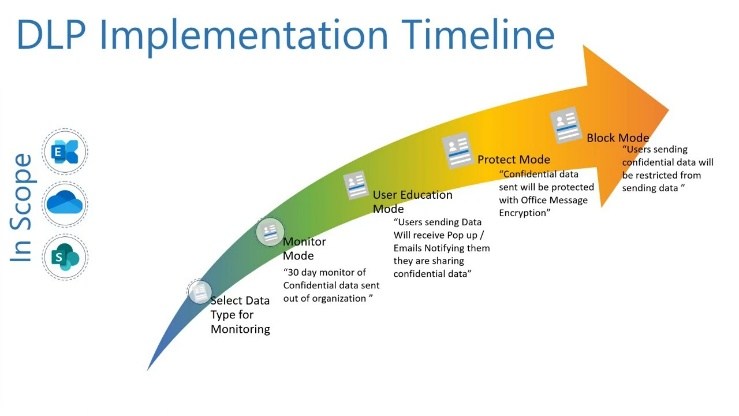
-
Types:
➢ Agentless (Primary - Cloud): For Microsoft 365 services (Exchange, SharePoint,
OneDrive), the DLP functionality is built-in and native, requiring no agents.
➢ Agent-based (Endpoint): For local device monitoring (Windows 10/11, macOS), it uses
the built-in Microsoft Defender for Endpoint agent to monitor file activity, making it a
"lightweight agent" approach.
➢ Signature-based/Context-Aware: It uses signature-based detection for SITs
(regex/keywords) and machine learning for document classification.
FEATURES AND CAPABILITIES:
Core Features:
- Detects sensitive data using predefined and custom patterns.
- Protects data across Microsoft 365 apps, endpoints, and Teams.
- Enforces security through policy-based rules and actions.
- Provides real-time user alerts and policy tips.
- Generates incident reports and audit logs for monitoring.
Advanced Features:
- Uses AI-based classification like EDM and trainable classifiers.
- Controls data sharing in browsers and cloud applications.
- Monitors user activities like copy, paste, and file transfers in real time.
- Enables granular policy targeting based on users, devices, and locations.
- Integrates deeply with Microsoft security ecosystem tools.
Limitations:
- Scans limited data size and file depth.
- Has restrictions on file size and supported formats.
- Limited effectiveness outside Microsoft ecosystem.
- Can produce false positives in data detection.
- Requires complex setup and ongoing tuning.
DEPLOYMENT TOOLs
Supported Environment:
On-premise:
Microsoft Purview DLP is not a fully on-premise solution. It can work in on-prem environments only through hybrid integration, such as connecting with on-premises Exchange servers. In this
setup, DLP policies are still managed from the cloud (Microsoft 365), while some level of monitoring or enforcement happens on local infrastructure. However, its capabilities are limited compared to cloud deployment, and full functionality requires cloud connectivity.
Cloud
The primary and most complete deployment model for Microsoft Purview DLP is in the cloud (Microsoft 365 environment). Here, it natively protects services like Exchange Online, SharePoint Online, OneDrive, and Teams. All policies are centrally managed through the Purview portal, and enforcement happens in real time. This model is highly scalable, automatically updated, and provides the full feature set of DLP.
SaaS
Microsoft Purview DLP is designed mainly for Software-as-a-Service (SaaS) applications, especially Microsoft 365 apps. It can also extend to some third-party SaaS applications through integration with tools like Microsoft Defender for Cloud Apps. In SaaS environments, DLP focuses on controlling data sharing, preventing leaks, and monitoring user activities across cloud- based applications.
Deployment Types:
Single Node
In Microsoft Purview DLP, the concept of a “single node” does not refer to a physical server but rather to centralized management from a single interface. All DLP policies are created and managed from one portal (Microsoft Purview compliance portal). This makes deployment simple and suitable for smaller organizations, but it doesn’t involve separate infrastructure like traditional DLP systems.
Distributed
Purview DLP follows a distributed enforcement model. While policies are centrally defined, they are enforced across multiple locations—such as cloud services, endpoints, and user devices. This allows organizations to apply consistent protection regardless of where the data resides. It is ideal for large enterprises because it improves scalability and ensures uniform policy enforcement across different environments.
Agent-based / Agentless
Agent-based deployment involves installing an endpoint agent (used in Endpoint DLP). This agent allows deep monitoring and control over user actions on devices, such as copying files to USB drives, printing documents, or copying data to the clipboard. It provides strong security and works even when the device is offline, but it requires installation and management on each endpoint.
Agentless deployment , on the other hand, works without installing any software on user devices. It operates directly within cloud services like Exchange Online, SharePoint, and OneDrive. This makes it easier and faster to deploy, especially in cloud-first organizations, but it offers less granular control compared to agent-based approaches.
SYSTEM REQUIRMENT
● OS: Windows 10/11, macOS, or Linux
● CPU: Intel Core i5 or higher (or equivalent)
● RAM: Minimum 8 GB (16 GB recommended)
● Storage: At least 256 GB free space
● Network requirements: Stable internet connection (minimum 10 Mbps recommended)
INSTALLATION AND SETUP
Local Setup (MANDATORY)
1. Sign in to Microsoft 365 Admin Center You start by logging into the Microsoft 365 Admin Center using administrator credentials. This gives you access to all security and compliance features required to configure DLP.
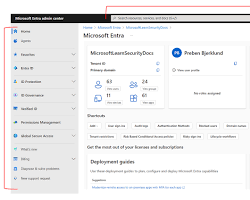
2. Open Microsoft Purview Compliance Portal From the admin center, you navigate to the Microsoft Purview portal. This is the central place where data protection, compliance, and DLP policies are managed.

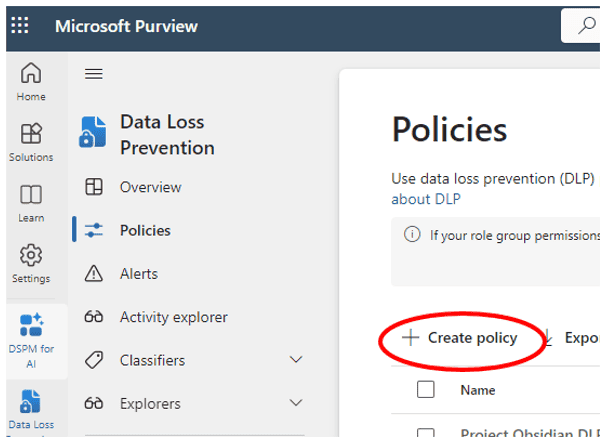
3. Go to Data Loss Prevention (DLP) Inside the Purview portal, you select the Data Loss Prevention section. This is where you can view, create, and manage policies that protect sensitive data.
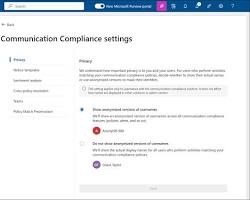
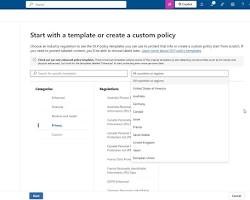
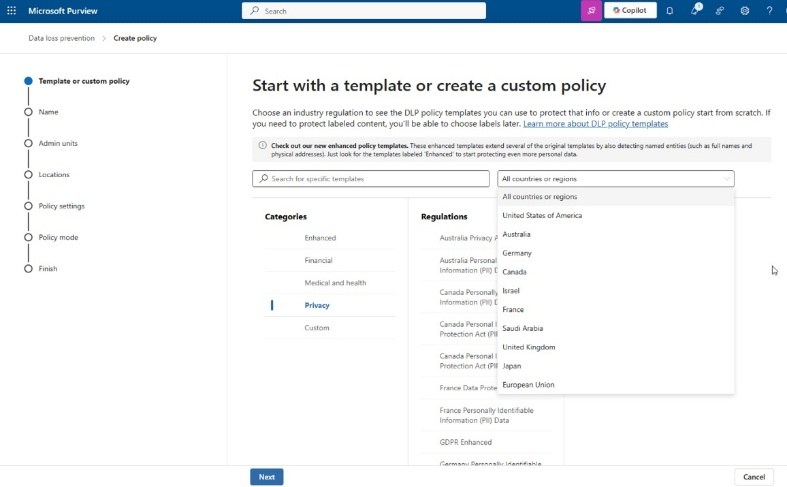
4. Create a New DLP Policy
You create a new policy using either built-in templates (like financial or personal data
protection) or a custom policy. This step defines what type of sensitive data you want to
protect.
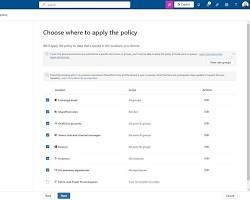
 5. Choose Locations to Apply Policy
You select where the policy should be applied, such as Exchange (emails), SharePoint,
OneDrive, Microsoft Teams, or endpoint devices. This ensures protection across selected
platforms.
5. Choose Locations to Apply Policy
You select where the policy should be applied, such as Exchange (emails), SharePoint,
OneDrive, Microsoft Teams, or endpoint devices. This ensures protection across selected
platforms.
 6. Configure Conditions and Actions
You define rules such as detecting sensitive information (e.g., credit card numbers) and
6. Configure Conditions and Actions
You define rules such as detecting sensitive information (e.g., credit card numbers) and
specify actions like blocking access, restricting sharing, or sending alerts to users/admins.
7. Enable and Test the Policy Finally, you enable the policy. You can first run it in test mode to check its effectiveness without blocking users, and then turn it on fully for enforcement.
CLOUD SECURITY (MANDATORY)
1.Cloud Provider Used: Microsoft Azure (Microsoft 365 / Purview Cloud Environment) Instance Type:
- SaaS-based (No dedicated VM required)
- Uses Microsoft 365 cloud services
- Optional: Azure Virtual Machine (Standard B1s / B2s) for testing
2.Setup Steps (with explanation):
1. Create Microsoft 365 Account Sign up for Microsoft 365 and choose a suitable subscription plan to access Purview services. 2. Access Microsoft Purview Portal Go to the Purview compliance portal using admin credentials to manage DLP policies.
3. Configure User Licenses Assign required licenses (like E3/E5) to users so they can use DLP features. 4. Create DLP Policy Set up a new Data Loss Prevention policy based on templates or custom rules. 5. Select Cloud Locations Choose services like Exchange Online, SharePoint Online, OneDrive, and Teams for policy enforcement. 6. Configure Rules and Actions Define conditions (sensitive data types) and actions (block, notify, restrict sharing). 7. Enable and Monitor Policy Turn on the policy and monitor activity using dashboards and reports.
● Estimated Daily Cost:
- Microsoft 365 E3: approx ₹150–₹250 per user/day
- Microsoft 365 E5: approx ₹300–₹500 per user/day
- Azure VM (optional): approx ₹50–₹150/day (Cost depends on usage, region, and subscription plan)
CONFIGURATION
Basic Configuration
- Permissions & Roles: Assign the Compliance Administrator or DLP Compliance Officer roles in Microsoft Entra ID.
- Workload Activation: Toggle "On" for the core workloads: Exchange, SharePoint, OneDrive, and Teams.
- Information Protection Integration: Ensure Sensitivity Labels are published; DLP policies often use these labels as a condition for protection.
- Sensitive Information Types (SITs): Configure or select from 300+ built-in templates (e.g., Credit Card, Passport) or create custom Regex-based SITs.
- Simulation Mode: Always deploy new policies in Simulation Mode first to gather telemetry without blocking business workflows. Advanced Configuration
- Endpoint DLP: Onboard Windows and macOS devices via Microsoft Intune. Configure "Device Settings" to restrict printing, copying to USB, or uploading to unmanaged cloud domains.
- Adaptive Policy Scopes: Use dynamic attributes (e.g., Department = "Finance") so the policy automatically follows users as they move within the organization, rather than manually adding users.
-
AI & Copilot Protection : Enable DLP for Microsoft 365 Copilot. This prevents users from including sensitive data in Copilot prompts and blocks Copilot from referencing restricted files in its responses.
-
Exact Data Match (EDM): Upload a hashed schema of your actual database (e.g., specific customer IDs) to prevent false positives and ensure only your specific data triggers a block.
- Advanced Logic: Utilize nested rule logic (AND/OR/NOT) to create complex enforcement scenarios (e.g., "Block if file is labeled 'Secret' AND shared externally AND recipient is NOT a partner").
Integrations APIs
- Microsoft Graph API (DLP): Used for real-time monitoring and applying actions to Teams messages or SharePoint files.
- Endpoint DLP Device Status API (New in 2026): Allows programmatic access to device-level health and onboarding status to monitor your security posture at scale.
- Office 365 Management Activity API: Ideal for pulling DLP incident logs into external SIEM/SOAR platforms (like Microsoft Sentinel or Splunk).
- MIP SDK: Enables developers to build native labelling and protection into custom line-of-business applications. Third-party tools
- Security Store: Accessible directly in the Purview portal to deploy integrations from partners like Netskope, iBoss, and Island.
- Network DLP (Palo Alto Prisma Access): A deep integration that extends Purview's SITs and labels to your network layer, inspecting unmanaged cloud app traffic.
- Enterprise Browsers : Native integration with Island and Microsoft Edge for Business allows Purview to block data exfiltration (like copy/paste) directly within the browser without device onboarding.
- SIEM/SOAR: Out-of-the-box connectors for Microsoft Sentinel to automate incident response (e.g., automatically revoking a user's access if they trigger multiple high- severity DLP alerts).
HANDS ON USAGE (PRACTICAL)
How to start tool?
- Direct URL: Navigate to compliance.microsoft.com.
- Microsoft 365 Admin Center: Go to Admin centers > Compliance.
- Authentication: Sign in with a user account assigned the Compliance Administrator role.
How to perform main function (Create/Edit Policy) The main function is defining what sensitive data to protect and where.
- Click Data loss prevention > Policies > + Create policy.
- Select a Template (e.g., Financial) or Custom.
- Define Locations (Exchange, SharePoint, etc.).
- Configure Advanced DLP rules to set conditions (e.g., "shared with external") and actions (e.g., "block").
Commands / UI actions
- Onboarding Devices: Go to Settings > Device onboarding to download the configuration package for Windows/macOS.
- Test-Drive: Use the Simulation Mode toggle at the end of the policy wizard.
- Update: Select an existing policy and click Edit policy to adjust sensitivity thresholds (e.g., changing "Confidence level" from 65% to 85% to reduce false positives).
Output: Microsoft Purview provides several high-level reporting views to prove compliance to stakeholders:
- DLP Policy Matches: Shows the number of times a policy was triggered over a specific period (24 hours, 7 days, 30 days).
- DLP Incidents: A detailed report of every "Block" or "Override" action taken.
- Third-party Cloud App Report: Shows data risks within non-Microsoft apps (if Microsoft Defender for Cloud Apps is integrated). Alerts When a policy is triggered, the system generates alerts based on your configuration:
- Admin Alerts: Found under Data loss prevention > Alerts. Admins can view the "Metadata" (who, what, where) and sometimes the "Actual Content" that triggered the alert to verify the risk.
- User Notifications (Policy Tips): An immediate pop-up in Outlook, Teams, or the desktop taskbar telling the user why their action was blocked. Dashboard explanation The DLP Overview Dashboard is your "Command Center." It is broken down into three primary visual areas:
- DLP Policy Matches (Graph): A line or bar chart showing trends. A sudden spike might indicate a data breach or a misconfigured policy.
- Top Policy Matches: A list of which policies are firing most often (e.g., "GDPR" vs. "Internal IP").
- Top Users: Identifies "high-risk" users who frequently trigger DLP rules, which may indicate a need for additional security training.
LAB SETUP (MANDATORY)
-
Lab environment created: o Tenant: A Microsoft 365 E5 Developer Sandbox (Renewable via the Microsoft 365 Developer Program). o Users: Created 3 test personas: Compliance Admin (Manager), Internal User (Sender), and External Guest (Gmail/Outlook.com recipient). o Endpoints: One Windows 11 Virtual Machine (VM) onboarded to Purview via the local script method for Endpoint DLP testing.
-
Tools used: o Microsoft Purview Portal: The primary command center. o DLPTester.com / Mockaroo: Used to generate "dummy" credit card numbers and Social Security numbers that pass Luhn algorithm checks (necessary to trigger the "High Confidence" DLP rules). o OneDrive / Teams Desktop Apps: To simulate file syncing and chat-based data exfiltration. o Microsoft Edge (Work Profile): Used to test "Unallowed Browser" blocks when accessing sensitive SharePoint sites.
- What was tested: o Exchange Leakage: Attempted to email 15 valid (test) credit card numbers to an external Gmail address. o Teams Exfiltration: Attempted to paste a "Confidential" sensitivity-labeled text block into a 1:1 chat with an external vendor. o Endpoint USB Block: Attempted to move a file containing sensitive keywords ("Project X - Trade Secret") from the desktop to a virtualized USB drive. o Override Logic: Tested if a user could bypass a block by providing a "Business Justification" and verified if that justification appeared in the Admin logs. Test Scenario Action Taken Result Log Entry Verified Email CC Info
External Send Blocked Yes (Alerts
Dashboard)
Teams Chat External Paste Message Removed Yes (Activity
Explorer)
USB Copy File Transfer Blocked w/ Toast
Notification
Yes (Endpoint DLP)
Override Test Justification
provided
Allowed Yes (Includes user
note)
1. USE CASE MAPPING
Target Users
- Compliance Officers: To ensure the organization meets legal requirements (GDPR, HIPAA, PCI-DSS).
- Security Administrators (SOC): To monitor and respond to intentional or accidental data exfiltration alerts.
- IT Managers: To manage device health and secure collaboration within Microsoft 365.
- End Users: Beneficiaries of "Policy Tips" that provide real-time security training during their normal workflow.
Company Size
- Small to Medium Business (SMB): Using out-of-the-box templates to secure basic customer data with minimal configuration.
- Enterprise: Utilizing Adaptive Scopes and Exact Data Match (EDM) to scale protection across tens of thousands of users and complex, multi-national data sets. Industry
- Healthcare: Protecting Patient Health Information (PHI) to maintain HIPAA compliance.
- Finance/Banking: Securing credit card numbers (PCI), bank account details, and preventing "Insider Trading" via monitored communications.
- Legal/Professional Services: Protecting Intellectual Property (IP) and attorney-client privileged documents.
- Government/Defense: Implementing high-restriction policies for "Top Secret" or "Classified" sensitivity label
1. PRICING & SUBSCRIPTION MODEL
Pricing Type
- Subscription-Based: Purview DLP is not a standalone purchase. It is a feature-set bundled into Microsoft 365 (M365) enterprise and business subscriptions.
- Consumption-Based (Add-ons): Certain advanced features, such as AI-powered data classification, Optical Character Recognition (OCR), and complex data exports, incur "pay-as-you-go" charges via an Azure subscription link. Plans Available
- Free: There is no permanent free version. However, Microsoft offers a 90 - day free trial of the Purview "E5 Compliance" suite for existing M365 customers.
- Paid: * Microsoft 365 E3: Includes Basic DLP (Exchange, SharePoint, OneDrive). o Microsoft 365 E5 / E5 Compliance: Includes Advanced DLP (Endpoint DLP, Teams DLP, Adaptive Scopes, and automated classification). o Business Premium: Tailored for SMBs (up to 300 users), including core DLP and Information Protection.
2. BILLING MODEL
- Per User/Month: This is the standard model. You pay for the number of users who are "in scope" of a DLP policy or who have the capability to create/share sensitive data.
- Capacity-Based (Specific Features): * OCR Scanning: Charged at approximately $1.00 per 1,000 images scanned for sensitive data. o Data Governance (Data Map): Charged per "Capacity Unit" (approx. $0.40/hour for metadata storage and processing). 3. COST ESTIMATION (Standard 2026 Rates) Company Size Recommended Plan Estimated Monthly Cost Small (<300) M365 Business Premium ~$22 per user/month Medium (300- 1k)
M365 E3 + Compliance
Add-on
~$45–$50 per user/month
Enterprise (1k+) M365 E5 Full Suite ~$57–$65 per user/month
FREE vs. PAID COMPARISON Key Differences
Feature Free (Trial/Basic) Standard (M365 E3) Premium (M365 E5 / E7)
Scope 90 - day full access
trial
Email, OneDrive,
SharePoint
+ Endpoints, Teams, &
Fabric
Classification Manual Only Basic SITs (Regex-
based)
AI-powered Auto-labeling
DLP Alerts Basic List Integrated Alert
Dashboard
AI-Summarized Incident
Reports
User Risk Not included Static Policy Tips Adaptive Protection
(Risk-based)
Copilot
Security
Limited Basic prompt blocking Full Agent & Prompt
Governance
COMPETITOR ANALYSIS
Competitor 1: Forcepoint
- Name: Forcepoint DLP
- Comparison: * Strengths: Often ranked higher for on-premises and hybrid environments. It features "Risk-Adaptive Protection," which automatically adjusts security tension based on individual user behavior (e.g., if a user starts behaving like an "insider threat," restrictions tighten instantly).
o Weakness: Significantly more complex to deploy than Purview. It requires a
dedicated agent that can be "heavy" on system resources compared to Purview’s
native integration into Windows and Office apps.
o Best For: Large enterprises with massive on-prem data centers and non-
Microsoft cloud footprints.
Competitor 2: Netskope
- Name: Netskope One DLP
- Comparison: * Strengths: A "Cloud-First" competitor that excels in Shadow IT discovery. While Purview is great at protecting data inside OneDrive/SharePoint, Netskope is superior at controlling data movement across thousands of non-Microsoft
SaaS apps (like Slack, Box, or niche industry apps) via its advanced Cloud Access
Security Broker (CASB).
o Weakness: Can be more expensive for small teams and lacks the "single-pane-
of-glass" simplicity Purview offers to M365 admins.
o Best For: Companies with a "Best-of-Breed" SaaS strategy (using many different
cloud vendors) rather than an "All-in-Microsoft" strategy.
Summary Comparison Table (2026)
Feature Microsoft Purview Forcepoint Netskope
Ease of Setup High (Native to M365) Low (Complex) Medium
M365 Integration Deepest / Native API-based API-based
Endpoint Agent None (Built into Win11) Required (Heavy) Required (Light)
User Behavior AI Good (Adaptive Scopes) Best-in-Class Strong (UEBA)
Non-MS SaaS Coverage Moderate Strong Best-in-Class
1. ADVANTAGES & DISADVANTAGES
Advantages
- Native Integration (Zero-Footprint): Unlike competitors that require a third-party agent installed on every laptop, Purview's Endpoint DLP is built directly into Windows 11 and Microsoft Edge. This means no "performance lag" for users and easier deployment for IT.
- Unified Governance: It uses the same "Sensitivity Labels" across the entire Microsoft ecosystem. If you label a document as "Confidential" in Word, the DLP policy in Exchange and Teams automatically knows how to treat it.
- AI-Powered "Adaptive Protection": In 2026, Purview integrates with Insider Risk Management. If the system detects a user is acting suspiciously (e.g., downloading large volumes of data before a resignation), it can automatically heighten their DLP restrictions in real-time.
- Education over Enforcement: "Policy Tips" act as a training tool. Instead of just blocking a user, it explains why the action was blocked, which significantly reduces repeat offenses and reduces the burden on the help desk.
- Vast Template Library: Out-of-the-box support for over 300 global regulations (GDPR, HIPAA, etc.) allows organizations to become compliant within hours rather than weeks of manual regex writing.
Disadvantages
- Licensing Complexity: The "feature wall" between E3 and E5 licenses is often frustrating. Advanced features like Teams DLP, Endpoint DLP, and automated labeling require the most expensive tiers (E5/G5), which can be a significant cost jump for SMBs.
- Microsoft-Centricity: While it has improved, Purview is still less effective at protecting data on non-Windows platforms (like Linux) or within non-Microsoft cloud apps (like Slack or Zoom) compared to "Cloud-Native" competitors like Netskope.
- The "False Positive" Slope: High-sensitivity settings can lead to many false positives. Tuning these policies requires significant administrative time and expertise; otherwise, "alert fatigue" sets in, and security teams start ignoring valid warnings.
- Sync Latency: Changes made to a DLP policy are not instantaneous. It can take anywhere from 1 hour to 24 hours for a policy update to replicate across all global data centers and endpoints, creating a "security gap" during policy updates.
- Mac & Third-Party Browser Support: While it exists, the functionality for macOS and browsers like Chrome or Firefox requires additional extensions or complicated configuration compared to the "seamless" experience in Windows and Edge.
Maintaining a Microsoft Purview DLP environment requires a proactive approach to troubleshooting, as the system relies on a complex chain of cloud services, endpoint sensors, and user activity logs.
1. ISSUES & TROUBLESHOOTING
Issues Faced
- Policy Propagation Lag: Changes to a DLP policy are not instantaneous. It can take up to 24 hours for a new rule or an updated sensitivity type to sync across all Microsoft 365 data centers and onboarded devices.
- False Positives: Legitimate business documents (like internal invoices or employee lists) triggering "Credit Card" or "Social Security Number" alerts because they contain long strings of numbers.
- Policy Tip Failure: Users not seeing the yellow warning bar in Outlook or Teams, even when the policy is correctly configured to "Notify."
- Endpoint Silent Fail: Devices showing as "Onboarded" in the portal but failing to report activity or block actions like copying to USB.
Common Errors
Error / Symptom Likely Cause
"Document didn't complete
scanning"
The file is too large (over 2 million characters) or is a nested
archive (over 3 levels deep).
"Mailbox is full" (Archive) DLP and Retention policies may be preventing the deletion of
data, causing the archive mailbox to hit its limit.
"Configuration status: Not
updated"
The device has missed its "heartbeat" signal to the Purview
service or the Diagnostic Data service is disabled.
GetDLPPolicyTip call not
found
Usually caused by an unsupported Outlook license or an
outdated Windows version (e.g., Windows 7).
Fixes
- Run Automated Diagnostics: Use the Microsoft 365 Admin Center diagnostic tool specifically for "DLP Policy Tips" to find configuration errors automatically.
- The "Simulation" Review: If false positives are too high, adjust the Instance Count (e.g., only trigger if >5 matches are found) or increase the Confidence Level (e.g., move from 65% to 85%).
- Service Check: For Endpoint issues, ensure the SENSE (Microsoft Defender for Endpoint behavioral sensor) and Diagnostic Data services are running on the local machine.
- Fiddler Tracing: For web-based policy issues, use a Fiddler trace to see if the GetDLPPolicyTip call is being blocked by a local firewall or proxy.
Common Mistakes
- "Enforce First" Mentality: Deploying a policy in "Turn on right away" mode instead of Simulation Mode. This often leads to massive business disruption when legitimate emails are suddenly blocked.
- Conflicting Rules: Creating multiple rules within one policy that target the same data with different actions (e.g., one rule says "Audit" and another says "Block"). The most restrictive rule usually wins, leading to confusion.
- Broad Location Scoping: Turning on "All Locations" for a highly sensitive policy without testing. This can cause the system to scan and block critical system files in SharePoint or admin accounts.
- Ignoring "Exclusions": Forgetting to exclude trusted domains (like your legal counsel or primary vendor) from external sharing blocks, causing constant friction in partnerships.
- Overlooking OCR: Expecting Purview to find sensitive data in scanned PDFs or images without enabling the Optical Character Recognition (OCR) add-on.
Microsoft Purview DLP is built on the Microsoft Azure cloud infrastructure, adhering to
the highest global security standards. In 2026, it serves as the "Trust Layer" for both
human-led and AI-driven workflows.
SECURITY & COMPLIANCE
Data Handling
Microsoft operates on a Zero Trust architecture. When a DLP policy scans a file, the
data is processed in a transient memory state.
- Encryption in Transit & Rest: All data being scanned is protected by TLS 1.3 while moving and AES- 256 at rest.
- Content Analysis: For Exchange, SharePoint, and Teams, the scanning happens within the "service boundary." For Endpoints, the local Microsoft Defender sensor performs the analysis on the device itself—meaning the actual content of your files is not uploaded to the cloud just for scanning purposes.
- Double Key Encryption (DKE): For highly regulated industries, Purview supports "Double Key" encryption where you hold one key and Microsoft holds the other. Even Microsoft cannot see your data without your key.
Log Storage
Audit logs and incident metadata are stored in a centralized, secure repository.
- Storage Location: By default, logs are stored in the Microsoft 365 Audit log. In 2026, organizations with Advanced Data Residency can specify exactly which geographic region (e.g., EU, UK, US, Australia) their logs are stored in to meet local laws.
- Retention Periods: * Audit (Standard): Logs are kept for 90 days.
o Audit (Premium): Logs are retained for 1 year (up to 10 years with an add-on).
- Exporting Logs: Most enterprises use the Office 365 Management Activity API to push DLP logs into a SIEM like Microsoft Sentinel or Splunk for long-term storage and advanced forensic analysis.
Compliance Support
Microsoft Purview is one of the most compliant platforms in the world, supporting over
100+ global standards.
- Regulatory Compliance: Out-of-the-box support for GDPR (EU) , HIPAA (Healthcare) , PCI-DSS (Finance) , CCPA (California) , and FedRAMP (US Government).
- Compliance Manager: Purview includes a tool called "Compliance Manager" that gives you a Compliance Score. It maps your DLP settings against specific regulatory controls and tells you exactly what steps you need to take to pass an audit.
- Multi-Cloud Support: In 2026, Purview extends these compliance checks to AWS S buckets and Google Cloud Storage , allowing you to run a single compliance report that covers your entire multi-cloud estate.
Feature Performance
Level
Scalability Method
Email Scanning Instant(In-transit) Native Exchange Integration
File Syncing High
(Background)
Differential Scanning (Only
new/changed)
Endpoint Policy Real-time
(Kernel)
Microsoft Intune / Group
Policy
Large Teams
Groups
Near-real-time Microsoft Graph API Change
Notifications
DEPLOYMENT SOP
This Deployment Standard Operating Procedure (SOP) is designed for IT service providers and internal security teams to ensure a consistent, professional-grade rollout of Microsoft Purview DLP in 2026.
1. Requirement Checklist
Before initiating the project, verify that the following assets and accesses are ready:
- Licensing: Microsoft 365 E5 / E5 Compliance or M365 Business Premium (for SMB).
- Admin Access: Compliance Administrator and Security Administrator roles in Microsoft Entra ID.
- Data Inventory: List of priority Sensitive Information Types (SITs) to protect (e.g., PCI, HIPAA, GDPR).
- Stakeholder List: Approval from Legal, HR, and Department Heads for block/audit actions.
- Network: Firewall exceptions for Microsoft Purview endpoints (especially for Endpoint DLP). 2. Architecture Selection
In 2026, Purview follows the "4-Engine Architecture." You must deploy separate policies for each engine to ensure predictable behavior:
- Exchange Engine: For in-transit email (Internal/External).
- SPO/ODB Engine: For file sharing in SharePoint and OneDrive.
- Teams Engine: For near-real-time chat and channel protection.
- Endpoint & Web Engine: For local device actions (USB, Print, SaaS uploads via Edge). 3. Installation Steps
- Global Settings: Navigate to Settings > Data loss prevention and configure "Endpoint DLP settings" (Unallowed browsers, restricted apps).
- Device Onboarding:
o Deploy the configuration package via Microsoft Intune (recommended) or GPO.
o Verify device health in the Purview Portal > Settings > Device onboarding.
- App Connectors: Link Microsoft Defender for Cloud Apps to extend DLP to non- Microsoft SaaS (Slack, Dropbox). 4. Configuration Steps
- SIT Definition: Create custom Sensitive Information Types or use built-in templates.
- Policy Creation: Use a standardized naming convention: [Engine]-[Data-Type]-[Action] (e.g., EP-CC_Data-Block).
- Adaptive Scopes: Define dynamic scopes (e.g., "Users in Finance Dept") to automate user assignment.
- Rule Logic: Set Conditions (Shared externally), Exceptions (Trusted domains), and Actions (Block with override).
- Notifications: Enable Policy Tips and customized email notifications to end-users. 5. Validation Checklist
Test Case Expected Result Pass/Fail
Email Test External email with CC info is blocked/audited. [ ]
Teams Test Sharing SSN in chat triggers "Message Removed." [ ]
USB Test Copying sensitive file to USB triggers block notification. [ ]
Web Test Uploading file to personal Gmail via Edge is blocked. [ ]
Copilot Test Copilot is restricted from referencing "Confidential" files. [ ]
6. Reporting Setup 1. Alert Triage: Set high-severity alerts to notify the Security Operations Center (SOC). 2. Dashboard Configuration: Pin DLP Policy Matches and Top Risk Users to the Purview homepage. 3. Sentinel Integration: Configure the Microsoft Sentinel Data Connector for long-term log retention and cross-tool correlation. 4. Monthly Tuning: Schedule a review of the Activity Explorer to identify and fix false positives. 7. Client Handover Process - Administrator Training: Walkthrough of the Alerts dashboard and incident remediation. - End-User Guide: A one-page PDF explaining what "Policy Tips" look like and why they appear.
- Documentation: Hand over the Policy Configuration Matrix (Mapping business rules to technical policies).
- Exception Process: Define how users can request permanent exceptions for specific business workflows.
- Health Check Schedule: Set a date for the 30-day "Post-Simulation" review to move policies from Simulation to Enforcement.