TOOL OVERVIEW
In today’s digital world, data has become one of the most valuable assets for any organization. Companies generate, store, and process vast amounts of sensitive information such as customer data, financial records, intellectual property, and internal business communications. However, with the rapid adoption of cloud computing, remote work, and digital collaboration tools, the risk of data breaches and unauthorized data exposure has increased significantly. Organizations are no longer only threatened by external attackers but also by insider threats, accidental data leaks, and human errors. This is where Data Loss Prevention (DLP) solutions play a critical role in modern cybersecurity strategies. Forcepoint DLP is a comprehensive data security solution designed to prevent sensitive data from being lost, misused, or accessed by unauthorized users. It provides organizations with deep visibility into how data is being accessed, used, and shared across different environments, including endpoints, networks, and cloud platforms. Unlike traditional security tools that primarily focus on protecting systems from external threats, Forcepoint DLP focuses on protecting the data itself, regardless of where it resides or how it is being used. This data-centric approach ensures that sensitive information remains secure even in complex and distributed IT environments.
One of the key challenges organizations face is the lack of control over data movement. Employees frequently share files through emails, upload documents to cloud applications, or transfer data using removable devices such as USB drives. In many cases, these actions are legitimate but can still lead to accidental exposure of confidential information. Additionally, malicious insiders may intentionally attempt to steal sensitive data for personal gain or to harm the organization. Forcepoint DLP addresses these challenges by continuously monitoring data activity and enforcing security policies that define how sensitive data should be handled. Forcepoint DLP uses advanced detection techniques to identify sensitive information. It combines content inspection, pattern matching, and contextual analysis to accurately classify data. For example, it can detect credit card numbers, personal identification details, or confidential business documents based on predefined rules or custom policies created by administrators. Beyond simple pattern matching, the tool also considers the context in which data is being used, such as the user’s role, location, device, and behavior. This helps reduce false positives and ensures that security measures are applied intelligently without unnecessarily disrupting business operations.
Another important aspect of Forcepoint DLP is its human-centric approach to security. Instead of treating all users the same, the tool analyzes user behavior to identify potential risks. For instance, if an employee suddenly starts downloading large volumes of sensitive data or attempts to transfer confidential files outside the organization, the system can flag this behavior as suspicious and take appropriate action. This approach allows organizations to proactively prevent data breaches before they occur, rather than simply reacting to incidents after the damage has been done. Forcepoint DLP also plays a crucial role in helping organizations meet regulatory and compliance requirements. Many industries are governed by strict data protection regulations such as GDPR, HIPAA, and PCI-DSS, which require organizations to safeguard sensitive information and maintain proper controls over data access and sharing. Failure to comply with these regulations can result in heavy fines, legal consequences, and damage to the organization’s reputation. By implementing Forcepoint DLP, organizations can enforce compliance policies, monitor data usage, and generate detailed reports that demonstrate adherence to regulatory standards.
Furthermore, Forcepoint DLP is designed to operate seamlessly across different environments. It supports deployment on-premise, in the cloud, or in hybrid infrastructures, making it suitable for organizations of all sizes. Whether a company operates entirely in a cloud environment or uses a combination of local and cloud-based systems, Forcepoint DLP provides consistent protection across all platforms. Its centralized management console allows administrators to define policies, monitor incidents, and respond to threats from a single interface, improving efficiency and reducing operational complexity.
HOW THE TOOL WORKS TECHNICALLY?
1.Working Mechanism:
Multi-Layer Data Protection
Forcepoint DLP works on a multi-layered approach to ensure that sensitive data is
protected at every stage of its lifecycle. It monitors data across three key states: data at
rest, data in motion, and data in use. This ensures that whether the data is stored, being
transferred, or actively accessed by a user, it remains under continuous protection.
Data Monitoring and Interception
The tool continuously monitors user activities such as sending emails, copying files to
USB devices, uploading documents to cloud platforms, or sharing files over a network.
Whenever such an action occurs, Forcepoint DLP intercepts the data through endpoint
agents or network sensors before it leaves the system or is shared externally.
Content Inspection Process
Once the data is intercepted, it is analysed by the content inspection engine. This engine
scans the data using predefined rules, keywords, and patterns to identify sensitive
information such as financial data, personal details, or confidential documents. Custom
policies can also be created to match organization-specific data.
Context-Aware Analysis
In addition to analysing the content, Forcepoint DLP evaluates the context in which the
data is being used. This includes factors like the user’s role, device, location, and
behaviour. This context-aware approach helps in making more accurate decisions and
reduces unnecessary blocking of legitimate activities.
Policy Enforcement and Action
After analysis, the system compares the results with defined DLP policies. Based on these
policies, it takes appropriate actions such as allowing the activity, blocking it, warning
the user, or generating an alert for administrators. All actions are logged for future
analysis and reporting.
- Architecture Components:
Central Management Server
The DLP Management Server acts as the core component of Forcepoint DLP. It is
responsible for creating, managing, and enforcing security policies across the
organization. Administrators use this server to configure rules, monitor incidents, and
generate reports from a centralized dashboard.
Endpoint Agents
Endpoint agents are installed on user devices such as laptops and desktops. These agents
monitor activities like file transfers, USB usage, clipboard actions, and local file access.
They provide deep visibility into user behavior and ensure that sensitive data is protected
directly at the endpoint level.
Network Sensors
Network sensors are deployed within the organization’s network to monitor data in
motion. They inspect traffic such as emails, web uploads, and file transfers across
network channels. These sensors help detect and prevent sensitive data from being
transmitted outside the organization.
Database and Storage System
All logs, alerts, and incident data are stored in a centralized database. This component is
essential for maintaining records, generating reports, and supporting compliance
requirements. It also helps security teams analyze past incidents and improve policies.
Integration Layer
Forcepoint DLP can integrate with other security tools such as SIEM systems, email
gateways, and cloud applications. This integration enhances visibility and allows
organizations to implement a more comprehensive security strategy.
- Data Flow Explanation:
User Activity Initiation
The data flow begins when a user performs an action such as sending an email, copying
a file to a USB device, or uploading data to a cloud platform. These actions trigger the
monitoring process within the system.
Data Interception
Once the activity is detected, the data is intercepted by either the endpoint agent (for local
actions) or the network sensor (for network-based actions). This ensures that the data can
be analysed before it is shared or transferred.
Data Inspection and Analysis
The intercepted data is then passed to the content inspection engine. Here, the system
scans the data for sensitive information using predefined patterns, keywords, and
classification rules. Contextual factors such as user role and location are also considered
during this step.
Policy Evaluation
After analysis, the system compares the data against predefined DLP policies. These
policies determine whether the data transfer is allowed or considered a violation based
on organizational rules.
Action and Response
Based on the policy evaluation, the system takes appropriate action. This may include
allowing the transfer, blocking it, warning the user, or sending an alert to administrators.
All actions are recorded in the system for monitoring and reporting purposes.
- Types:
Forcepoint DLP supports both agent-based and agentless deployment models. In agent-based mode, software agents installed on endpoints provide detailed visibility and control over user activities. In agentless mode, the system monitors data through network-level integration without requiring installation on individual devices. Additionally, the tool uses both signature-based detection (matching known patterns of sensitive data) and behavior-based analysis (identifying unusual user actions) to enhance its effectiveness.
FEATURES AND CAPABILITIES:
Core Features:
Data Discovery and Classification
Forcepoint DLP provides strong capabilities for discovering and classifying sensitive data
across the organization. It scans files, databases, endpoints, and cloud storage to identify
confidential information such as financial records, personal data, and intellectual
property. The tool uses predefined templates as well as custom classification rules,
allowing organizations to tailor detection based on their specific needs.
Real-Time Monitoring
One of the most important features of Forcepoint DLP is its ability to monitor data
activities in real time. It continuously tracks how data is accessed, used, and shared by
users. This ensures that any suspicious or unauthorized activity is detected immediately,
enabling quick response and prevention of data leaks.
Policy Enforcement
Forcepoint DLP allows administrators to create detailed security policies that define how
sensitive data should be handled. These policies can be applied across endpoints,
networks, and cloud environments. Based on these rules, the system can automatically
allow, block, or restrict actions involving sensitive data.
Endpoint Protection
The tool provides strong endpoint-level protection by installing agents on user devices.
These agents monitor activities such as copying files to USB drives, printing documents,
or transferring data between applications. This ensures that sensitive data is protected
even when users are working offline.
Network Monitoring
Forcepoint DLP monitors network traffic to detect sensitive data being transmitted via
email, web uploads, or file transfers. This helps prevent data from leaving the
organization through communication channels.
Advanced Features:
Optical Character Recognition (OCR)
Forcepoint DLP includes OCR capabilities that allow it to detect sensitive information
within images and scanned documents. This is especially useful for identifying data that
is not in text format, such as screenshots or scanned files.
User Behaviour Analytics
A key advanced feature is its ability to analyse user behavior. The system tracks user
actions over time and identifies unusual patterns, such as accessing large volumes of
sensitive data or attempting unauthorized transfers. This helps detect insider threats
before they cause damage.
Context-Aware Protection
Unlike basic DLP solutions, Forcepoint considers context along with content. It evaluates
factors such as:
User role
Device type
Location
Time of access
This allows the system to make intelligent decisions, reducing false positives and
ensuring normal business operations are not disrupted.
Cloud Application Monitoring
Forcepoint DLP extends its protection to cloud platforms and applications. It monitors
data uploaded to services like cloud storage or SaaS applications and ensures that
sensitive information is not exposed outside the organization.
Risk-Adaptive Protection
The tool can dynamically adjust security measures based on risk levels. For example, if
a user is identified as high-risk, stricter controls can be applied automatically. This
adaptive approach improves overall security effectiveness.
Limitations:
Complex Configuration
Forcepoint DLP can be complex to configure, especially for beginners. Setting up policies and tuning them for accuracy requires time and expertise.
High Cost
As a commercial enterprise solution, it can be expensive, making it less suitable for small organizations with limited budgets.
False Positives
In some cases, the system may incorrectly identify normal data as sensitive. This requires fine- tuning of policies to improve accuracy.
Resource Intensive
The tool may require significant system resources, especially in large-scale deployments with heavy data monitoring.
DEPLOYMENT TOOLS
Supported Environment:
On-premise:
In an on-premise environment, Forcepoint DLP is deployed within the organization’s internal infrastructure such as local servers or data centers. This model provides complete control over data storage and security, making it suitable for organizations with strict compliance and regulatory requirements. However, it requires higher initial investment and dedicated IT resources for maintenance.
Cloud
In a cloud-based environment, Forcepoint DLP is hosted on cloud platforms and accessed through the internet. This deployment model is highly scalable and flexible, allowing organizations to quickly expand their security infrastructure as needed. It also reduces the need for physical hardware, but depends on reliable internet connectivity.
SaaS
In the SaaS model, Forcepoint DLP is provided as a fully managed service by the vendor. Organizations can use the tool without worrying about installation, maintenance, or updates. This is ideal for businesses looking for a simple and cost-effective deployment, though it offers less control compared to on-premise solutions.
Deployment Types:
Distributed
In distributed deployment, different components of Forcepoint DLP such as servers, agents, and sensors are installed across multiple systems. This improves performance, scalability, and fault tolerance, making it suitable for large organizations with high data traffic.
Agent-based deployment
In this type, software agents are installed on endpoint devices like laptops and desktops. These agents provide detailed monitoring of user activities such as file access, USB usage, and data transfers. This approach offers deep visibility and strong control over endpoint data
Hybrid Deployment
Hybrid deployment combines multiple models, such as on-premise and cloud. It allows organizations to store sensitive data locally while using cloud services for monitoring and management. This approach provides a balance between control, flexibility, and scalability.
SYSTEM REQUIRMENT
Hardware Requirements: Minimum 4 CPU cores (8 cores recommended for large deployments) Minimum 8 GB RAM (16 GB or more recommended) Minimum 100 GB storage (500 GB+ preferred for logs and data storage) Software Requirements: Supports Windows Server (2016, 2019, 2022) Supports Linux for specific components
INSTALLATION AND SETUP
Local Setup (MANDATORY)
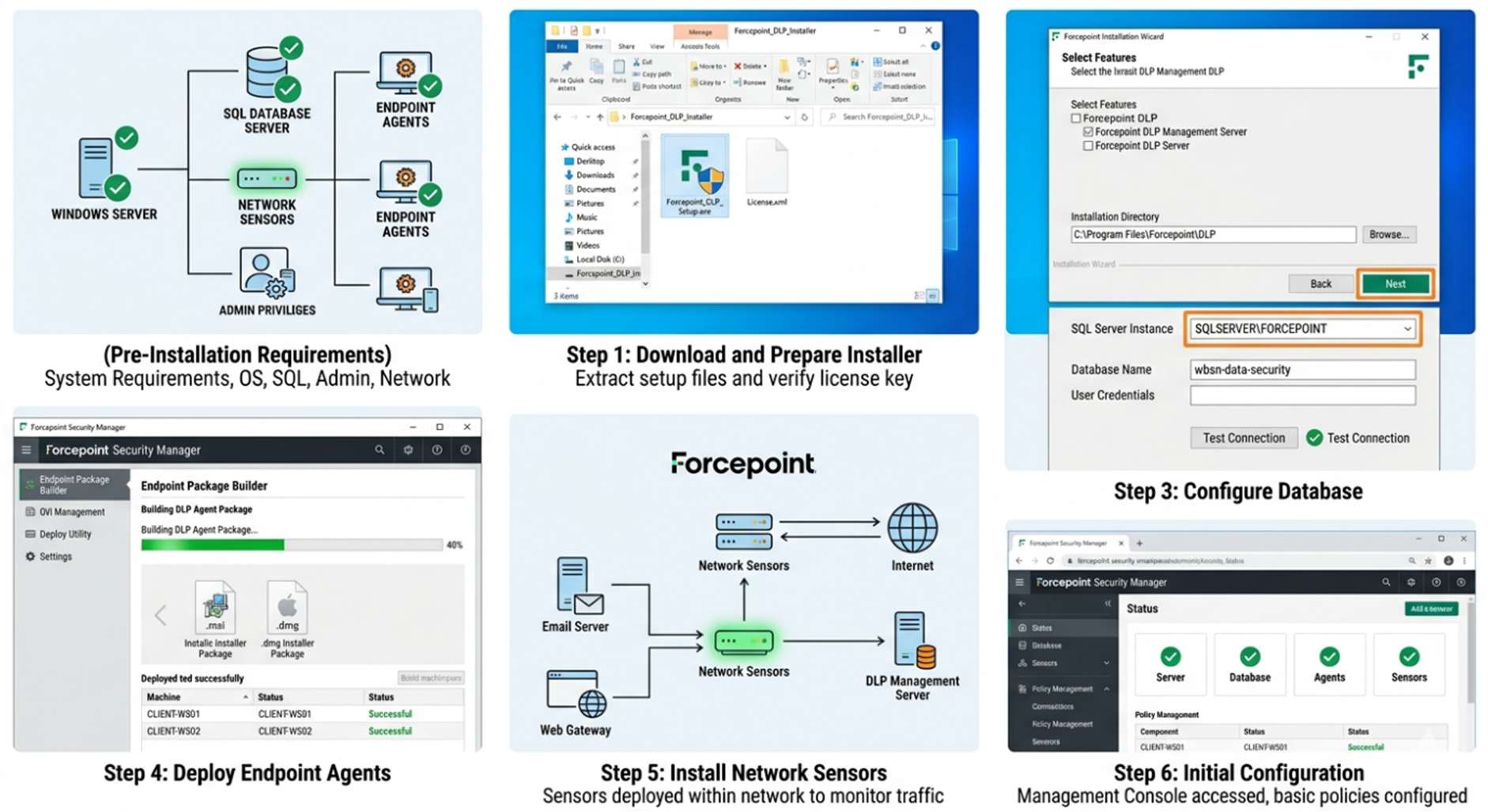
1. Pre-Installation Requirements
Before starting the installation, the following prerequisites must be ensured: System meets hardware and software requirements Windows Server or supported OS is installed SQL database server is ready Administrative privileges are available Network connectivity between components is established
- Installation Steps Step 1: Download and Prepare Installer Download Forcepoint DLP installer from the official website Verify installation files and licenses Extract setup files
Step 2: Install DLP Management Server Run the installer as administrator Select “DLP Manager” installation Configure installation directory Connect to SQL database Complete installation
Step 3: Configure Database Create database instance Assign user credentials Connect DLP server to database Verify database connectivity Step 4: Deploy Endpoint Agents Generate agent installation package Install agents on endpoint devices Configure communication with server Verify agent connectivity
Step 5: Install Network Sensors Deploy sensors within network Configure email/web monitoring Integrate with DLP server
Step 6: Initial Configuration Access management console Set administrator credentials Configure basic policies Enable logging and alerts
CLOUD SECURITY (MANDATORY)
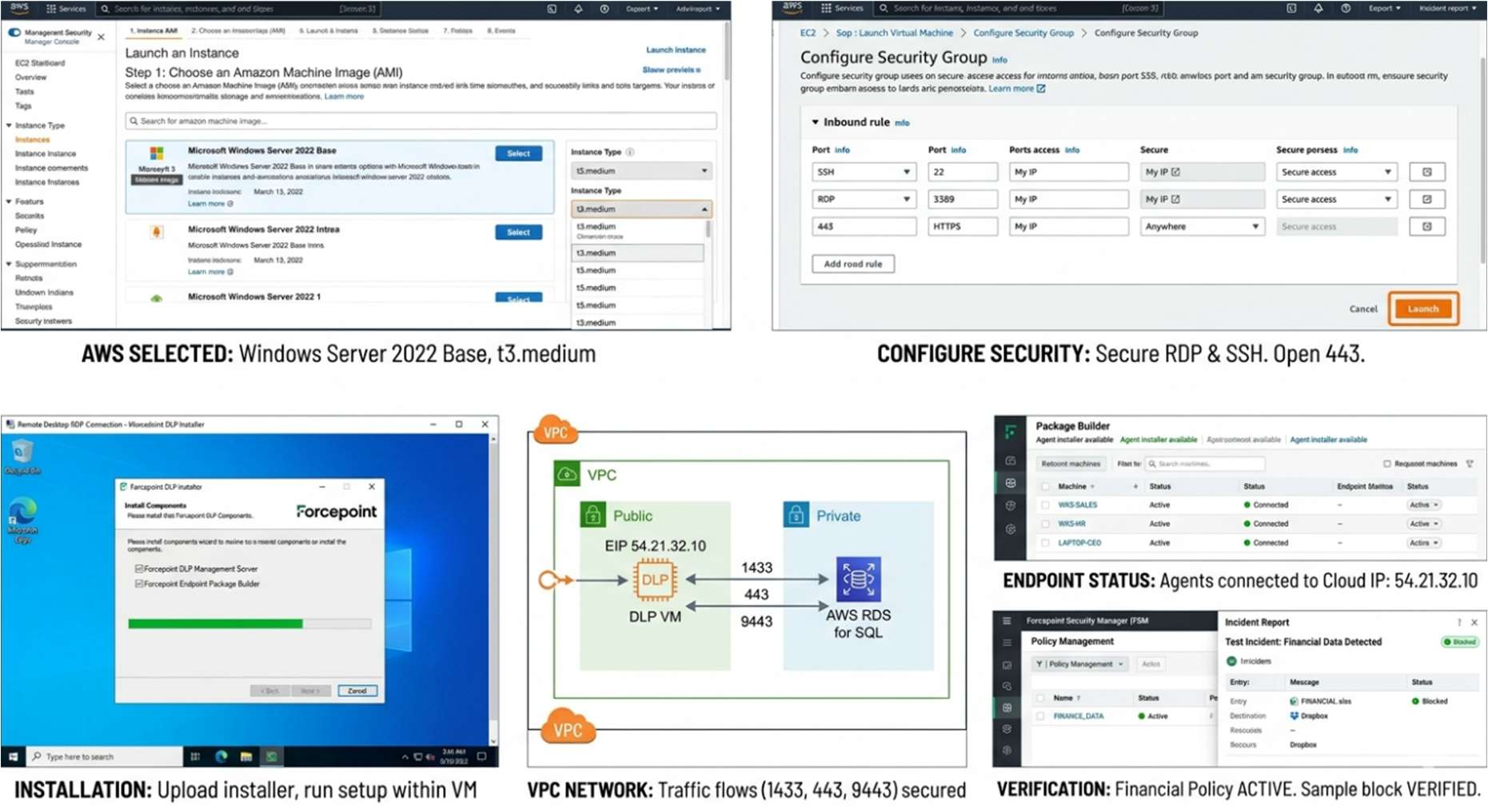
1.Cloud Provider Used: Choose cloud provider (AWS / Azure) Create virtual machine instance Select appropriate instance type (e.g., medium or large VM) Configure storage and network settings
2.Setup Steps (with explanation):
Step 1: Launch Virtual Machine Create VM with required OS Configure security groups and firewall Enable remote access (RDP/SSH)
Step 2: Install Forcepoint DLP Components Upload installer to VM Run installation process Configure database (local or cloud DB) Complete setup Step 3: Configure Networking Open required ports Configure communication between components Ensure secure connections
Step 4: Deploy Endpoint Agents Download agent package Install on remote systems Connect agents to cloud server
Step 5: Policy Setup and Testing Create DLP policies Test with sample data Verify detection and blocking
● Estimated Daily Cost: Cloud VM: ₹300 – ₹800 per day Storage and bandwidth charges extra Cost depends on usage and scale
CONFIGURATION
Basic Configuration Setup administrator account and login credentials Configure DLP Management Console access (URL, ports) Define basic security policies (e.g., blocking USB data transfer) Select predefined sensitive data types (PII, financial data, etc.) Assign policies to users, groups, or endpoints Enable logging and alert notifications Configure basic email/web monitoring rules Verify connectivity between server, agents, and sensors Advanced Configuration Create custom DLP policies using keywords, regex, and file fingerprinting Configure context-aware rules (based on user role, location, device) Enable user behaviour analytics for detecting insider threats Set risk levels and adaptive protection controls Configure OCR (Optical Character Recognition) for image-based data detection Define granular actions (allow, block, warn, justify, encrypt) Implement data classification labels and tagging Set automated incident response workflows Fine-tune policies to reduce false positives Integrations APIs REST APIs for automation and integration API-based data exchange with external security systems Support for custom scripts and automation tools Enables reporting, policy updates, and incident management via API
Third-party tools SIEM tools (e.g., Splunk, Q Radar) for centralized log analysis Email security gateways for monitoring email traffic Cloud platforms (AWS, Azure) for cloud-based deployment Identity and Access Management (IAM) tools Endpoint security tools (EDR/Antivirus solutions)
HANDS ON USAGE (PRACTICAL)
How to start tool?
Open the web browser on the system where Forcepoint DLP is installed
Enter the DLP Management Console URL (e.g., https://
The main function is defining what sensitive data to protect and where. Creating a Policy
- Navigate to Policy Management section in the dashboard
- Click on Create New Policy
- Enter policy name and description
- Select the type of sensitive data (e.g., financial data, personal data)
- Define rules using: a. Keywords b. Patterns (e.g., credit card format) c. File types
- Choose the action: a. Allow b. Block c. Warn user d. Alert admin
- Assign the policy to users, groups, or endpoints
- Save and activate the policy
Editing a Policy Go to Existing Policies list Select the required policy Click Edit Modify rules, conditions, or actions Save changes and reapply policy
Commands / UI actions Onboarding Devices: Go to Settings > Device onboarding to download the configuration package for Windows/macOS. Test-Drive: Use the Simulation Mode toggle at the end of the policy wizard. Update: Select an existing policy and click Edit policy to adjust sensitivity thresholds (e.g., changing "Confidence level" from 65% to 85% to reduce false positives).
Alerts
Alerts are generated when a policy violation occurs
Types of alerts:
o Data transfer blocked
o Unauthorized access attempt
o Suspicious user behavior
Alerts include details like:
o User name
o File name
o Time and action performed
Dashboard explanation Incident Summary: Shows total policy violations User Activity: Displays actions performed by users Risk Level Indicators: Highlights high-risk users or actions Reports Section: Provides detailed logs and analytics Alerts Panel: Displays real-time alerts
LAB SETUP (MANDATORY) Lab environment created: o A virtual lab environment was created using virtualization software (e.g., VMware / VirtualBox) o One system was configured as the Forcepoint DLP Server o Multiple virtual machines were used as endpoint devices (clients) o Network connectivity was established between server and endpoints o Test environment simulated a real organizational setup
Tools used:
o Test files containing sensitive data (credit card numbers, personal information)
o Email client (for testing email data transfer)
o Web browser (for uploading/downloading files)
o USB storage device (for data transfer testing)
o Optional: OWASP Juice Shop for testing data leakage scenarios
What was tested:
o Copying sensitive files to USB devices
o Sending confidential data through email attachments
o Uploading sensitive files to web/cloud platforms
o Downloading protected data from endpoints
o User behaviour scenarios (normal vs suspicious activity)
o Policy enforcement actions (allow, block, warn, alert)
Test Scenario Action Taken Result Log Entry Verified
Email CC
Info
External Send Blocked Yes (Alerts
Dashboard)
Teams Chat External Paste Message Removed Yes (Activity
Explorer)
USB Copy File Transfer Blocked w/ Toast
Notification
Yes (Endpoint DLP)
Override
Test
Justification
provided
Allowed with User
Justification
Yes (Includes user
note)
1. USE CASE MAPPING
Target Users Security Operations Teams (SOC Analysts): Monitor alerts, investigate incidents, and respond to potential data breaches IT Administrators: Configure and manage DLP policies, deploy agents, and maintain system performance Data Protection Officers (DPOs): Ensure that organizational data handling complies with regulatory requirements Compliance and Risk Management Teams: Track policy violations and generate reports for audits System and Network Administrators: Manage infrastructure and ensure secure communication between components Company Size Medium Enterprises: Suitable for organizations that are scaling and require structured data protection policies Large Enterprises: Highly effective for organizations with large volumes of sensitive data, multiple departments, and distributed users Multi-location Organizations: Ideal for companies operating across different geographic locations with centralized security control Not commonly used by small businesses due to higher cost and configuration complexity Industry Finance & Banking: Protect sensitive financial data such as account details, transactions, and credit card information Healthcare: Secure patient records, medical reports, and confidential health data IT & Software Companies: Prevent leakage of source code, project data, and intellectual property Government & Defense: Safeguard classified information and sensitive internal communications E-commerce & Retail: Protect customer personal details, payment information, and transaction data
1. PRICING & SUBSCRIPTION MODEL
Pricing Type Forcepoint DLP follows a subscription-based pricing model, where organizations pay annually or on a multi-year basis It also supports license-based pricing for enterprise customers who prefer long-term deployment contracts There is no freemium or free-tier version, as it is designed primarily for enterprise use Pricing is typically customized based on factors such as number of users, endpoints, features required, and deployment model
Plans Available Free: Not available (no trial version in most cases, but demos may be provided by the vendor) Paid: Available with multiple enterprise-grade plans o Basic plans include core DLP features o Advanced plans include user behavior analytics, OCR, cloud protection, and integrations o Enterprise plans include full feature access, priority support, and scalability options
2. BILLING MODEL
Per Endpoint: Most common model, where cost depends on the number of devices
protected
Per User: Pricing based on number of employees/users accessing the system
Per Asset/Data Volume: Used in large-scale enterprise deployments
Custom Licensing: Organizations can negotiate pricing based on requirements,
infrastructure, and usage
- COST ESTIMATION (Standard 2026 Rates) Small Company: ₹2 – ₹5 lakhs per year Covers limited endpoints and basic policy enforcement Suitable for organizations with minimal data protection needs Medium Company: ₹10 – ₹20 lakhs per year Includes advanced features like behavior analytics and cloud monitoring Supports multiple departments and users Enterprise: ₹50 lakhs+ per year Full-scale deployment across multiple locations Includes all advanced features, integrations, and dedicated support
FREE vs. PAID COMPARISON
Key Differences Feature Free / Demo Version Paid Version
Availability No full free version; only demo or
trial access via vendor
Fully available with subscription
or license
Access Level Limited testing environment Full enterprise-level access
Data Protection
Features
Basic or restricted features Complete DLP protection
(endpoint, network, cloud)
Policy Creation Limited or predefined policies only Fully customizable and advanced
policies
Detection
Capability
Basic pattern matching Advanced detection (AI, OCR,
behavior analytics)
Monitoring Limited visibility Real-time monitoring across all
data channels
Alerts &
Reporting
Basic alerts with minimal details Detailed alerts, reports, and
analytics dashboard
Integrations Limited or not available Full integration with SIEM, APIs,
and cloud services
Scalability Not scalable for real use Highly scalable for enterprise
environments
Support Limited or no technical support Full support, updates, and
maintenance
COMPETITOR ANALYSIS
Tool Overview Strengths Weaknesses Best Use Case
Microsoft
Purview
Cloud-based
DLP integrated
with Microsoft
365
Easy to use, strong
integration with
Teams, OneDrive,
SharePoint
Limited outside
Microsoft
ecosystem
Organizations
using Microsoft
365
Symantec
DLP
Enterprise-grade
DLP with deep
policy control
Very detailed
policies, strong
data protection
Complex setup,
high maintenance
Large enterprises
with strict
compliance
Digital
Guardian
DLP
Endpoint-
focused DLP
solution
Strong endpoint
visibility, managed
services
Less focus on
network/cloud
Endpoint-heavy
organizations
Netskope
DLP
Cloud-native
DLP platform
Excellent for SaaS
and cloud apps,
scalable
Limited on-
premise support
Cloud-first
companies
Forcepoint
DLP
Multi-channel
DLP (endpoint,
network, cloud)
Risk-adaptive
policies, behaviour
analytics, full
coverage
Complex
configuration,
expensive
Hybrid enterprise
environments
1. ADVANTAGES & DISADVANTAGES
Advantages
Provides comprehensive data protection across endpoints, networks, and cloud
environments
Uses advanced detection techniques like pattern matching, OCR, and behavior analysis
Supports context-aware policies based on user role, device, and location
Helps prevent insider threats and accidental data leaks
Offers real-time monitoring and alerts for quick response
Ensures compliance with regulations like GDPR, HIPAA, and PCI-DSS
Provides centralized management dashboard for easy monitoring and control
Supports flexible deployment (on-premise, cloud, hybrid)
Enables integration with other security tools like SIEM and cloud platforms
Disadvantages
High cost, making it less suitable for small businesses
Complex configuration and setup, requires skilled administrators
May generate false positives if policies are not properly tuned
Resource-intensive, requires good hardware for large deployments
Steep learning curve for beginners
Dependency on proper policy design and maintenance
Integration and deployment may be time-consuming in large environments
1. ISSUES & TROUBLESHOOTING
Issues Faced
Difficulty in initial setup and configuration of DLP components
Endpoint agents not connecting properly to the DLP server
Delays in policy enforcement or detection
High number of false positives during early deployment
Network latency affecting real-time monitoring
Complexity in integrating with third-party tools
Common Errors
Database connection failure during installation
Agent communication errors (agent not reporting to server)
Policy misconfiguration leading to incorrect actions
Service not starting due to port conflicts
Authentication/login issues in management console
Incomplete data logs or missing alerts
Fixes
Verify database credentials and ensure proper configuration
Check network connectivity and firewall settings between components
Restart services and re-sync endpoint agents
Fine-tune policies to reduce false positives
Ensure correct port configuration and avoid conflicts
Update software to latest version for bug fixes
Reinstall agents if communication issues persist
Common Mistakes
Creating overly strict policies that block normal user activities
Not testing policies before deploying in production
Ignoring system requirements leading to performance issues
Misconfiguring network ports and firewall rules
Not monitoring logs and alerts regularly
Skipping regular updates and maintenance
Lack of proper training for administrators
If you want, I can next give:
SECURITY & COMPLIANCE
Data Handling
Sensitive data is continuously monitored across endpoints, network, and cloud
Data is inspected using content analysis, pattern matching, and classification rules
Supports encryption and secure data transfer mechanisms
Access to sensitive data is controlled based on user roles and policies
Prevents unauthorized sharing, copying, or transmission of confidential information
Log Storage
All activities, alerts, and policy violations are recorded in a centralized logging system
Logs include details such as user actions, timestamps, file names, and policy triggered
Stored securely in databases for auditing and analysis
Supports log retention policies for long-term storage
Logs can be integrated with SIEM tools for advanced monitoring and reporting
Compliance Support
Supports major regulatory standards such as:
GDPR (General Data Protection Regulation)
HIPAA (Health Insurance Portability and Accountability Act)
PCI-DSS (Payment Card Industry Data Security Standard)
Helps organizations enforce data protection policies required for compliance
Provides audit reports and evidence for regulatory checks
Enables tracking and monitoring of sensitive data usage for compliance verification
SCALABILITY & PERFORMANCE
● Can it scale?
Yes, Forcepoint DLP is highly scalable
Supports small to large enterprise environments
Can handle increasing number of users, endpoints, and data volume
Supports distributed deployment for large organizations
Easily expandable with additional servers and storage
● Performance Observations:
Provides real-time data monitoring and policy enforcement
Performance depends on system resources (CPU, RAM, network)
Works efficiently when properly configured and optimized
May experience slight delays in large-scale environments without tuning
Endpoint agents are lightweight and do not heavily impact user systems
● Enterprise Readiness:
Designed for enterprise-level data protection
Supports multi-location and global deployments
Provides centralized management and reporting
Integrates with other enterprise security tools
Suitable for organizations with high security and compliance requirements
DEPLOYMENT SOP
- Requirement Checklist
Identify and categorize sensitive data such as personal information, financial records, and
confidential business documents
Determine the number of users, endpoints, and departments that need protection
Evaluate existing IT infrastructure, including servers, network capacity, and storage
Define compliance requirements such as GDPR, HIPAA, or PCI-DSS
Assess risks related to data leakage and insider threats
Ensure availability of required hardware, software, and licenses before deployment
- Architecture Selection
Choose appropriate deployment model (On-premise, Cloud, or Hybrid) based on
business needs
Decide whether to use agent-based, agentless, or combined approach
Plan placement of DLP components such as management server, database, endpoint
agents, and network sensors
Design network architecture to ensure smooth communication between components
Consider scalability and future expansion requirements during planning
- Installation Steps
Install the DLP Management Server on a dedicated system
Configure and connect the SQL database for storing logs and policies
Deploy endpoint agents on all user systems for monitoring data usage
Install and configure network sensors to monitor email, web, and file transfers
Ensure proper communication between all components through network configuration
- Configuration Steps
Create and define DLP policies based on organizational security requirements
Configure sensitive data detection methods such as keywords, patterns, and classification
rules
Assign policies to specific users, departments, or devices
Set actions for policy violations (allow, block, warn, alert)
Configure alerts, notifications, and reporting settings
Integrate with other security tools if required
- Validation Checklist
Test the system using sample sensitive data to ensure proper detection
Verify that policies are correctly enforced across endpoints and network
Check agent connectivity and ensure all components are functioning properly
Confirm that logs, alerts, and reports are being generated accurately
Validate compliance requirements and security controls
- Reporting Setup
Configure dashboards to monitor real-time incidents and system status
Set up automated report generation (daily, weekly, monthly)
Customize reports based on user activity, policy violations, and risk levels
Integrate logs with SIEM tools for advanced analysis
Enable alert notifications for quick response to incidents
- Client Handover Process
Provide complete documentation including architecture diagrams and configuration
details
Train administrators and security teams on using the DLP system
Share secure access credentials and user roles
Explain policy creation, monitoring, and incident response procedures
Provide guidelines for maintenance, updates, and troubleshooting
Offer ongoing support and ensure smooth transition to operational use