1. TOOL OVERVIEW
- CrowdStrike Falcon is a cloud native cybersecurity platform that provides advanced endpoint protection, threat detection, and real-time response capabilities.
- CrowdStrike Falcon is designed to protect computers and networks from cyber threats by monitoring endpoints such as; laptops, desktops, and servers for suspicious activity. It is primarily an endpoint detection and response (EDR) tool, but it also integrates next- generation antivirus (NGAV), extended detection and response (XDR), and managed threat hunting services. Falcon operates through a lightweight falcon sensor installed on endpoints, which continuously collects telemetry data including file executions, process launches, registry changes and network communications.
2. HOW THE TOOL WORKS (TECHNICAL)
CrowdStrike Falcon is designed as a true cloud-native cybersecurity platform , meaning all heavy computation, analytics, and intelligence processing occur in a centralized cloud environment rather than on local systems. This architecture follows a Software-as-a-Service (SaaS) model, allowing organizations to deploy security rapidly without managing infrastructure such as servers, databases, or update mechanisms.
The Falcon platform uses a multi-tenant cloud architecture , where a single cloud instance securely serves multiple customers while maintaining strict data isolation. This design ensures high scalability, elasticity, and performance , enabling the system to process trillions of security events daily. Additionally, the architecture supports real-time updates , meaning threat intelligence and detection capabilities are continuously improved without requiring manual intervention or signature downloads on endpoints.
- Working mechanism:
The Falcon Sensor acts as the core operational component of the platform and is installed on endpoints such as desktops, laptops, and servers. It is designed to be extremely lightweight, consuming minimal CPU, memory, and disk resources while continuously monitoring system activity.
The working mechanism begins with real-time telemetry collection , where the sensor observes and records detailed system behaviour, including process execution chains, DLL injections, command-line arguments, file integrity changes, registry modifications, and network traffic patterns. Unlike traditional antivirus systems that depend primarily on static signatures, Falcon leverages behavioural detection techniques , focusing on how processes behave rather than what they look like.
The sensor incorporates on-device machine learning models that can instantly detect known malicious patterns and suspicious behaviours. For example, if a process attempts privilege escalation or executes a suspicious script in memory (fileless attack), the sensor can immediately block the action. This ensures real-time prevention even before cloud analysis occurs.
Simultaneously, the sensor communicates with the cloud backend, sending enriched telemetry for deeper inspection. It also receives policy updates, detection rules, and response instructions from the cloud, ensuring that endpoints remain aligned with the latest security posture.
- Core Architecture Components:
The Falcon architecture is composed of several tightly integrated components that work together seamlessly.
1. Falcon Sensor (Data Collection & Enforcement Layer)
This component resides on endpoints and serves as both a data collector and enforcement mechanism. It captures detailed system activity and executes response actions such as process termination, file quarantine, and network containment.
2. Falcon Cloud Platform (Processing & Analytics Layer)
The cloud platform acts as the central brain of the system. It ingests telemetry data from millions of endpoints and processes it using distributed computing systems. It performs:
- Event correlation across endpoints
- Behavioural pattern recognition
- Attack chain reconstruction
- Long-term data storage for forensic analysis
3. Threat Graph Database
A unique feature of Falcon is its Threat Graph , a massive, continuously updated graph database that stores relationships between events, processes, and indicators. This enables rapid detection of attack patterns by connecting seemingly unrelated events into a coherent threat narrative.
4. AI & Machine Learning Engine
The platform uses multiple machine learning models trained on vast datasets to detect anomalies and predict malicious intent. These models operate both:
- Locally (on sensor) for immediate detection
- In the cloud for deep analysis and correlation
5. Intelligence Layer
Falcon integrates global threat intelligence collected from millions of sensors worldwide. This includes:
- Indicators of Compromise (IOCs)
- Indicators of Attack (IOAs)
- Adversary tactics, techniques, and procedures (TTPs)
- Detailed Data Flow Explanation:
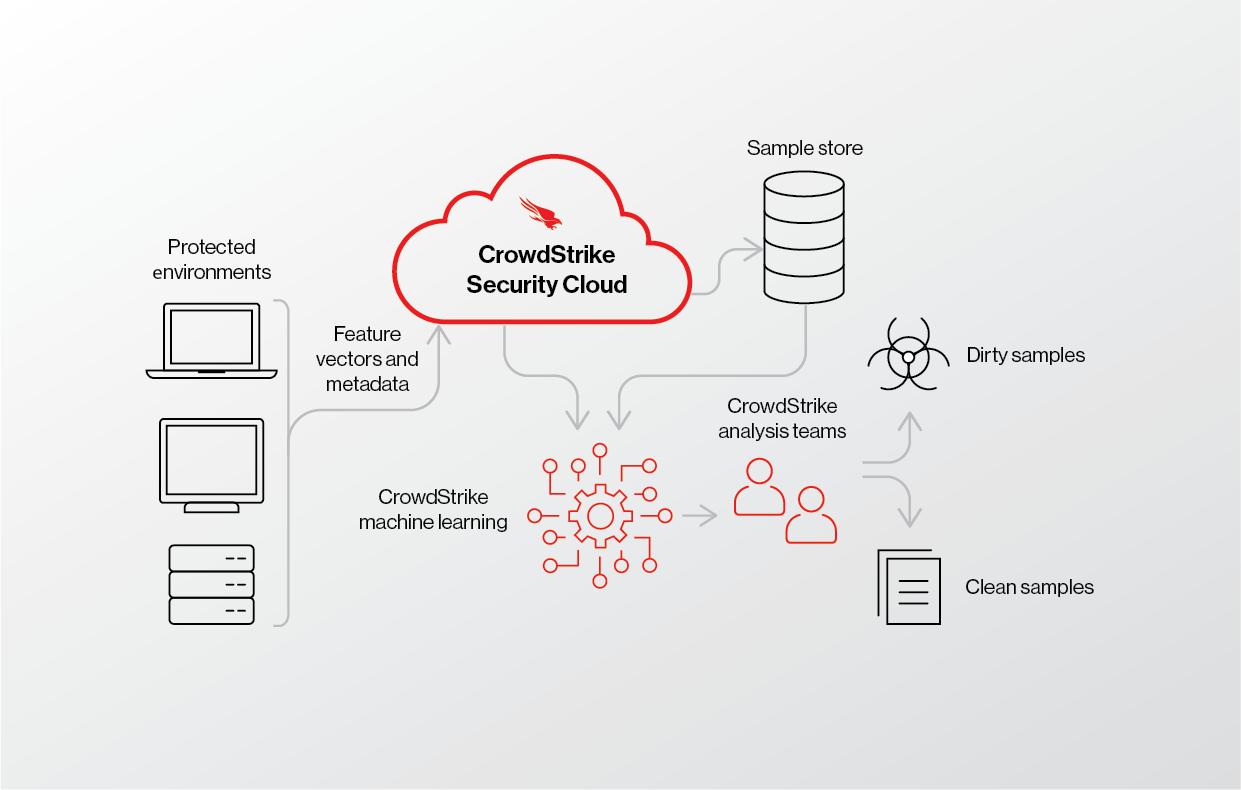
The data flow in Falcon follows a continuous and intelligent pipeline :
Step 1: Data Collection at Endpoint
The Falcon Sensor captures raw telemetry data, including system calls, process metadata, user actions, and network activity. This data provides a comprehensive view of endpoint behaviour.
Step 2: Local Preprocessing and Filtering
To optimize performance and bandwidth, the sensor filters irrelevant data and compresses important telemetry. It prioritizes events that are more likely to indicate malicious activity.
Step 3: Secure Transmission to Cloud
The processed telemetry is transmitted to the Falcon Cloud using encrypted communication channels , ensuring data confidentiality and integrity.
Step 4: Data Ingestion and Normalization
The cloud platform ingests incoming data streams and normalizes them into a structured format for analysis. This step ensures consistency across different endpoint types and operating systems.
Step 5: Advanced Analytics and Correlation
The data is analysed using:
- Machine learning algorithms
- Behavioural analytics
- Threat intelligence feeds
- Threat Graph correlation
This enables the system to identify complex, multi-stage attacks that may not be visible from a single event.
Step 6: Detection and Classification
Each activity is classified as:
- Benign
- Suspicious
- Malicious
The system assigns severity levels and generates alerts accordingly.
Step 7: Automated Response
Based on predefined policies, Falcon can automatically:
- Kill malicious processes
- Quarantine infected files
- Isolate endpoints from the network
- Block command-and-control communication
Step 8: Feedback Loop and Continuous Learning
The results of detection and response are fed back into the system, improving machine learning models and enhancing future threat detection across all customers globally.
- Types of Falcon Capabilities:
The Falcon platform offers a wide range of security capabilities through modular services:
1. Next-Generation Antivirus (NGAV)
Provides signature-less malware detection using AI and behavioural analysis, ensuring protection against both known and unknown threats.
2. Endpoint Detection and Response (EDR)
Offers deep visibility into endpoint activities, enabling security teams to investigate incidents, perform root cause analysis, and respond effectively.
3. Managed Threat Hunting (Overwatch)
A proactive threat hunting service where security experts continuously monitor environments to detect hidden threats.
4. Threat Intelligence
Delivers real-time insights into emerging threats, adversary behaviour, and global attack trends.
5. Cloud Workload Protection
Extends security to cloud environments, protecting virtual machines, containers, and workloads.
6. Extended Detection and Response (XDR)
Integrates data from multiple sources such as endpoints, identity systems, and cloud platforms to provide unified threat detection and response
3. FEATURES & CAPABILITIES
• Core Features
1. Endpoint Security
CrowdStrike Falcon provides comprehensive endpoint protection against a wide range of cyber threats, including malware, ransomware, exploits, and fileless attacks. Unlike traditional antivirus solutions that rely on signature-based detection, Falcon uses behavioural analysis and Indicators of Attack (IOAs) to detect suspicious activities. This allows it to identify threats even when no known signature exists. The lightweight Falcon Sensor ensures that security operations run efficiently in the background without causing noticeable system slowdowns, making it suitable for enterprise environments with performance-sensitive workloads.
2. Real-Time Threat Detection
One of the most critical features of Falcon is its ability to perform continuous real-time monitoring of endpoint activities. The sensor tracks process execution, file changes, network communication, and user behaviour. By applying machine learning and behavioural analytics , Falcon can detect abnormal patterns such as privilege escalation, lateral movement, or command-and-control communication. This enables the
system to prevent attacks at an early stage , often before they fully execute, thereby reducing potential damage.
3. AI – Native Architecture
Falcon is built on an AI-native architecture , meaning artificial intelligence is embedded at every layer of the platform. Machine learning models are used to analyse vast amounts of telemetry data and identify patterns associated with malicious activity. This AI-driven approach enables:
- Automated threat detection
- Intelligent prioritization of alerts
- Faster incident response As a result, security teams can focus on high-priority threats instead of being overwhelmed by large volumes of alerts. 4. Next-Gen Identity Security
Falcon extends its protection beyond endpoints to include identity security , which is a critical component in modern cyberattacks. It monitors identity-related activities such as login attempts, credential usage, and privilege escalation. By correlating identity data with endpoint and cloud telemetry, Falcon can detect identity-based attacks such as credential theft, brute-force attacks, and unauthorized access attempts. This ensures protection across the entire attack lifecycle.
5. Cloud Security
Falcon provides comprehensive cloud security through both agent-based and agentless approaches. It protects cloud workloads, virtual machines, and containers across platforms such as AWS and Azure. The platform offers visibility into misconfigurations, vulnerabilities, and runtime threats in cloud environments. By integrating cloud telemetry with endpoint data, Falcon delivers unified security monitoring , enabling organizations to secure hybrid and multi-cloud infrastructures effectively.
- Advanced Features 1. Threat Graph & Behavioural Correlation
A key advanced capability of Falcon is its Threat Graph , which correlates billions of security events in real time. This graph-based system connects processes, users, and
events to identify complex attack patterns. It enables detection of multi-stage attacks that would otherwise go unnoticed when analysing individual events in isolation.
2. Endpoint Detection and Response (EDR)
Falcon’s EDR capability provides deep visibility into endpoint activity , allowing security teams to investigate incidents in detail. It records process trees, execution timelines, and attack paths, enabling analysts to perform root cause analysis. This feature is essential for identifying how an attack started, how it spread, and how to prevent similar incidents in the future.
3. Managed threat Hunting (Overwatch)
Falcon includes a managed threat hunting service known as Overwatch, where security experts proactively search for hidden threats within the environment. This combines human intelligence with AI-driven analytics , ensuring that even stealthy attacks are detected early.
4. Extended Detection and Response (XDR)
Falcon’s XDR capability integrates data from multiple sources, including endpoints, cloud workloads, and identity systems. This unified approach allows for cross-domain threat detection , improving visibility and enabling faster response to complex attacks that span multiple environments.
5. Threat Intelligence Integration
Falcon leverages global threat intelligence collected from millions of endpoints worldwide. This intelligence includes attacker techniques, malware signatures, and behavioural indicators. By continuously updating its knowledge base, Falcon ensures that organizations are protected against emerging and evolving threats.
6. Automated Response and Remediation
Falcon supports automated response actions such as:
- Killing malicious processes
- Quarantining files
- Isolating infected endpoints
- Blocking malicious IP addresses
This automation reduces response time and minimizes the impact of security incidents
- Limitations 1. Dependence on Cloud Connectivity
Since Falcon is a cloud-native platform, it relies heavily on internet connectivity for full functionality. While the sensor can perform some local detection, advanced analytics and threat intelligence require communication with the cloud. In environments with limited or unstable connectivity, performance may be affected.
2. Complexity for Beginners
Falcon provides a wide range of advanced features, which can make it complex for new users or small teams. Understanding dashboards, alerts, and investigation workflows may require training and experience, especially for organizations without a dedicated security operations team.
3. Cost Considerations
As a premium enterprise solution, Falcon can be relatively expensive , particularly for small and medium-sized organizations. Licensing is typically modular, meaning additional features such as threat intelligence or identity protection may increase overall costs.
4. Alert Volume and False Positives
Although Falcon uses AI to reduce noise, organizations may still experience high alert volumes , especially in large environments. Some alerts may require manual validation, which can contribute to analyst fatigue if not properly managed.
5. Limited Offline Capabilities
While the Falcon Sensor can operate independently to some extent, its full capabilities depend on cloud interaction. Offline environments may not benefit from real-time updates, global intelligence, or centralized visibility.
4. DEPLOYMENT MODELS
• Supported environments:
1. Supported Operating System Environment
CrowdStrike Falcon is designed to operate across a wide range of operating systems, ensuring comprehensive endpoint protection in diverse IT environments. It supports major platforms such as Windows, macOS, and Linux , including both client and server editions. On Windows systems, Falcon provides deep visibility into registry activities, PowerShell execution, and system processes. On Linux systems, it monitors kernel-level activities and process behaviours, while on macOS, it ensures protection against modern threats targeting Apple environments. This cross-platform compatibility allows organizations to maintain a unified security posture across heterogeneous environments without requiring multiple security tools.
2. Supported Cloud Environments
Falcon is highly optimized for cloud environments and supports major cloud platforms such as Amazon Web Services (AWS), Microsoft Azure, and Google Cloud Platform (GCP). It provides visibility into cloud workloads, virtual machines, and containers, enabling organizations to secure dynamic and scalable infrastructures. By integrating with cloud APIs, Falcon can detect misconfigurations, monitor runtime behaviour, and identify threats within cloud-native applications. This ensures that organizations adopting cloud computing can maintain strong security controls while benefiting from cloud scalability and flexibility.
3. On-Premises and Hybrid Environments
Although Falcon is a cloud-native platform, it fully supports on-premises infrastructure and hybrid environments. Organizations with traditional data centres can deploy Falcon sensors on physical servers and internal systems while simultaneously protecting cloud workloads. In hybrid setups, Falcon provides centralized visibility and control across both environments, enabling seamless monitoring and threat detection. This capability is particularly important for enterprises transitioning from legacy systems to cloud-based infrastructures, as it ensures consistent security during the migration process.
4. Supported Endpoint Types
Falcon supports a wide range of endpoint types, including:
- Desktops and laptops
- Servers (physical and virtual)
- Cloud workloads
- Containers (e.g., Kubernetes environments) This broad coverage ensures that all critical assets within an organization are protected. The Falcon Sensor adapts to each endpoint type, providing tailored monitoring and protection based on the specific environment.
- Deployment Types: 1. Agent Based Deployment
The primary deployment method for Falcon is agent-based deployment , where the Falcon Sensor is installed on endpoints. This lightweight agent continuously monitors system activity and communicates with the cloud platform. It provides real-time detection, prevention, and response capabilities directly on the endpoint. Agent-based deployment is highly effective because it offers deep visibility and control , enabling immediate response to threats without relying solely on cloud analysis.
2. Agentless Deployment
Falcon also supports agentless deployment , particularly for cloud environments. In this approach, Falcon integrates directly with cloud provider APIs to monitor workloads without installing an agent on each instance. This is useful for:
- Temporary or ephemeral workloads
- Containerized environments
- Large-scale cloud infrastructures Agentless deployment provides rapid visibility and compliance monitoring , although it may not offer the same level of deep endpoint control as agent-based deployment. 3. Hybrid Deployment Model
A hybrid deployment model combines both agent-based and agentless approaches. Organizations can deploy Falcon Sensors on critical endpoints while using agentless methods for cloud resources. This approach ensures comprehensive coverage across different environments while optimizing performance and resource utilization. Hybrid deployment is
ideal for organizations with complex infrastructures that include both on-premises systems and cloud platforms
5. SYSTEM REQUIREMENTS
OS: - Supports Windows ( 10,11 , Server Version) - Support macOS (Latest Version) - Support Linux ( Ubuntu, RHEL, CentOS, Amazon Linux, etc.) - Works on both desktop and server system
CPU: - Minimum 1 GHz processor ( Intel/AMD ) - Very Low CPU usage (Lightweight agent) - Suitable for both normal PCs and high-performance servers
RAM: - Minimum 2GB RAM - Uses very less memory during normal operation - No major performance impact on system
Storage: - Requires very small disk space (approx. 100-500 MB) - No large signature database stored locally - Most data stored and processed in the cloud
Network requirements: - Requires stable internet connection - Uses secure ( encrypted ) communication with cloud - Low bandwidth usage (only sends important data) - Needed for: Real Time updates, Threat detection and Cloud Analysis
6. INSTALLATION & SETUP
-
Local Setup (MANDATORY)
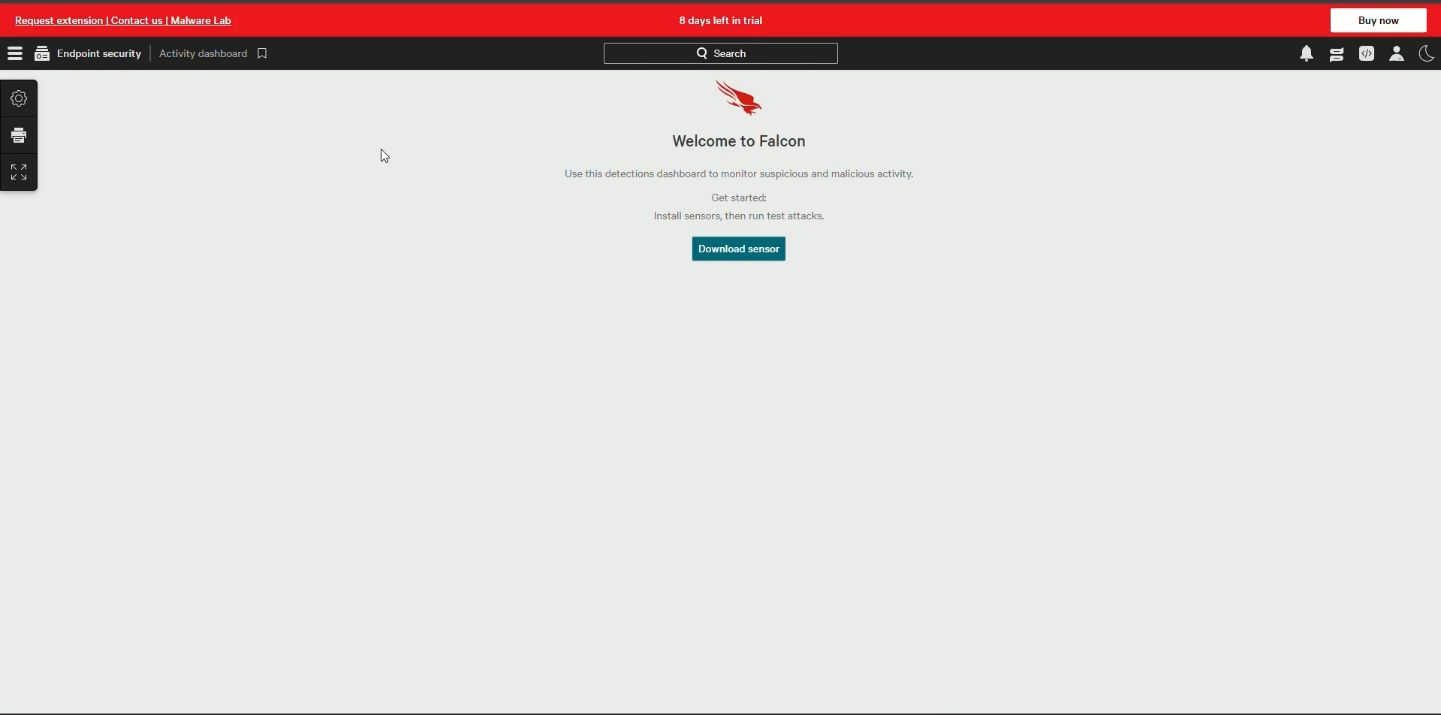
- After signing in, you’ll get a page where “Download sensor” button appears
-
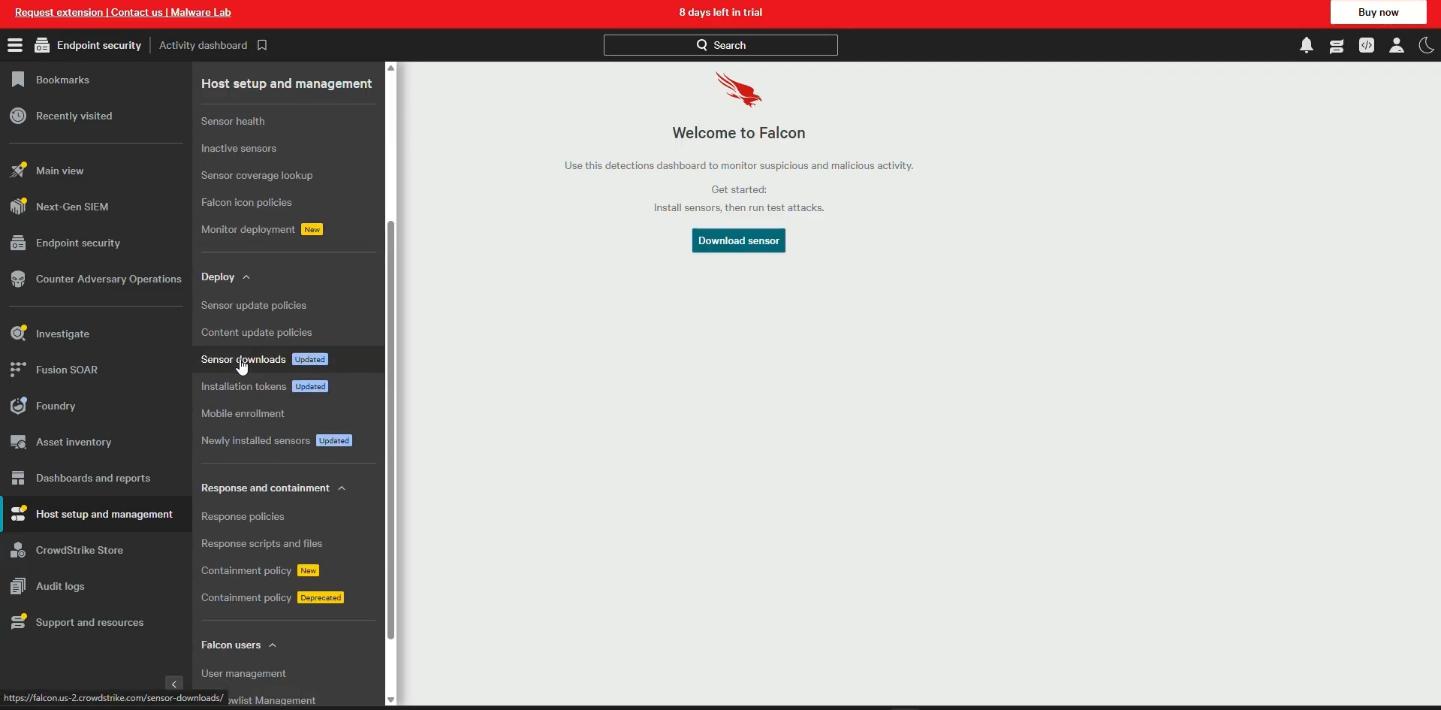
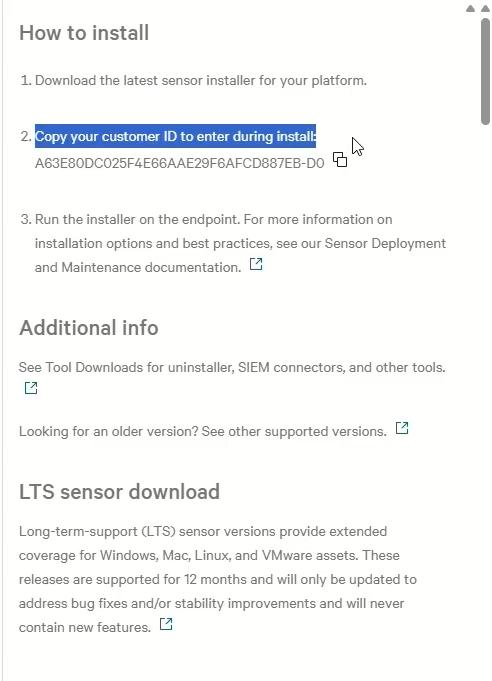
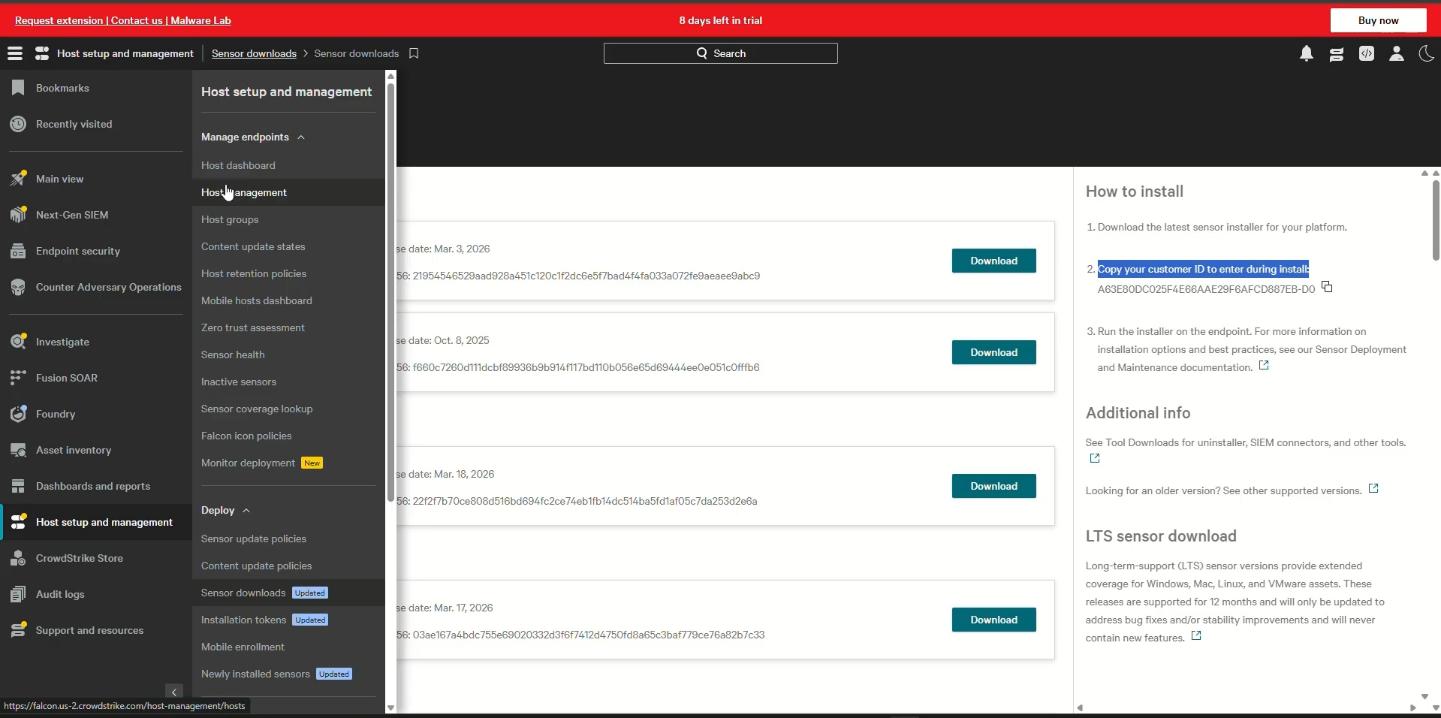
You have to open menu option in top left corner, select host setup and management and select sensor download
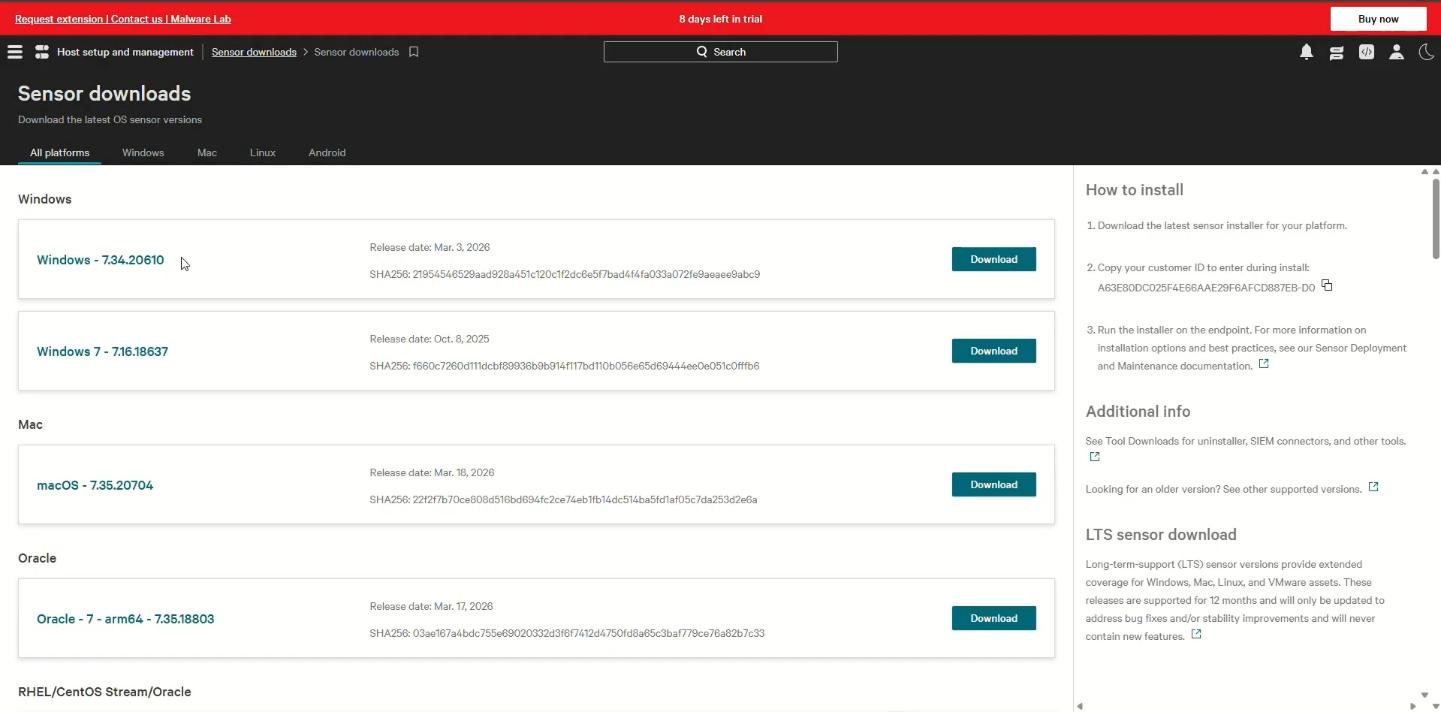
- You’ll get options to download with your specifications.
- Make sure to copy the customer ID on right side of it.
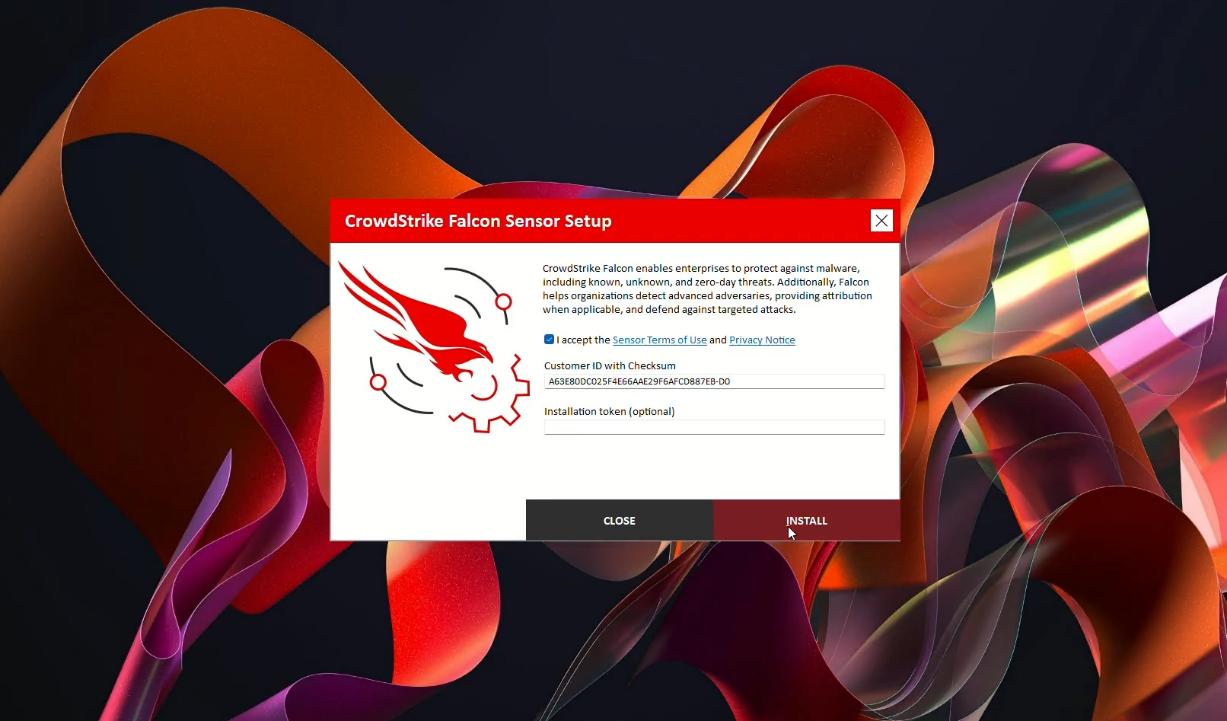
- In that downloaded sensor you have to paste it customer ID section
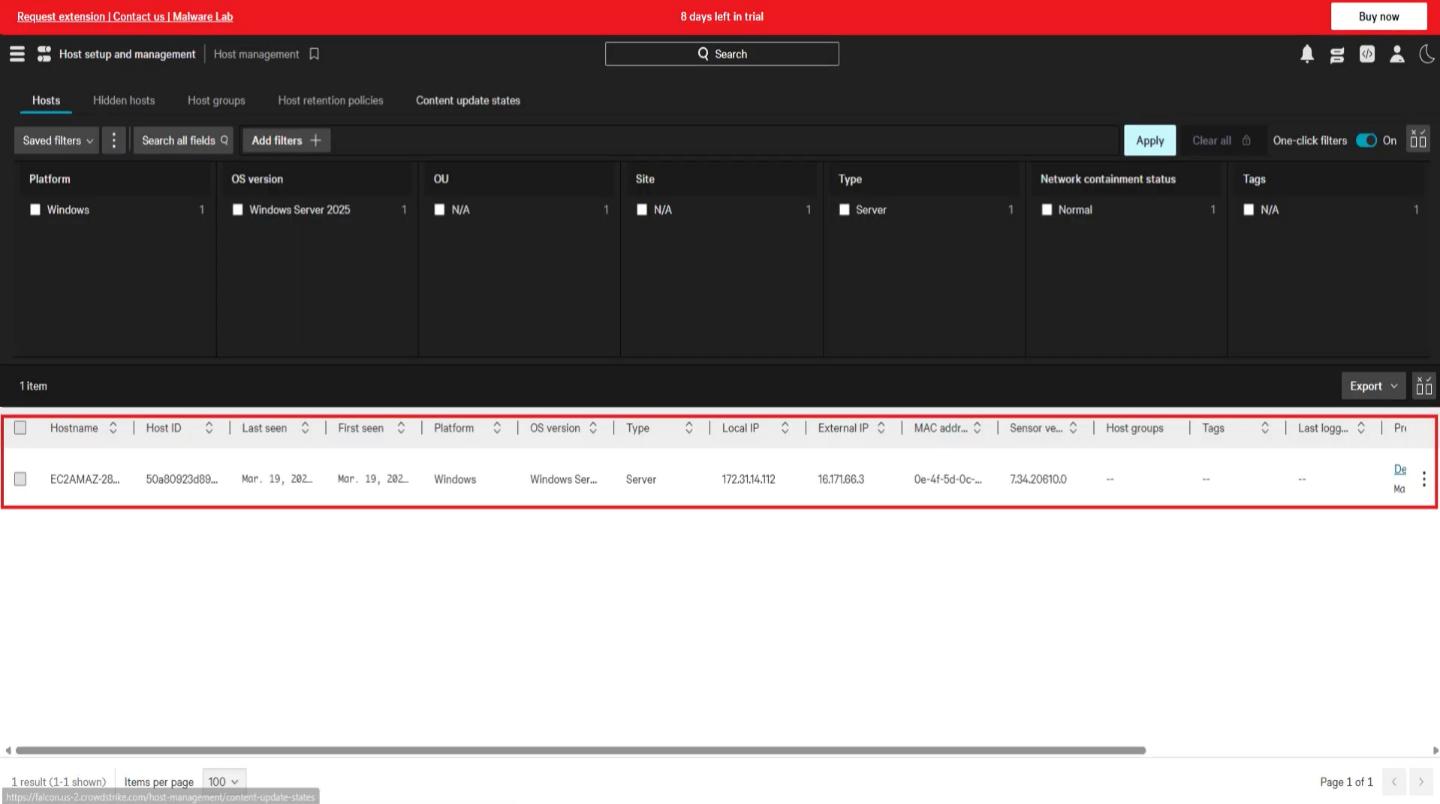
- After that open same menu after the installation, you’ll find an option called host setup and management. In that select host management an you’ll able to find the installation is done or not.
7. CONFIGURATION
• Basic Configuration:
1. System Readiness and Requirement Verification
The first step in the basic configuration of Falcon involves ensuring that all endpoints meet the minimum system requirements. This includes verifying supported operating systems such as Windows, macOS, and Linux, along with adequate CPU, RAM, and storage availability. Additionally, endpoints must have a stable internet connection to communicate with the Falcon Cloud. Performing this readiness check helps prevent installation issues and ensures that the Falcon Sensor operates efficiently without impacting system performance.
2. Network Configuration and Connectivity Setup
Since Falcon operates on a cloud-native architecture, proper network configuration is essential. Organizations must configure firewalls, proxies, and DNS settings to allow secure outbound communication to CrowdStrike cloud servers. This ensures that telemetry data collected by endpoints is transmitted without interruption. Network configuration also enables real-time updates, policy synchronization, and threat intelligence sharing between endpoints and the cloud platform. Without proper connectivity, the effectiveness of Falcon’s detection and response capabilities may be reduced.
3. Falcon Sensor Installation
The next step involves installing the Falcon Sensor , which is the lightweight agent deployed on endpoints. The installation process can be performed manually using installation packages or through simple scripts. During installation, a Customer ID (CID) is required to associate the sensor with the organization’s Falcon console. Once installed, the sensor runs silently in the background, continuously monitoring endpoint activity and enforcing security policies.
4. Initial Policy Application
After installation, endpoints automatically register with the Falcon Cloud, and default security policies are applied. These policies enable basic protection features such as malware detection, behavioural monitoring, and alert generation. Administrators can review and adjust these policies as needed, but the default configuration provides immediate baseline security.
This ensures that endpoints are protected from common threats right from the initial deployment stage.
5. Verification and Monitoring
The final step in basic configuration is verifying that all endpoints are successfully onboarded and functioning correctly. Administrators can use the Falcon console to check device status, review telemetry data, and monitor alerts. This step confirms that the system is properly configured and ready for further customization in advanced stages.
- Advanced Configuration: 1. Enterprise-Scale Deployment Automation
In advanced configuration, organizations move from manual installation to automated deployment across the enterprise. Tools such as Active Directory, Microsoft SCCM, and MDM solutions are used to deploy the Falcon Sensor to thousands of endpoints simultaneously. This ensures consistency, reduces manual effort, and speeds up large-scale deployment.
2. Policy Customization and Fine Tuning
Advanced configuration involves customizing security policies based on organizational requirements. Administrators can define prevention rules, detection thresholds, and automated response actions. For example, policies can be configured to block specific types of malwares, detect suspicious behaviours, or isolate compromised endpoints. Fine-tuning these policies helps reduce false positives while maintaining strong security.
3. Role-Based Access Control (RBAC)
To enhance security and management, Falcon supports role-based access control. This allows organizations to assign different access levels to users based on their roles, such as administrators, analysts, or auditors. RBAC ensures that only authorized personnel can modify configurations or access sensitive data, improving overall system security and governance.
4. Integration with Security Tools
Falcon can be integrated with other enterprise security tools using APIs. This includes integration with:
- SIEM systems for centralized logging
- SOAR platforms for automated response
- Ticketing systems for incident management These integrations enable seamless data sharing and improve overall security operations by creating a unified security ecosystem. 5. Automation and Workflow Orchestration
Advanced configuration includes implementing automation workflows to improve efficiency. For example, when a threat is detected, Falcon can automatically isolate the endpoint, generate alerts, and trigger incident response workflows. Automation reduces response time and minimizes the impact of cyber incidents.
6. Advanced Security Features Enablement - Organizations can enable additional Falcon modules such as: - Endpoint Detection and Response (EDR) - Managed Threat Hunting (Overwatch) - Extended Detection and Response (XDR) - Identity and Cloud Security These features provide deeper visibility, proactive threat detection, and comprehensive protection across the entire IT environment. 7. Continuous Monitoring and Optimization
Advanced configuration is not a one-time process. Security teams must continuously monitor alerts, analyse incidents, and update policies based on evolving threats. Regular optimization ensures that Falcon remains effective and aligned with the organization’s security strategy.
8. HANDS-ON USAGE (PRACTICAL)
Step-by-step workflow & Output Verify Installation & detection:
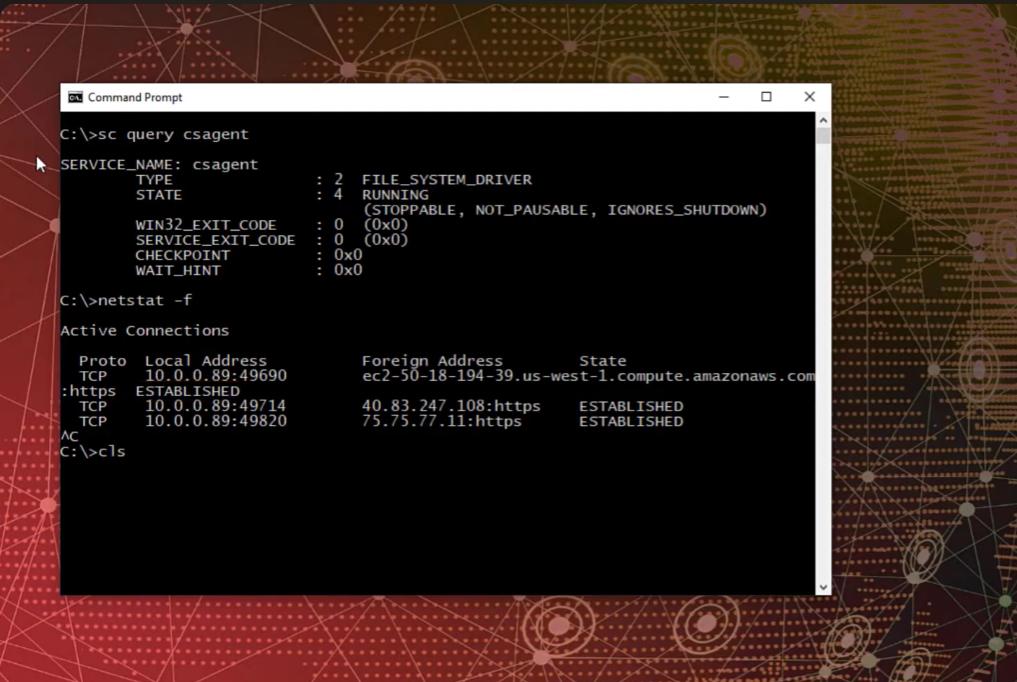
- Open CMD and set installation using “sc query csagent’ command
- Use “netstat -f” command to see the connection is active or not
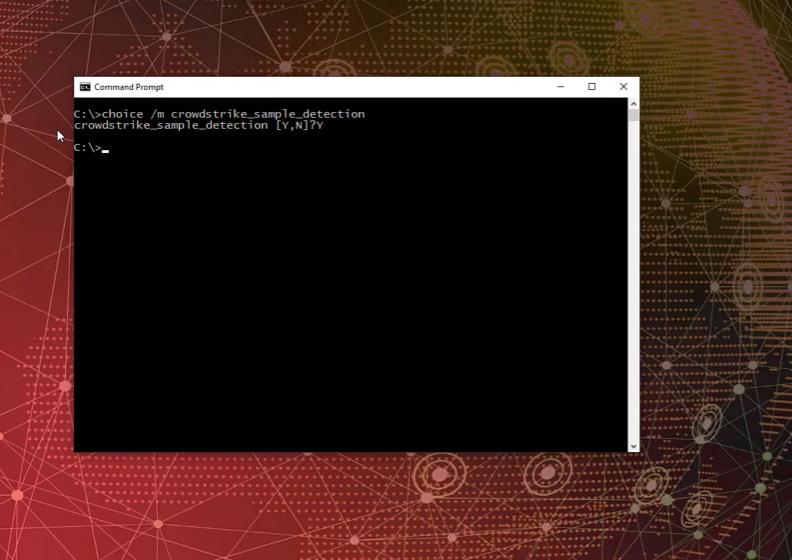
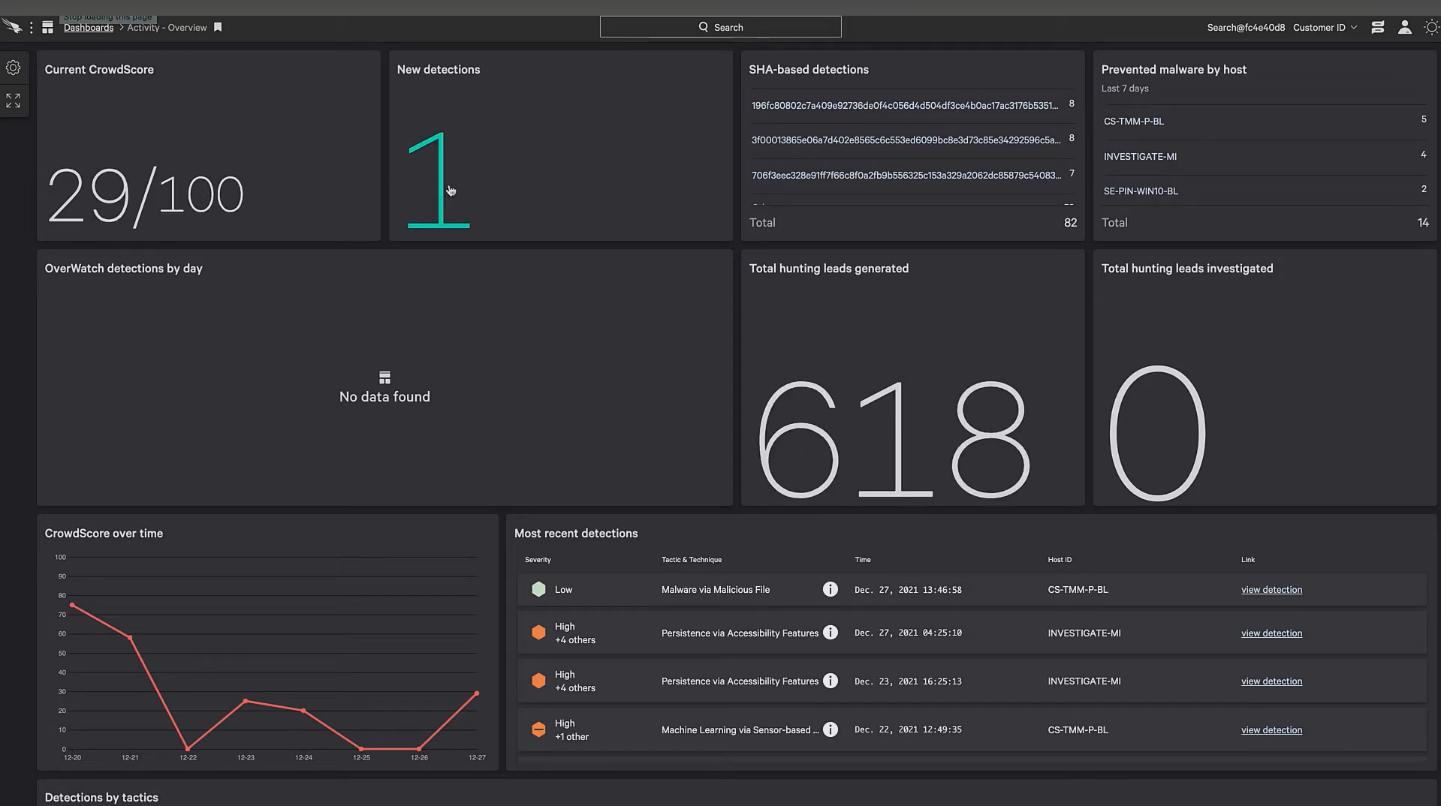
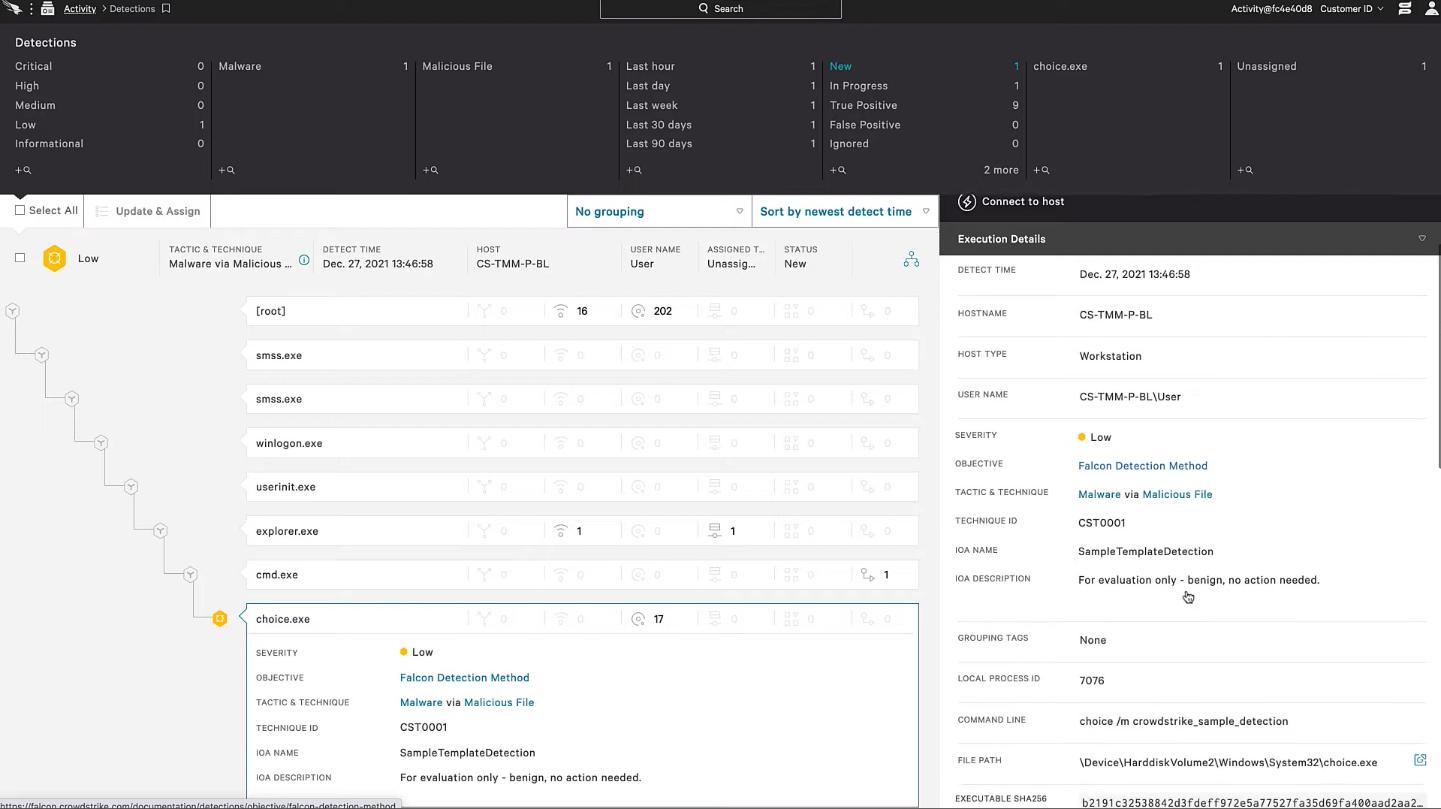
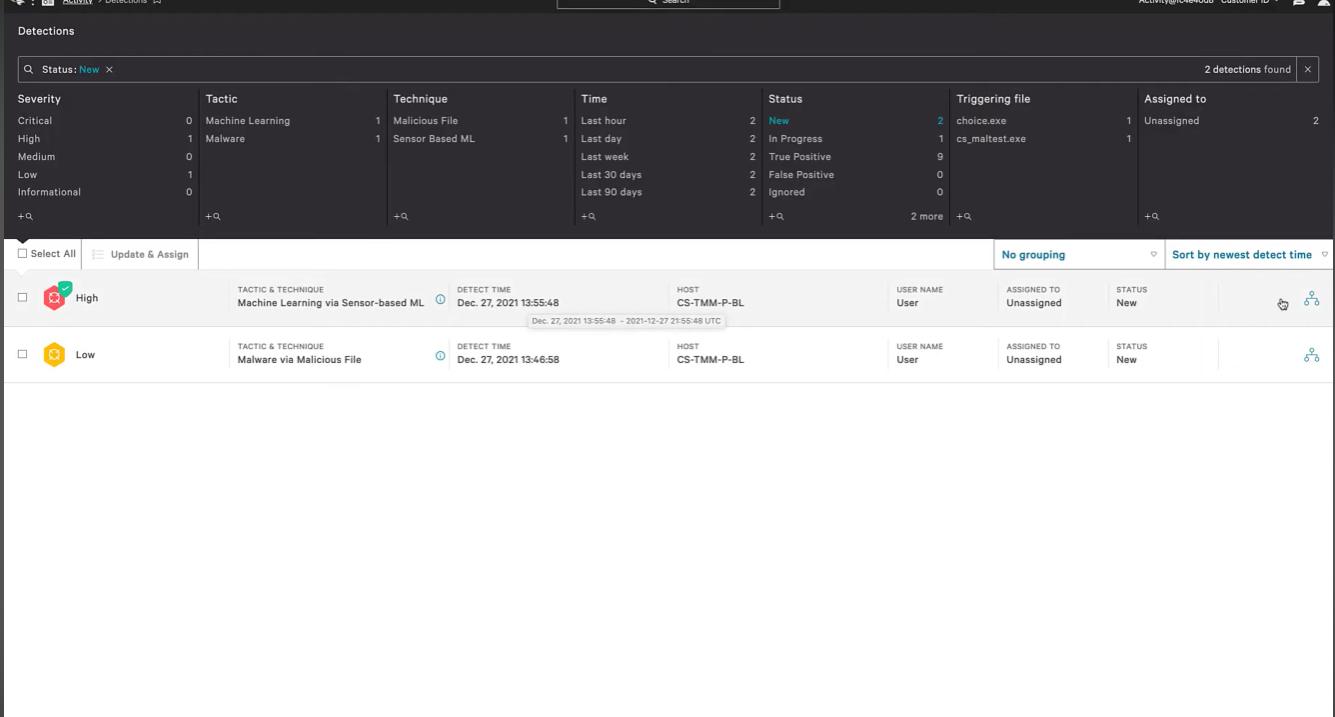
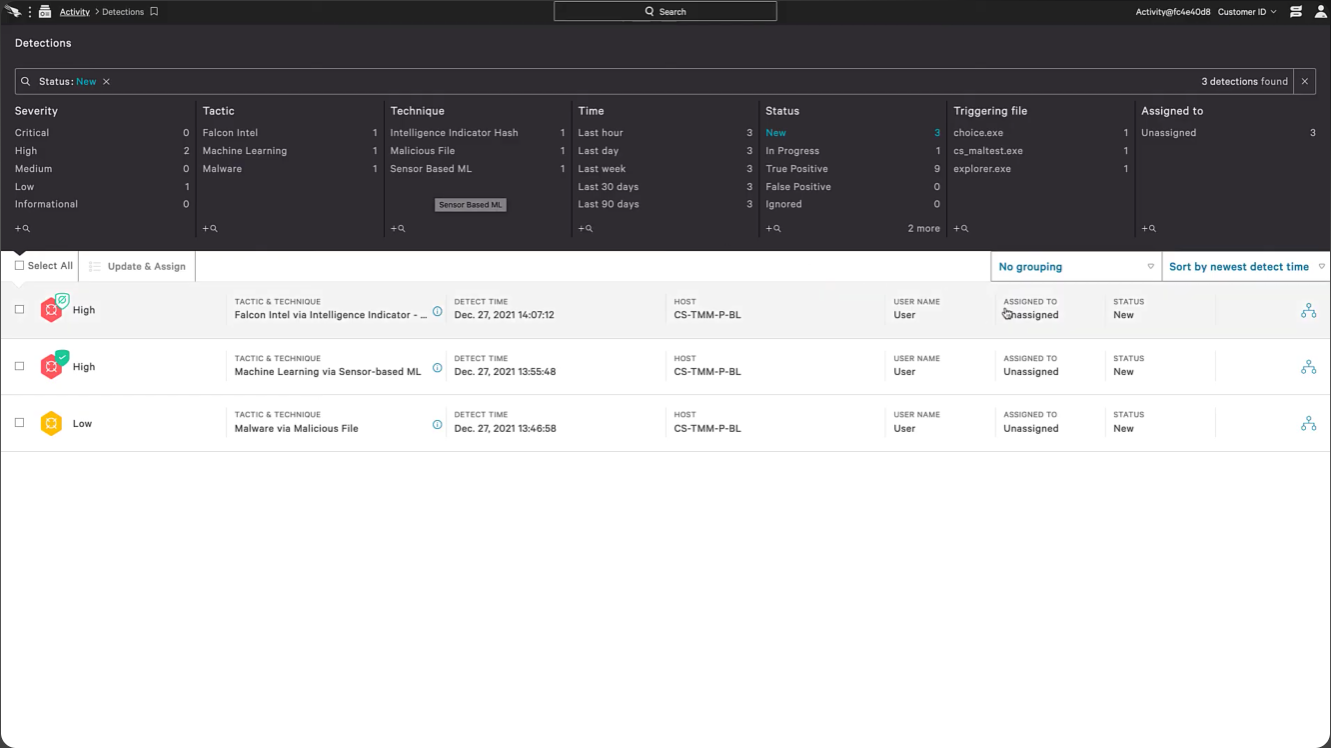
- Open CrowdStrike Falcon and you’ll find new detection 1
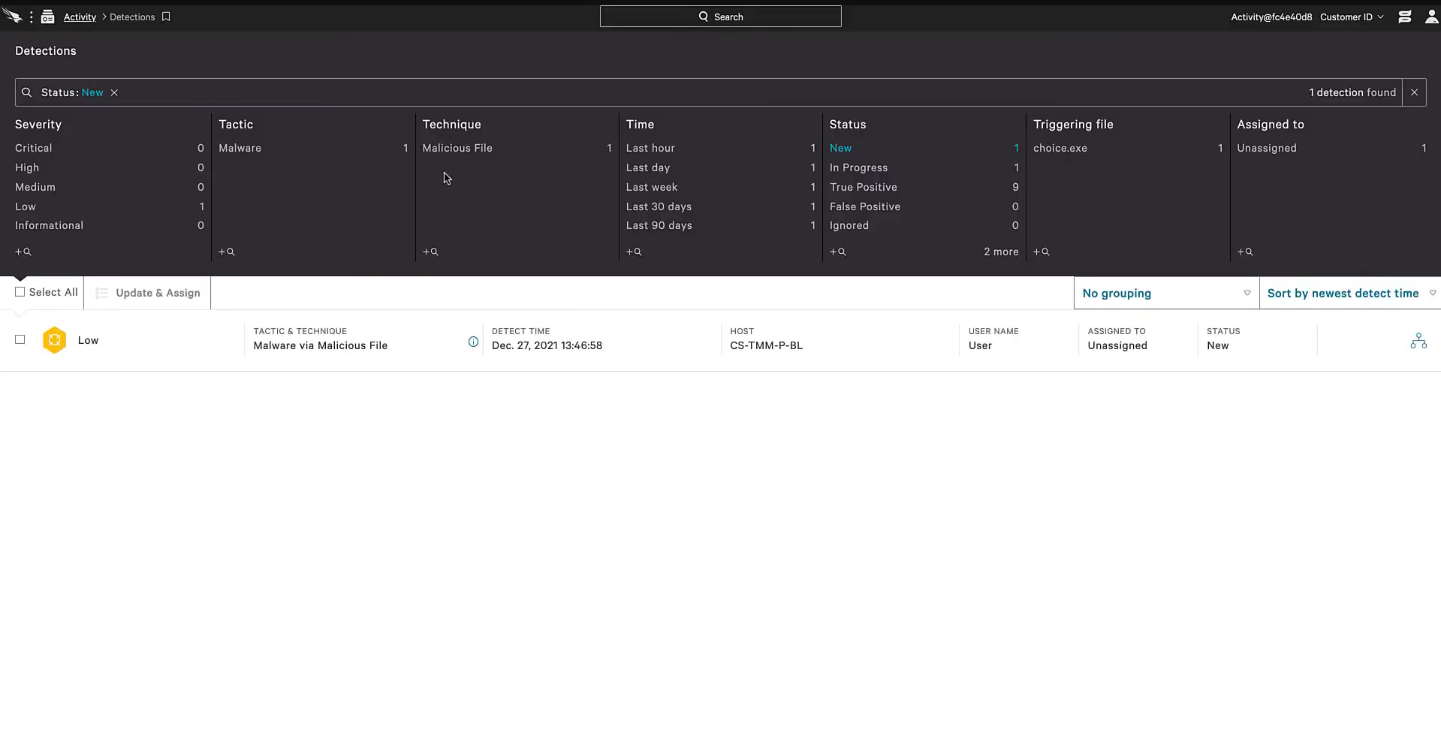
- Open the detection and you will able to find the detected file.
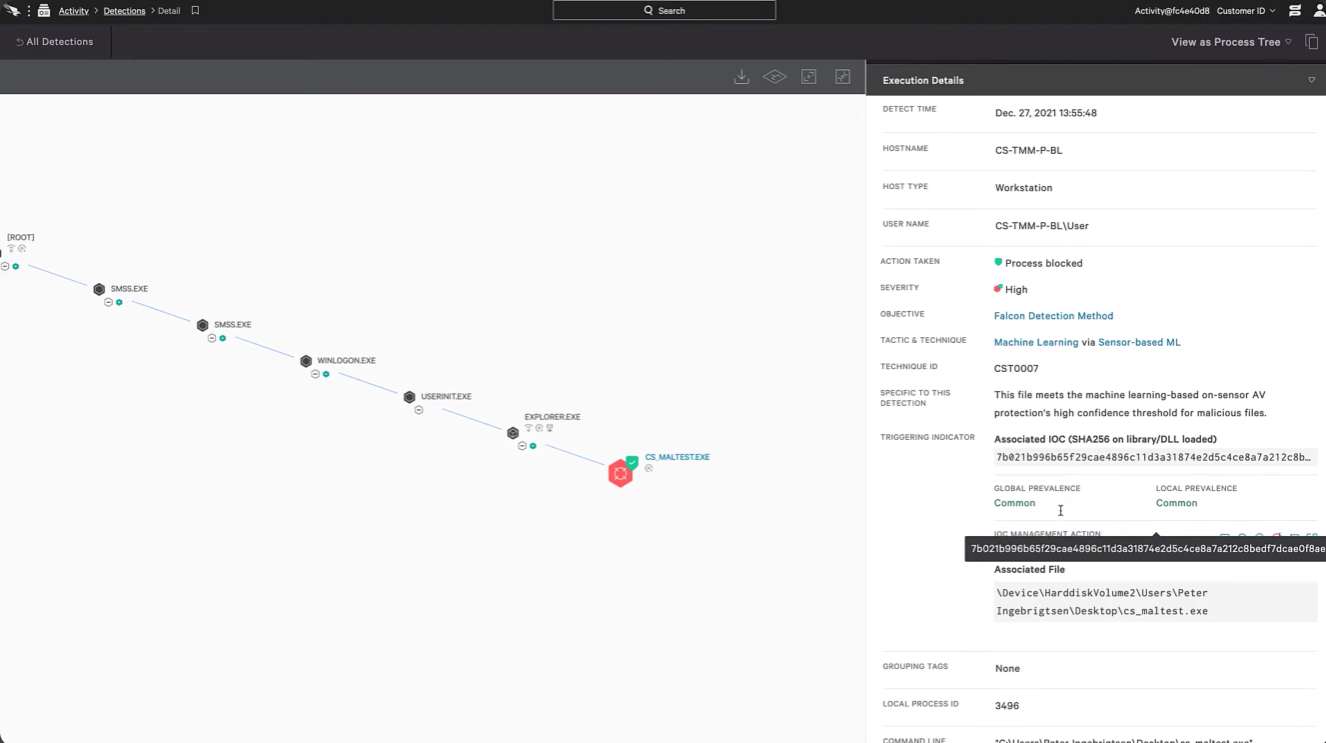
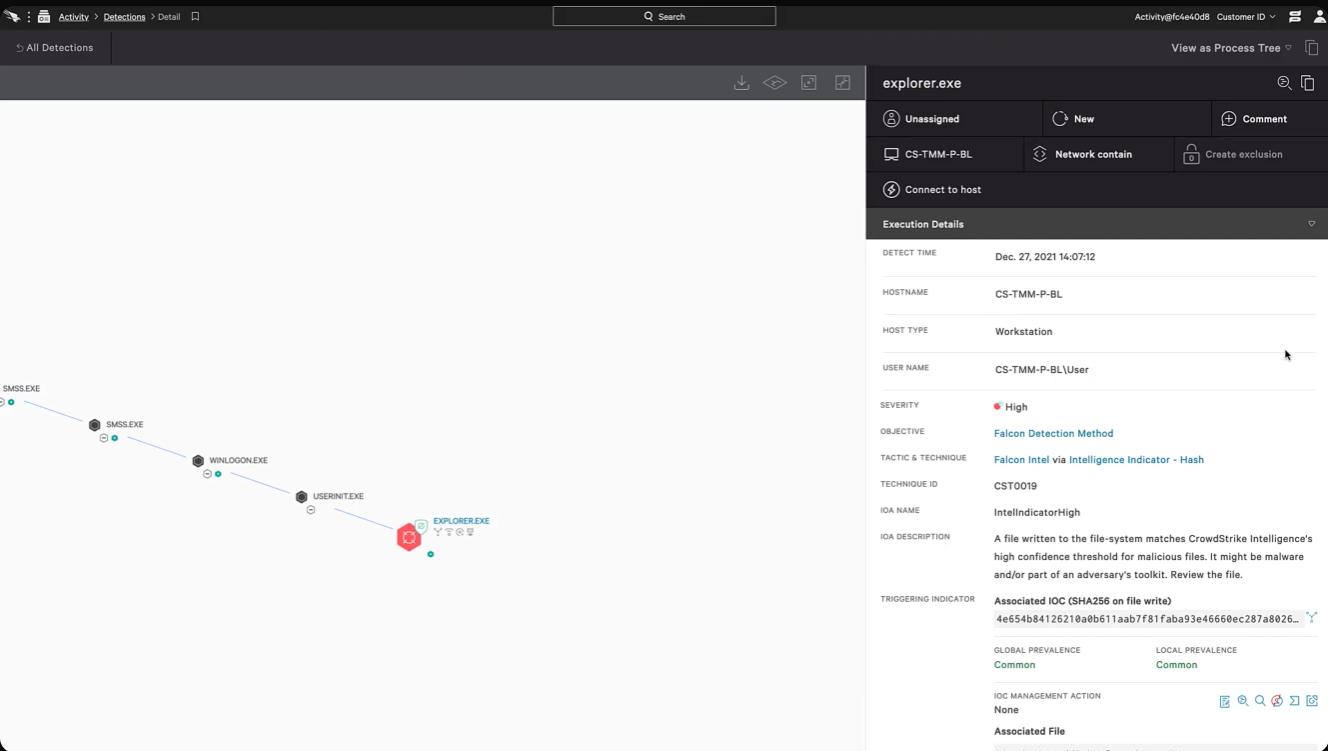
- Opening the detected file, you can find the source of the detected file.
- Test Prevention Policy:
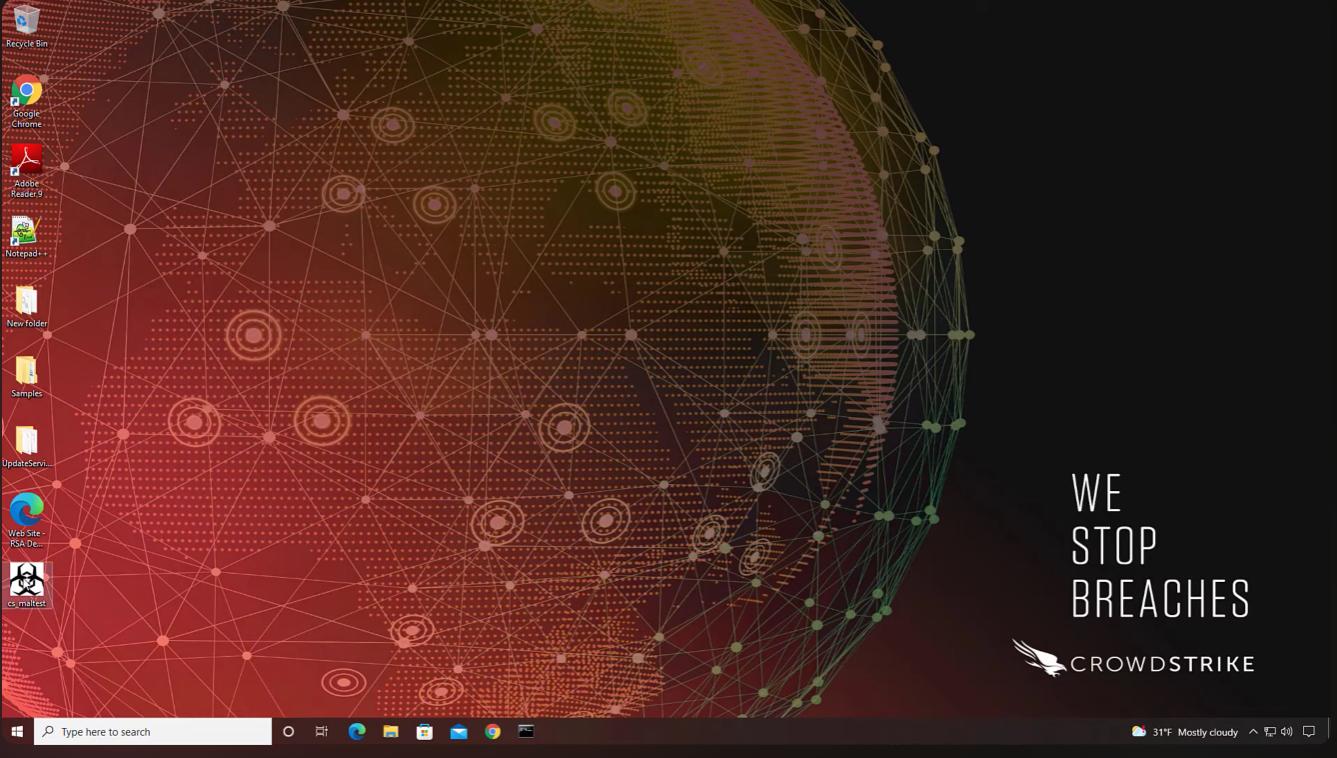
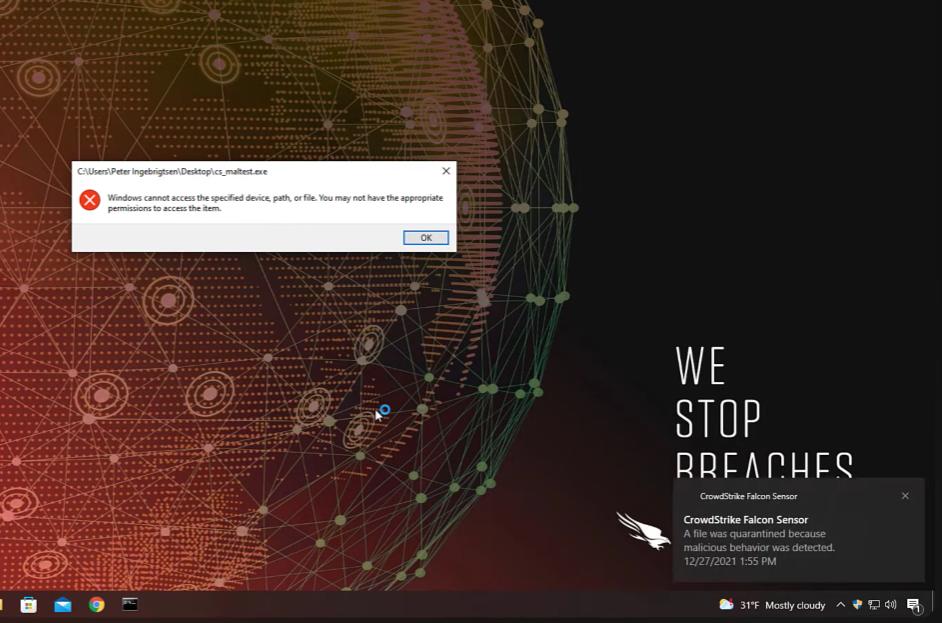
- Open the testing file, which is suspicious.
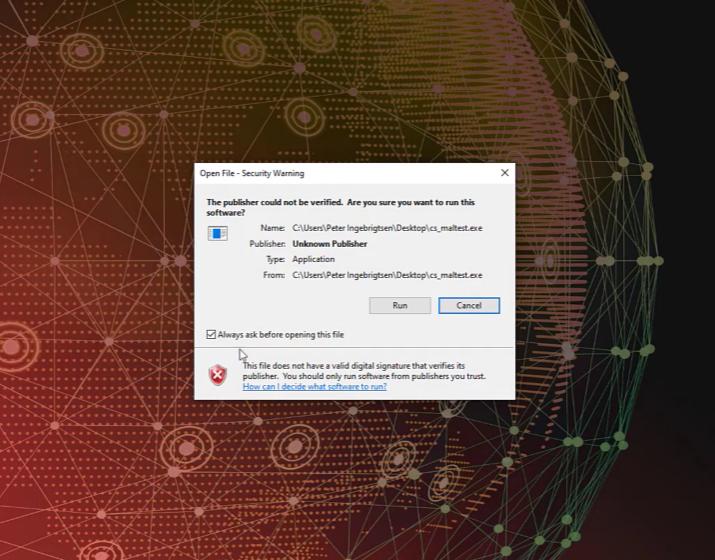
- Security warning dialog box appears and select the option run.
- While that time the software will not be seen in the desktop.
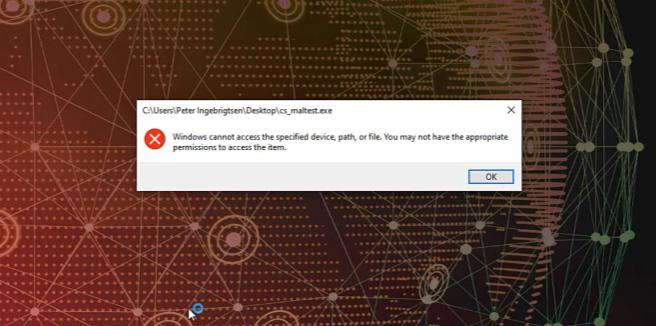
- Permission is not given to open an inappropriate file.
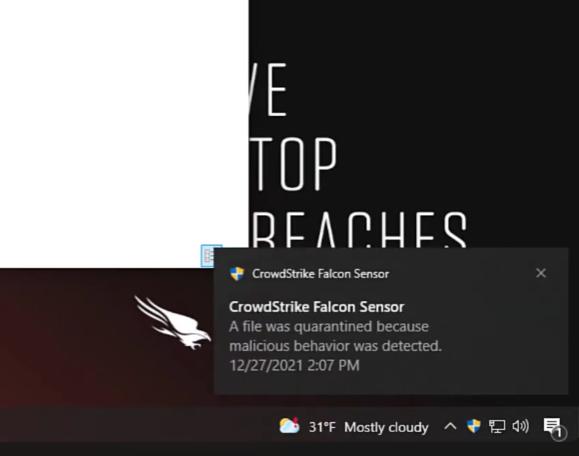
- You’ll get notification from CrowdStrike Falcon Sensor, that the file you selected wad quarantined due to malicious behaviour.
- By selecting the notification that appear, it will redirect to the CrowdStrike application and it will detect the risk as “HIGH”.
- By selecting the process tree, you can able to find the root of the malicious file.
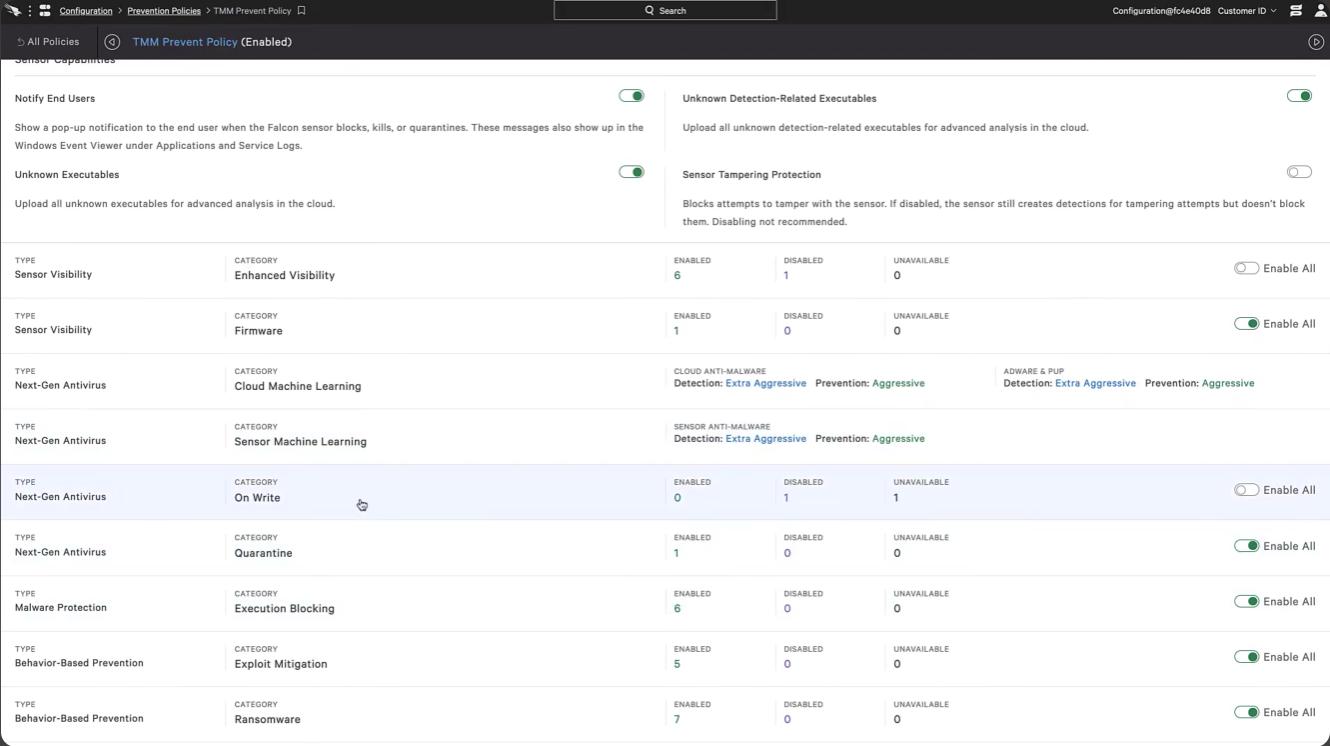
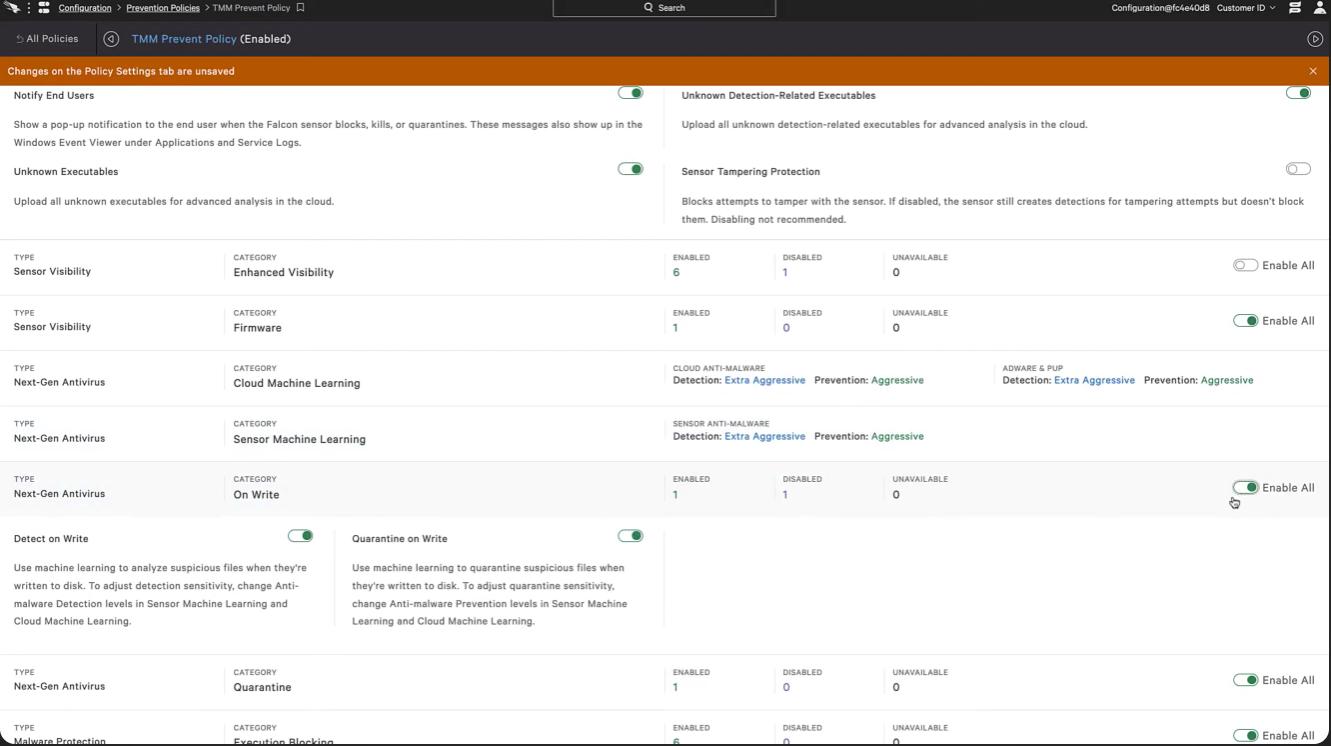
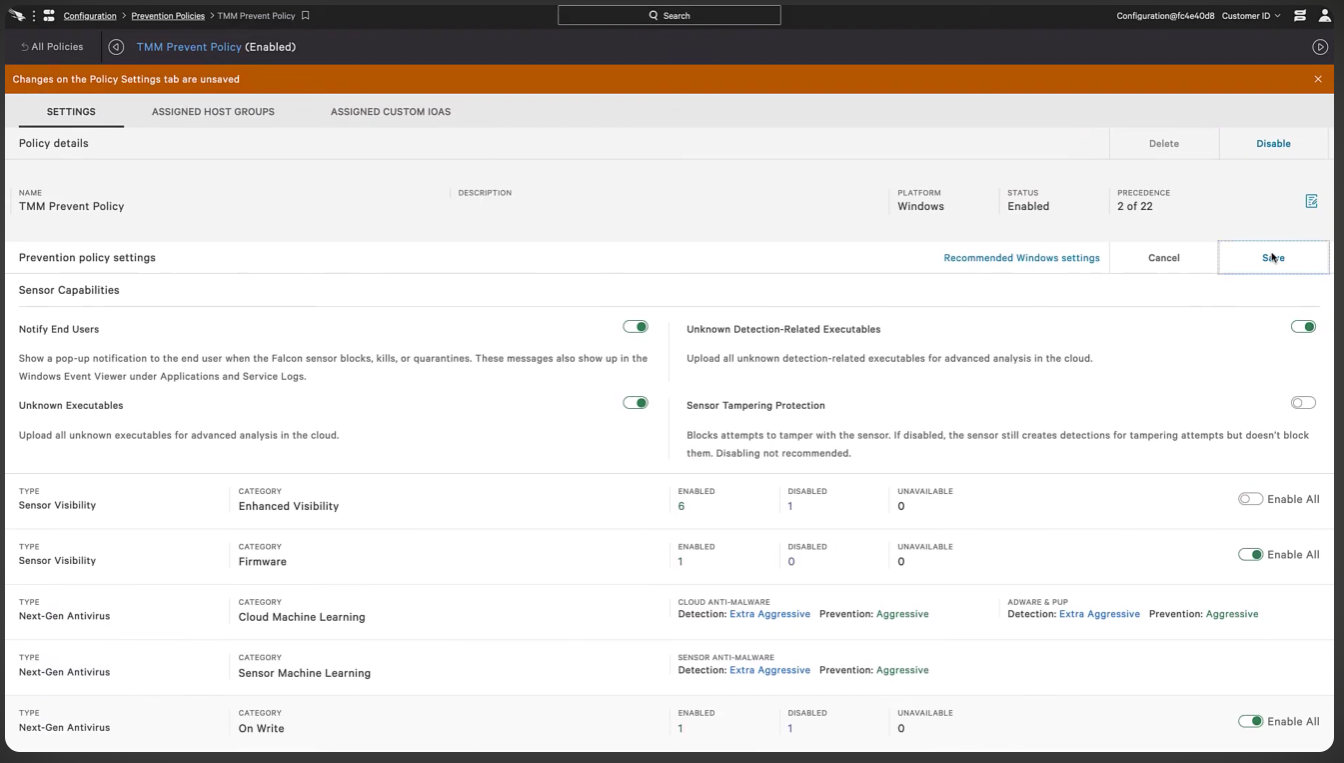
- After that, select configuration from menu option ---- Prevention policy ------ TMM Prevent Policy.
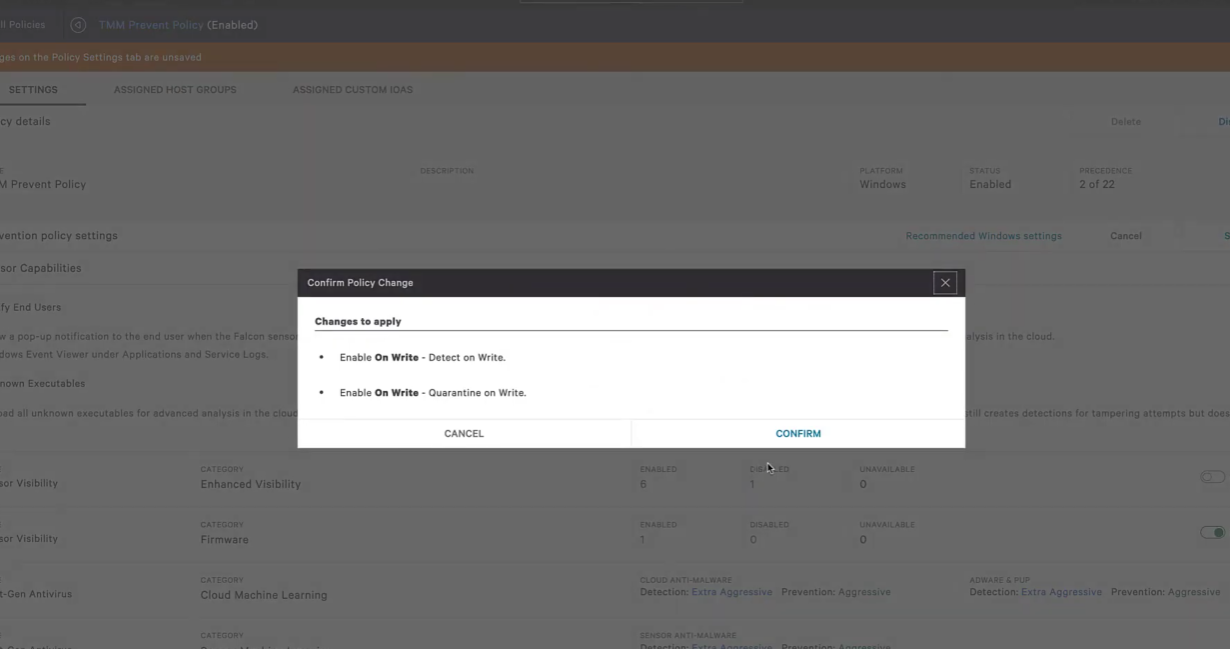
- Prevent policy, select the category called “On write”. There is option called enable all. Select that option and save the changes you have done.
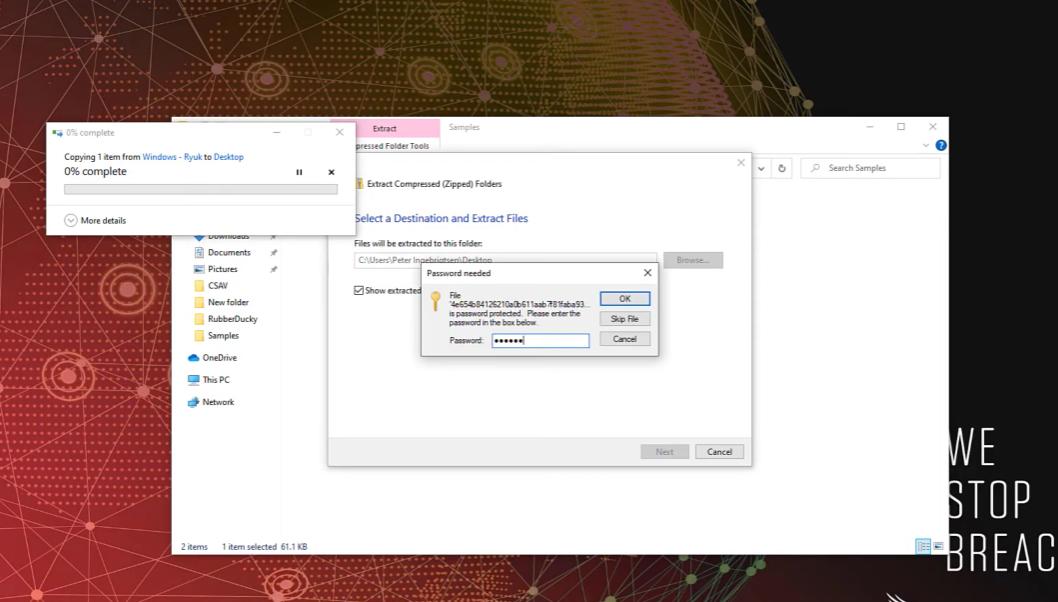
- Try the extracting the file you have downloaded.
- It automatically stops opening or installing the file and make the file quarantine.
- Check in the CrowdStrike application for. The falcon console with white badge indicates that process was killed or an operation was blocked.
- So, we confirm that sensor is behaving as expected and changes to policy we selected.
9. LAB SETUP:
The lab setup for CrowdStrike Falcon is designed to simulate a real-world enterprise environment where endpoints are monitored and protected using the Falcon platform. Since Falcon is a cloud-based solution, the lab primarily consists of endpoints (virtual or physical systems), internet connectivity, and access to the Falcon cloud console.
A typical lab environment includes multiple machines such as a Windows system, a Linux system, and optionally a macOS device, all connected to the internet. These endpoints act as test systems where the Falcon Sensor is installed. The purpose of the lab is to observe how Falcon detects threats, generates alerts, and responds to malicious activities in a controlled environment.
• Lab Environment:
1. Endpoint Systems
The core of the lab environment consists of endpoint devices , which can be either physical machines or virtual machines. These endpoints are used to simulate user activity and potential threats. Common configurations include:
- Windows 10/11 virtual machine
- Linux (Ubuntu/CentOS) virtual machine
- Optional macOS system
Each endpoint should meet the minimum system requirements and have internet access to communicate with the Falcon Cloud.
2. Virtualization Environment
To create a flexible and cost-effective lab, virtualization tools are commonly used. These tools allow multiple operating systems to run on a single physical machine. Popular options include:
- Oracle VM VirtualBox
- VMware Workstation
Using virtualization, users can easily create, modify, and reset lab environments for testing different scenarios without affecting real systems.
3. Network Setup
The lab requires a basic network configuration with internet connectivity. Endpoints must be able to:
- Access the Falcon cloud console
- Send telemetry data
- Receive updates and policies
A simple NAT or bridged network setup in virtualization tools is sufficient. Firewalls should allow outbound HTTPS communication to ensure proper functioning of Falcon.
4. Falcon Cloud Access
Access to the Falcon platform is essential for the lab. This includes:
- Falcon console login credentials
- Customer ID (CID) for sensor installation
- Access to dashboard, detections, and reports
The cloud console acts as the central monitoring and management interface for all endpoints in the lab.
- Tools Used:
1. Virtualization Tools
- Oracle VM VirtualBox – Used to create and manage virtual machines
- VMware Workstation – Alternative for advanced virtualization
These tools help simulate multiple endpoints in a single lab setup.
2. Operating Systems - Windows (for primary testing environment) - Linux distributions (Ubuntu, CentOS, etc.) - Optional macOS
These systems are used to test Falcon’s cross-platform capabilities.
3. Network & Browser Tools - Web browsers (Chrome, Edge) → Access Falcon console - Internet connectivity → Required for cloud communication 4. Command Line – Tools - Windows Command Prompt / PowerShell - Linux Terminal
Used for:
- Installing Falcon Sensor
- Running test commands
- Simulating activities
- Testing & Simulation Tools
To test Falcon’s detection capabilities, basic simulation tools can be used:
- Safe test files (like EICAR test file )
- Script execution (PowerShell or Bash)
- Basic penetration testing tools (controlled use) These tools help generate alerts and validate Falcon’s functionality in the lab.
10. PRICING & SUBSCRIPTION MODEL
- Pricing Type:
- Falcon Go (Basic Protection) ~$59.99 per device/year
- Falcon Pro (Intermediate Level) ~$99.99 per device/year
- Falcon Enterprise (Advanced Level) ~$184.99 per device/year
- Free Trail:
CrowdStrike provides a free trial (typically 15 days) that allows organizations to test the
platform before purchasing.
This helps users:
- Evaluate features
- Test performance
- Understand usability
- Enterprise & Custom Pricing:
For large organizations, CrowdStrike offers custom pricing plans such as:
- Falcon Elite / Premium → Advanced threat intelligence & hunting
- Falcon Complete (MDR) → Fully managed security service
These plans:
- Do not have fixed public pricing
- Are quoted based on:
- Number of endpoints
- Features selected
- Contract duration
11. FREE vs PAID COMPARISON
- Security capability:
- CrowdStrike Falcon provides advanced protection against modern threats , including ransomware, fileless malware, and zero-day attacks using behavioural analysis and AI.
- Free antivirus tools mainly rely on signature-based detection , which is effective only for known threats and may fail against new or advanced attacks.
- Threat Detection & Response
- Falcon offers real-time detection and automated response , such as isolating infected devices or killing malicious processes.
- Free tools usually detect after infection and provide limited response capabilities.
- Architecture & Performance
- Falcon uses a cloud-native architecture , where most processing happens in the cloud, reducing system load and improving performance.
- Free antivirus tools run mostly on the local system , which can slow down performance during scans and updates.
12. ADVANTAGES & DISADVANTAGES
-
Advantages:
- Advanced Threat Detection: Uses AI and behavioural analysis to detect zero-day attacks and fileless malware.
- Cloud-Native Architecture: No need for on-premise infrastructure; automatic updates from cloud.
- Lightweight Agent: Minimal CPU, RAM, and storage usage.
- Real-Time Monitoring: Continuous endpoint visibility and fast threat detection.
- Automated Response: Can isolate devices, kill processes, and stop attacks instantly.
- Scalable: Easily supports large enterprise environments.
-
Disadvantages:
- High Cost: Expensive for small organizations; advanced features cost extra.
- Complexity: Requires training and skilled users.
- Internet Dependency: Needs stable connection for full functionality.
- Alert Overload: Can generate many alerts, including false positives.
- Integration Challenges: Setup with other tools may be complex.
13. ISSUES & TROUBLESHOOTING
- Common Issues:
- Sensor Installation Failure Installation may fail due to unsupported OS, missing permissions, or incorrect CID.
- Sensor Not Communicating with Cloud Endpoint not sending data due to network/firewall restrictions.
- High CPU / Performance Issues Rare cases where sensor consumes more resources during scans or analysis.
- Endpoint Not Visible in Console Device not appearing due to installation or connectivity problems.
- False Positives / Too Many Alerts Legitimate processes flagged as suspicious.
- Policy Misconfiguration
Incorrect policies may block normal applications or reduce protection.
-
Troubleshooting:
- Check System Requirements Ensure OS, CPU, RAM meet Falcon requirements.
- Verify Network Connectivity Allow outbound HTTPS (port 443) to Falcon cloud servers.
- Reinstall or Update Sensor Reinstall agent with correct CID if issues persist.
- Check Console Status Verify endpoint status in Falcon dashboard (online/offline).
-
Adjust Policies Tune detection and prevention policies to reduce false alerts.
- Review Logs and Alerts Analyse detection logs for root cause of issues.
- Restart Services / System Helps resolve temporary glitches